
Participant
December 20, 2021
Answered

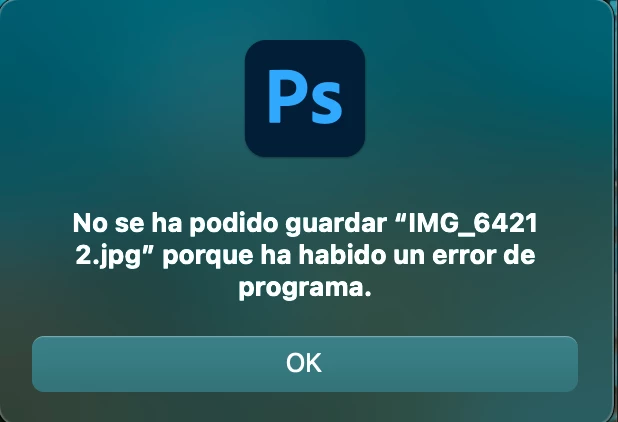
Error No se ha podido guardar porque ha habido un error del programa al guardar por segunda vez

  • December 20, 2021
  • 5 replies
  • 1065 views

No puedo guardar por segunda vez un archivo en photoshop. Guardo el archivo, lo cierro, vuelvo a abrirlo para hacer una modificación y es el momento cuando me sale el error. Seguí todas las indicaciones para el error "No se ha podido guardar (nombre del archivo) porque ha habido un error del programa", Oculté las capas, borre e instalé nuevamente photoshop, regresé a las veresiones anteriores y no lo he logrado solucionar.


Actualmente Photoshop 22.0.1

iMac M1 / MacOS Big Sur 11.3
This topic has been closed for replies.
Correct answer Fidpad

Just to let you know. It worked updating to MacOS Monterey and creating a new admin user. Thanks!

5 replies

FidpadAuthorCorrect answer
Participant
December 21, 2021

Just to let you know. It worked updating to MacOS Monterey and creating a new admin user. Thanks!

FidpadAuthor
Participant
December 21, 2021
I'll try and let you know if it worked
Legend
December 20, 2021

Hmm. If you create a new Admin user account and run Photoshop from the new user account, does the problem go away: https://helpx.adobe.com/photoshop/kb/basic-troubleshooting.html#permissions

FidpadAuthor
Participant
December 20, 2021
No, I don't save it on Google Drive (Desktop app).

Yes, it also happens when I save it locally on the computer and this
computer is not connected to a server. I even tried to manually give Full
Disk Access to photoshop and it didn't work.

But this error just happens when I'm trying to save files on the Apple
Silicon Mac, on intel base models it doesn't happen
Legend
December 20, 2021

Do you have Google Drive on this Mac?


Are you saving to the local drive (for example, the Desktop)? Or are you saving to a network drive or server?