
Participant
January 15, 2021
Answered

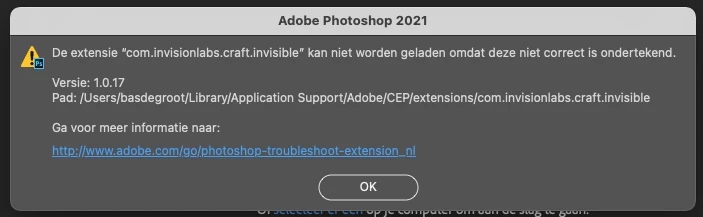
Error on extension com,invisionlabs.craft.invisible

  • January 15, 2021
  • 7 replies
  • 6047 views

Since the latest upgrade I recieve an error in starting up Photoshop. I deleted full Photoshop and installed it completely like the troubleshoot advises, error stays the same. See image. HELP!!!
Correct answer Niesha Arya

You can try updating the app from website if you have purchased the plugin.

or else you can remove it from system library adobe >CEP > extension >com.invisionlabs.craft.invisible 


https://www.invisionapp.com/craft

7 replies

Participant
April 12, 2022

puedos que hacer unos de llos


Bas5D34Author
Participant
April 12, 2022

Just use shift+command+G and then paste:

~/Library/Application Support/Adobe/CEP/extensions

Then delete the folder com.invisionlabs.craft.invisible file and it fixed my problem.

Participant
September 6, 2021

Go to Finder Folder use Shift+Command+G then, type Application Support, open Adobe folder then CEP/extensions.. You can delete com.invisionlabs.craft.invisible file to remove this error.


I worked on my end. 

Participant
April 19, 2021

Im having the same issue.


I did downloaded CRAFT an app from invision, but Ive already deleted it.

I still receive this message and it keeps crashing my photoshop...


Deleting my PLUING  folders didnt helped also.


If I search my mac theres no folder/file for CRAFT or invision anymore


Kevin Stohlmeyer
Community Expert
Community Expert
April 19, 2021

Did you delete or uninstall?

There are other package files that could still be hanging out.

Not all are named with craft.

Check the link in the top from the vendor.

Participant
April 19, 2021

Ive deleted photoshop AND craft. Ive searched in my mac for every file with "invision" in it and I coudnt find anything.


To fix this issue, Ive re-downloaded CRAFT. But its an app I do not use and that I would like to delete if possible...


Any tips on which folders I should find those files? I cant find the files through the path suggested on this topic

Niesha Arya
Adobe Employee
Niesha AryaCorrect answer
Adobe Employee
February 15, 2021

You can try updating the app from website if you have purchased the plugin.

or else you can remove it from system library adobe >CEP > extension >com.invisionlabs.craft.invisible 


https://www.invisionapp.com/craft

Kevin Stohlmeyer
Community Expert
Community Expert
January 19, 2021

https://support.invisionapp.com/hc/en-us/articles/360017421052-Craft-for-Photoshop 

This is definitely a third party plugin and does not come with the standard install for Photoshop.

It's called Craft Sync and had to be installed at some point by the user or an admin.

This is the solution from the vendor:

https://support.invisionapp.com/hc/en-us/community/posts/360076469752-Photoshop-error-with-Sync 

Participant
January 22, 2021

Windows 10 and had the same issue. I uninstalled something called "Craft Version 2.x..." and the problem went away. 

I think it must have been installed when someone shared an invision mockup with me recently. Don't remember installing anything but there it was. 

Participant
January 29, 2021

Thank you @Joe Hakooz ! That was the solution for me. Much appreciate you taking the time to post that. I note that the installation date for the Craft app was in 2018 and very likely to be part of a project where I was sent invision mockups too. 

Participant
January 18, 2021

I have the same message but never used Big Sur (and I don't have Apple). Photoshop crashes several times. Any idea?

Kevin Stohlmeyer
Community Expert
Community Expert
January 18, 2021

Contact the plugin manufacturer or see if they have an updated plugin for Catalina/Big Sur.

MiekeRoth
Participant
January 19, 2021

That is a way to go, but I never added that plugin myself. I don't use any plugins other than those that come standard with Photoshop. So it's a bit weird to have to do this while I'm not the direct customer. And again: it's also on pc. 

Kevin Stohlmeyer
Community Expert
Community Expert
January 15, 2021

You must be running Big Sur.

This is an Apple issue where third party developers are not signing their dev certificates so Apple is now blocking them from loading/installing properly.

Contact the vendor support and demand they sign their products!

Bas5D34Author
Participant
January 15, 2021

Thanks for your reply Kevin. Indeed I am using Big Sur since it was launched. I never had this problem before in the time I used Big Sur. Which vendor support do you mean? Adobe or Apple?

Kevin Stohlmeyer
Community Expert
Community Expert
January 15, 2021

Whatever extension you are trying to use - invisionlabs.