
Inspiring
January 2, 2019
Answered

Everything turning blue in Photoshop

  • January 2, 2019
  • 2 replies
  • 5543 views

Hi everyone,

Yesterday I created some stars and used color overlay on them to make them blue.  I then linked the 5 layers of the stars together.

When I came back to my computer today, everything I do in Photoshop turns blue!

For example:

a) Creating a new rectangle, it appears blue on the canvas, even though the Fill color shows it as yellow and the layer in the layer panel shows it as yellow.  FYI, when I export to PNG, the rectangle remains blue.
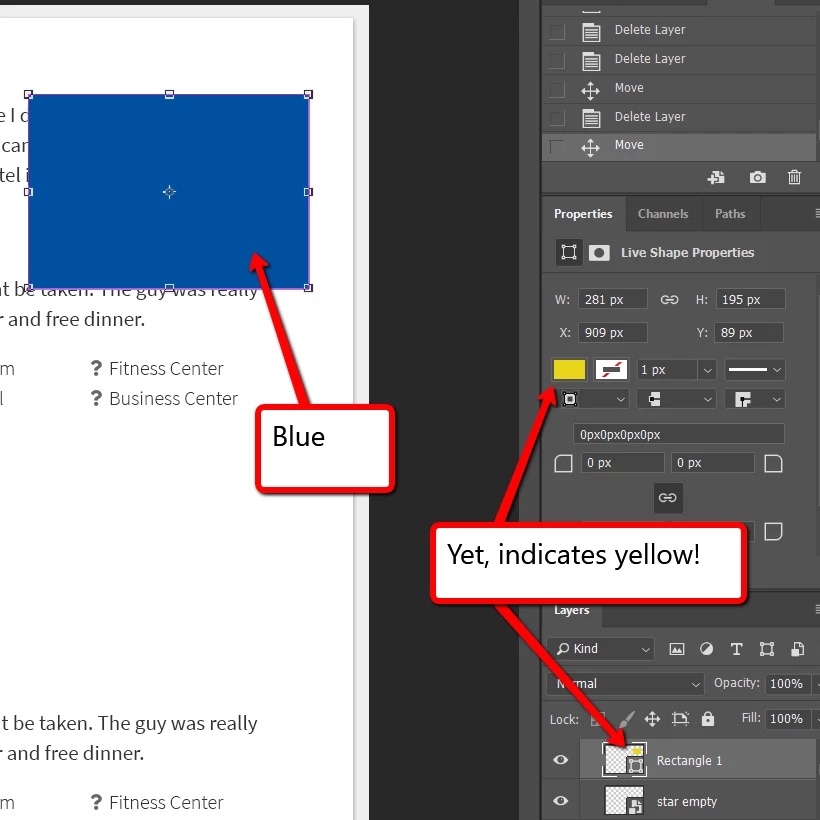
b) When I press Ctrl+Alt and drag text WITH the blue stars the text suddenly becomes blue too.  Changing the text color does not work, just like it didn't work with the rectangle above.

c) When I copy a screenshot and paste it onto my canvas, the entire screenshot appears on the canvas as just one big blue rectangle.  However, if I first copy and paste one of the text boxes and THEN copy & paste the screenshot, it pastes like normal.

Any idea why this is happening and how to resolve?

It's really really holding up my work.

Thanks!

This topic has been closed for replies.
Correct answer Keebster

Are there (Adjustment) Layers above the Rectangle?


Nope.  Nothing in place that would change the colors as far as I can tell.

SOLUTION!  This is clearly some sort of bug.  The 5 stars that were blue were all in a folder.  I had applied the blue overlay to the entire folder.  This is what caused the problem -- still not clear WHY this would be a problem, but as soon as I removed the color overlay from the folder, everything is working normally again.

I've now applied color overlay to the full stars (one smart object) and the empty stars (another smart object).  No folder with color overlays for me anymore!

Thanks for your help looking into this everyone.

2 replies

davescm
Community Expert
Community Expert
January 2, 2019

Keebster  wrote

...............This is clearly some sort of bug..........

That is no bug. If you apply a colour overlay to a group, of course it should affect the contents of the group. If it did not - it would be a bug.

Dave

KeebsterAuthor
Inspiring
January 2, 2019

Thanks, Dave.  I see now how this was happening.  Every new element I created via copy & paste was being created inside the folder with the color overlay on it.  Alas, not a bug.  I just didn't realize what was going on. Thanks.

*laughs*   "Bug" = anything that doesn't do what I want it to!

davescm
Community Expert
Community Expert
January 2, 2019

Haha - by that definition - a bug

Dave

January 2, 2019

Hi

What version of Photoshop do you have, have you tried resetting Photoshop preferences

KeebsterAuthor
Inspiring
January 2, 2019

Hi Ged,

Thanks for the reply.

Adobe Photoshop Version: 19.1.6

Windows 10

I took your suggestion and tried resetting preferences upon exit.  Problem still occurring.

c.pfaffenbichler
Community Expert
Community Expert
January 2, 2019

Are there (Adjustment) Layers above the Rectangle?