
Exit
  • Global community
    • Language:
      • Deutsch
      • English
      • Español
      • Français
      • Português
  • 日本語コミュニティ
  • 한국 커뮤니티
0

Evnet for select active project

New Here ,
Feb 02, 2025 Feb 02, 2025
:light_bulb:Hello,

Using ExtendScript, I want to select a notifier (event listener) only when the active Photoshop document changes.
For example:

It should be triggered when switching to a different document (Ctrl+Tab or Window → Select Document) without closing the current document.
However, selection errors should not be triggered when the tool is changed or a new document is opened.
What I've tried so far:
:white_heavy_check_mark: Tried the "Opn" and "Cls" events, but these only work when the document is opened and closed.
:white_heavy_check_mark: "slct" activity is not suitable for intense effort.
:white_heavy_check_mark: I tried "Ntfy", "Dcmn", sometimes it works and sometimes it doesn't seem to work.

Is there a definitive method that only works on document exchange?

Code example:

javascript
copy
To organise
app.notifiersEnabled = true;
var notifierFile = new File($.fileName);
app.notifiers.add("Ntfy", notifierFile, "Dcmn"); // Should work on document exchange
:pushpin: I want to know if this method is reliable or if there is a better approach.
Thanks for your answers people! 🙌
TOPICS
Windows
117
Translate
Report
Community guidelines
Be kind and respectful, give credit to the original source of content, and search for duplicates before posting. Learn more
community guidelines

correct answers 1 Correct answer

Community Expert , Feb 03, 2025 Feb 03, 2025

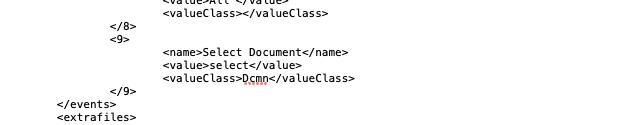
I think you can add the event in »Script Events Manager.xml«: 

Screenshot 2025-02-03 at 09.04.25.png

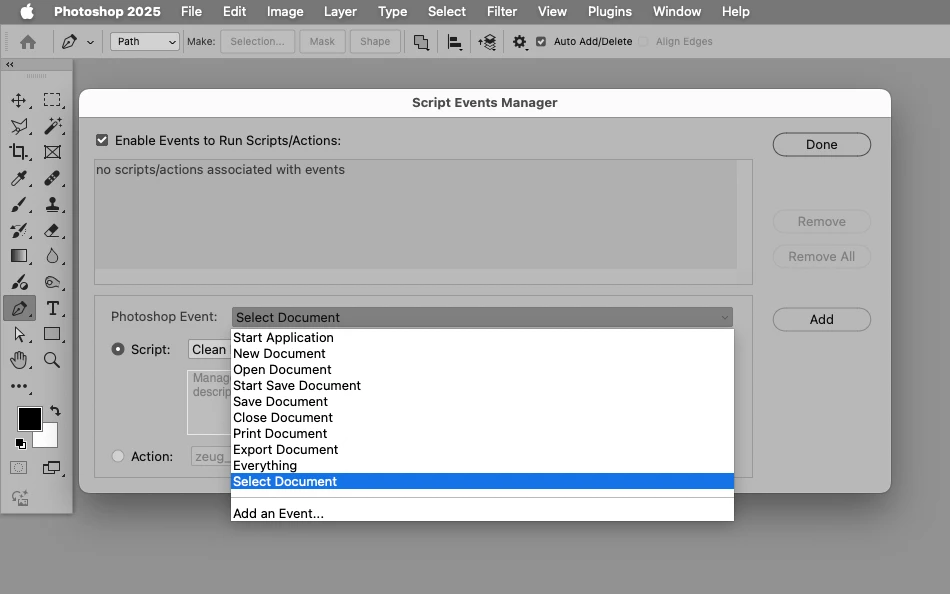
Edit: The event should then be available in Script Events Manager. 

Screenshot 2025-02-03 at 09.11.31.png

Translate
Adobe
Community Expert ,
Feb 03, 2025 Feb 03, 2025
LATEST

I think you can add the event in »Script Events Manager.xml«: 

Screenshot 2025-02-03 at 09.04.25.png

Edit: The event should then be available in Script Events Manager. 

Screenshot 2025-02-03 at 09.11.31.png

Translate
Report
Community guidelines
Be kind and respectful, give credit to the original source of content, and search for duplicates before posting. Learn more
community guidelines