

rechmbrs
Inspiring
March 2, 2020
Question

Example of Extendscript PALETTE and colored BUTTONS (revised)

  • March 2, 2020
  • 3 replies
  • 4323 views

Below is a script for use in Photoshop which uses the window type "palette".  It is opened by locating the jsx file in File>Scripts>...   It will remain open until closed by the user even while applying operations to an image.  The script also demonstrates a way of creating rectangular buttons with colored background and text.


Thanks to r-bin and Kukurykus for supplying the information for building this script.


This script can  be used as input for creating a jsxbin file.  To create a jsxbin file, remove the last six lines of code (BridgeTalk lines) and run save binary in ESTK.   With the jsxbin file, run the code from r-bin below in the thread to run the jsxbin file.


//#script "palette3.jsx"
//@target photoshop
/* 
    This routine is a combined effort based on information supplied 
    by r-bin and Kukurykus of Adobe Community.
*/

paletteFunction();
function paletteFunction()
{
    var paletteTitle = "RONC 02Mar2020";

    var winTest, win;
    var bridgeTalk, photoShop;

    var b1, b2, b3;
    var g0, g1, g2, g3;

    try
    {
        winTest = Window.find("palette", paletteTitle);
        if (winTest)
        {
            beep();
            winTest.show();
            return;
        }

        win = new Window("palette", paletteTitle);
        win.spacing = 0;
        win.margins = 0;

        var font = ScriptUI.newFont("Arial", ScriptUI.FontStyle.BOLD, 20);

        g0 = win.add("group");
        g0.orientation = "row";
        g0.alignment = "center";
        g0.spacing = 0;
        g0.margins = 0;


        g1 = g0.add("group");
        g1.spacing = 0;
        g1.margins = 0;
        g1.preferredSize = [150, 60];

        g1.graphics.backgroundColor = g1.graphics.newBrush(g1.graphics.BrushType.SOLID_COLOR, [1, 0, 0, 1]);
        b1 = g1.add("statictext", undefined, "Test1");
        b1.justify = "center";
        b1.alignment = ["fill", "fill"];
        b1.graphics.foregroundColor = b1.graphics.newPen(b1.graphics.PenType.SOLID_COLOR, [0, 1, 0, 1], 1);
        b1.graphics.font = font;
        b1.onClick = function () { alert(this.text); };

        g3 = g0.add("group");
        g3.spacing = 0;
        g3.margins = 0;
        g3.preferredSize = [150, 60];

        g3.graphics.backgroundColor = g3.graphics.newBrush(g3.graphics.BrushType.SOLID_COLOR, [1, 1, 0, 1]);
        b3 = g3.add("statictext", undefined, "Test3");
        b3.justify = "center";
        b3.alignment = ["fill", "fill"];
        b3.graphics.foregroundColor = b3.graphics.newPen(b3.graphics.PenType.SOLID_COLOR, [0, 1, 1, 1], 1);
        b3.graphics.font = font;
        b3.onClick = function () { alert(this.text); };


        g2 = win.add("group");
        g2.spacing = 0;
        g2.margins = 0;
        g2.preferredSize = [150, 60];

        g2.graphics.backgroundColor = g2.graphics.newBrush(g2.graphics.BrushType.SOLID_COLOR, [0, 0, 1, 1]);
        b2 = g2.add("statictext", undefined, "Test2 - Close");
        b2.justify = "center";
        b2.alignment = ["fill", "fill"];
        b2.graphics.foregroundColor = b2.graphics.newPen(b2.graphics.PenType.SOLID_COLOR, [1, 1, 0, 1], 1);
        b2.graphics.font = font;
        b2.onClick = function () { alert(this.text); win.close(); };

        win.show();
    }
    catch (e)
    {
        alert(e);
    }
}

bridgeTalk = new BridgeTalk();

var photoShop = BridgeTalk.getSpecifier("photoshop");

if (!photoShop) photoShop = "photoshop-60.064"; // need redone
bridgeTalk.target = photoShop;

bridgeTalk.body = "var f=" + paletteFunction.toSource() + ";f();";
bridgeTalk.send();


This is what the "palette and colored buttons" should look like:
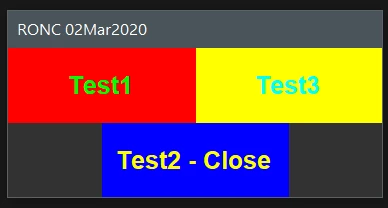
RONC


This topic has been closed for replies.

3 replies

Participant
March 4, 2020

ใส่มาเยอะๆ

Legend
March 2, 2020
Make all the main code in a separate file. Compile it in JSXBIN. Place the JSXBIN file in the same folder as the main script.

Use this code.


var bt = new BridgeTalk();

var ph = BridgeTalk.getSpecifier("photoshop");

if (!ph) ph = "photoshop-60.064" // only for CS6x64, need redone
bt.target = ph;

var jsxbin = "aaaa.jsxbin"; // your jsxbin name here

var pth = new File($.fileName).parent.fullName + "/" + jsxbin;
bt.body = "$.evalFile(" + pth.toSource() + ")"; 
bt.send();


P.S. JSXBIN will not save you from hackers. ))

rechmbrs
rechmbrsAuthor
Inspiring
March 3, 2020

r-bin,

I removed the 6 lines related to BridgeTalk at bottom of original source above save as palette3.jsx and created a jsxbin file from that source.  Plugged the name of the file palette3.jsxbin into your code from above (see below also) and saved as paletteBT.jsx.  I ran that file from Photoshop and nothing happened.


Your code with my changes:

var bt = new BridgeTalk();

var ph = BridgeTalk.getSpecifier("photoshop");

if (!ph) ph = "photoshop-60.064" // only for CS6x64, need redone
bt.target = ph;

var jsxbin = "palette3.jsxbin"; // your jsxbin name here

var pth = new File($.fileName).parent.fullName + "/" + jsxbin;

//var pth = "C:/Users/RECHM/Dropbox/$$-SYNC/$$-Scripts/__SC-Save/palette3.jsxbin";
alert(pth);
bt.body = "$.evalFile(" + pth.toSource() + ")";
alert(bt.body);
bt.send();
/*

location  of  jsxbin:
C:\Users\RECHM\Dropbox\$$-SYNC\$$-Scripts\__SC-Save\palette3.jsxbin

---------------------------
pth  Script Alert
---------------------------
~/Dropbox/$$-SYNC/$$-Scripts/__SC-Save/palette3.jsxbin
---------------------------
OK
---------------------------

---------------------------
bt.body  Script Alert  try with actual code
---------------------------
$.evalFile((new String("~/Dropbox/$$-SYNC/$$-Scripts/__SC-Save/palette3.jsxbin")))
---------------------------
OK
---------------------------

---------------------------
---------------------------
bt.body  Script Alert  try with inputing complete address.
---------------------------
$.evalFile((new String("C:/Users/RECHM/Dropbox/$$-SYNC/$$-Scripts/__SC-Save/palette3.jsxbin")))
---------------------------
OK
---------------------------


*/

 I tried two ways.  First just using your code and the filename and a second where I put the complete path and filename and both did nothing.


Did I need to remove more that the last lines for making the jsxbin?


I'm lost.

RONC

Legend
March 3, 2020

>>>I removed the 6 lines related to BridgeTalk at bottom of original source above

>>>save as palette3.jsx and created a jsxbin file from that source.

>>>Plugged the name of the file palette3.jsxbin into your code from above (see below

>>>also) and saved as paletteBT.jsx. I ran that file from Photoshop and nothing happened.


Did you insert a function call into this new script? )


paletteFunction();


JJMack
Community Expert
Community Expert
March 2, 2020

I like to position dialogs not centered so I added a littlt code to your script to position the dialog foe  ny 1K display.

//#script "palette3.jsx"
//@target photoshop
/* 
    This routine is a combined effort based on information supplied 
    by r-bin and Kukurykus of Adobe Community.
*/

function paletteFunction()
{
    var paletteTitle = "RONC 02Mar2020";

    var winTest, win;
    var bridgeTalk, photoShop;

    var b1, b2, b3;
    var g0, g1, g2, g3;

    try
    {
        winTest = Window.find("palette", paletteTitle);
        if (winTest)
        {
            beep();
			winTest.onShow = function() {
				var ww = winTest.bounds.width;  
				var hh = winTest.bounds.height;  
				winTest.bounds.x  = 1870 - ww;  
				winTest.bounds.y  = 100;  
				winTest.bounds.width  = ww;  
				winTest.bounds.height  = hh;  
			}	
            winTest.show();
            return;
        }

        win = new Window("palette", paletteTitle);
        win.spacing = 0;
        win.margins = 0;

        var font = ScriptUI.newFont("Arial", ScriptUI.FontStyle.BOLD, 20);

        g0 = win.add("group");
        g0.orientation = "row";
        g0.alignment = "center";
        g0.spacing = 0;
        g0.margins = 0;


        g1 = g0.add("group");
        g1.spacing = 0;
        g1.margins = 0;
        g1.preferredSize = [150, 60];

        g1.graphics.backgroundColor = g1.graphics.newBrush(g1.graphics.BrushType.SOLID_COLOR, [1, 0, 0, 1]);
        b1 = g1.add("statictext", undefined, "Test1");
        b1.justify = "center";
        b1.alignment = ["fill", "fill"];
        b1.graphics.foregroundColor = b1.graphics.newPen(b1.graphics.PenType.SOLID_COLOR, [0, 1, 0, 1], 1);
        b1.graphics.font = font;
        b1.onClick = function () { alert(this.text); };

        g3 = g0.add("group");
        g3.spacing = 0;
        g3.margins = 0;
        g3.preferredSize = [150, 60];

        g3.graphics.backgroundColor = g3.graphics.newBrush(g3.graphics.BrushType.SOLID_COLOR, [1, 1, 0, 1]);
        b3 = g3.add("statictext", undefined, "Test3");
        b3.justify = "center";
        b3.alignment = ["fill", "fill"];
        b3.graphics.foregroundColor = b3.graphics.newPen(b3.graphics.PenType.SOLID_COLOR, [0, 1, 1, 1], 1);
        b3.graphics.font = font;
        b3.onClick = function () { alert(this.text); };


        g2 = win.add("group");
        g2.spacing = 0;
        g2.margins = 0;
        g2.preferredSize = [150, 60];

        g2.graphics.backgroundColor = g2.graphics.newBrush(g2.graphics.BrushType.SOLID_COLOR, [0, 0, 1, 1]);
        b2 = g2.add("statictext", undefined, "Test2 - Close");
        b2.justify = "center";
        b2.alignment = ["fill", "fill"];
        b2.graphics.foregroundColor = b2.graphics.newPen(b2.graphics.PenType.SOLID_COLOR, [1, 1, 0, 1], 1);
        b2.graphics.font = font;
        b2.onClick = function () { alert(this.text); win.close(); };


        win.show();
    }
    catch (e)
    {
        alert(e);
    }
}

bridgeTalk = new BridgeTalk();

var photoShop = BridgeTalk.getSpecifier("photoshop");

if (!photoShop) photoShop = "photoshop-60.064"; // need redone
bridgeTalk.target = photoShop;

bridgeTalk.body = "var f=" + paletteFunction.toSource() + ";f();";
bridgeTalk.send();
JJMack
rechmbrs
rechmbrsAuthor
Inspiring
March 7, 2020

JJ,

I was asked by the users to include your positioning code in the palette as an option and have done it.  It works well except on vertical monitors.  Can you add code to adapt to the actual monitor size instead of using 1870, 100?  They also asked for the default to be a lower right side.


Thanks,

RONC

JJMack
Community Expert
Community Expert
March 8, 2020

Adobe re-implemented ScriptUI is Photoshop CC 2015 or 2015.5 I can not remember which one I had Problems with changes Adobe made in that time frame   There here always be problems in ScriptUI  Adobe did not care to fix and the new implementation works somewhat differently then the original old version and there were problems in the new implementation Some have been fixed.  Photoshop Supports multiple display and it is possible withs scriot  get information about the number of displays current in use and Photoshop's displays bounds, Windows  can be located on any via ScriptUI.  I stopped positioning window on display other than Photoshop main display a simply hard code thye location  for my main display.  On one machine  a 1K  1920x1080 one my other a 4lk Display 3840x2160 I normally locate windows near the the top left or top right below Photoshop Tool Option bar and to the right of the Tool Bar or left of my pallets bar.  Photoshop displays mounds does not includes Windows task bar.


//alert($.screens)
PaletteDisplay = 0; // Photoshop's First Display
//PaletteDisplay = $.screens.length-1; // Photoshop's Last Display
PaletteTop = $.screens[PaletteDisplay].top + 100; // Relative to Top of display
PaletteLeft = $.screens[PaletteDisplay].right - ww - 46 ; // Relative to Right of side not Left side of display
p.bounds.x = PaletteLeft;
p.bounds.y = PaletteTop;
p.bounds.width = ww;
p.bounds.height = hh;

JJMack