
daniely60223190
Participant
October 2, 2017
Answered

Exclusion grayed out

  • October 2, 2017
  • 1 reply
  • 943 views

I'm new to Photoshop CC and i'm trying to replicate this:

but i can't figure out how to make the inverse text color effect. I'm sure the post has said to use the Exclusion blend mode, but it's grayed out and i have no idea what to do. Any help? !

This topic has been closed for replies.
Correct answer davescm

You were correct about exclusion

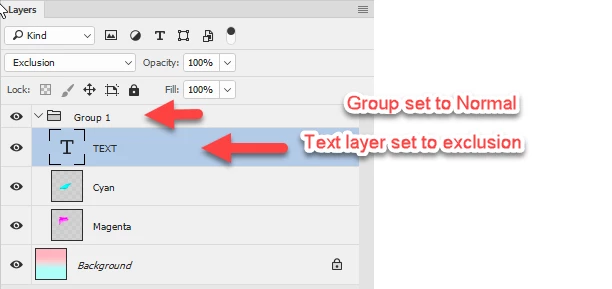
Type in white and set the text layer to exclusion blend mode. Put the text and paint layers into a group and set the group blending mode to normal rather than pass through so that the text does  not use the exclusion blend mode with the background

Dave

1 reply

davescm
Community Expert
davescmCommunity ExpertCorrect answer
Community Expert
October 2, 2017

You were correct about exclusion

Type in white and set the text layer to exclusion blend mode. Put the text and paint layers into a group and set the group blending mode to normal rather than pass through so that the text does  not use the exclusion blend mode with the background

Dave

daniely60223190
Participant
October 2, 2017

Dave, i tried this and i still couldn't select exclusion. Do you think there's something wrong with my settings?

daniely60223190
Participant
October 2, 2017

Never mind, i didn't see the "Don't Merge" button.


Thanks, it works now.