
Inspiring
December 21, 2016
Question

Expandable Arrows Are Terrible !!! Adobe Please Fix !!!

  • December 21, 2016
  • 3 replies
  • 456 views

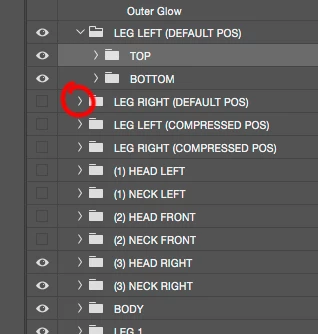
I love Photoshop but the expandable arrows are way too hard to expand. Adobe please make the arrows more sensitive so they expand on first touch. I have †o work with folders in PS and I almost always have to hit the expand arrow more than once to get it to "expand" It's driving me crazy to the point I had to post on the Forum.

I'm using a Wacom Cintiq and I've made sure my Cintiq settings are set properly. Adobe please make them so they respond easier to touch so you don't have to click them a second time.
This topic has been closed for replies.

3 replies

jbm007
Community Expert
Community Expert
December 22, 2016

I requested positive feed back from UI symbols for years.

When one mouses over a UI symbol it should change color to confirm its ability to be selected.

That was 10 years ago.

JJMack
Community Expert
Community Expert
December 22, 2016

Some form of feedback will surly help. Often there is no feedback provided by touch device drivers and there are time touch interfaces fail to work.  When you move you Wacom pen close to your intuos tablet or Wacom display a brush tip cursor is displayed. If you finger get near your Wacom touch device there is no feedback when when contact is made with a single finger you can move the mouse cursor. However  your finger may be nowhere near where your finger is on your Wacom touch display. What feedback is the for touch gestures. does palm detection always work.  There is no question about it there is a lot of work that needs to be done to make communication between user and computers better and more efficient.

JJMack
Trevor.Dennis
Community Expert
Community Expert
December 21, 2016

Yes it's a pain.  I 'think' I have seen a comment somewhere about what's new with CC 2017, that said they had improved it (I think it started being a problem with CC2015 or 2015.5, but I might be getting confused with the big tabs option that is in Preferences now.  Either way it is a problem and needs fixing.

JJMack
Community Expert
Community Expert
December 21, 2016

The thing is Photoshop was designed 20+ years ago before touch devices were available so Photoshop UI weres not designed for use with touch devices.   A touch user interface would requires UI elements to be displayed much lager in size to be usable with touch devices.  That would greatly reduce the display area left for editing your images.

Adobe need to address the problems users have using Photoshop with touch devices there are many usability issues for sure.

Photoshop current palette UI designs are not well suited for use with touch devices. New types of UI are need tor use with touch devices.

High resolution displays were introduced over a decade ago. This also caused usability problem for application user interfaces display smaller on high resolution display.  A decade later there is still no common general easy solution for the problem. That application can use for their user interfaces.

Operating systems can scale what is displayed on displays.   However doing that defeats the purpose of having a display with high resolution for whatever you display will be scaled to a lower resolution. It take a long time for software to catch up and there is so much more software Today as there was yesterday.

It is also not an easy problem to solve.  If it were there would be no problem

JJMack
Comp__792Author
Inspiring
December 21, 2016

Thanks. Sorry. To clarify I am not using touch. But using my wacom pen. I think my initial post made it sound like I was using touch. Selecting the expandable arrow in CC 2014 was fine but the problem came when they changed the solid arrow into an arrow line like this >. Now for some reason it is harder to select.

JJMack
Community Expert
Community Expert
December 22, 2016

I believe you are touching your pen to your tablet. That you are not using a mouse to position a cursor to the  > icon in the layers palette then clicking a mouse button. IMO you are using a touch device on a UI element designed for use with a mouse.

JJMack