
williamb67390983
Participant
March 23, 2017
Answered

Expert level! How do I resize a selection, like tolerance, so my selection gets exactly the same pixels from the edge of my figure?

  • March 23, 2017
  • 4 replies
  • 708 views

How do I resize a selection, like tolerance, so my selection gets exactly the same pixels from the edge of my figure?

If I resize the High and width, dosen't the space between the selection and the edge of the figure get the same size.

I know it is possible, because I once saw it on a video, but I didn't thought I would need it.

Thanks for the help!!
This topic has been closed for replies.
Correct answer davescm

You can adjust this two ways

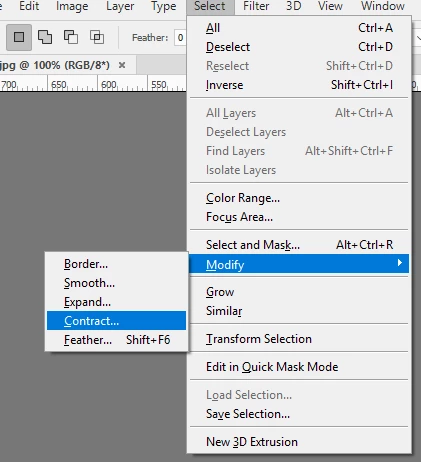
1. With your selection made, go to Select - Modify and choose Expand or Contract

or

2. With your selection made, go to Select -Transform Selection

Hold down the shift key whilst dragging the handles to increase /decrease height and width in proportion

Dave

4 replies

williamb67390983
Participant
March 23, 2017

It worked! I used Select -> modify -> Contract -> contract by 5 pixels

It was exactly this I wanted, Thank you so much!

davescm
Community Expert
Community Expert
March 23, 2017

You're welcome

Dave

Bettina Di Virgilio
Participating Frequently
March 23, 2017

Hello, I'd go in Select&Mask: there you can have a preview of your selection in diverse ways, per example with black or white background. Then you can shift the edge of yous selection and have a preview.

davescm
Community Expert
davescmCommunity ExpertCorrect answer
Community Expert
March 23, 2017

You can adjust this two ways

1. With your selection made, go to Select - Modify and choose Expand or Contract

or

2. With your selection made, go to Select -Transform Selection

Hold down the shift key whilst dragging the handles to increase /decrease height and width in proportion

Dave

Inspiring
March 23, 2017

Please post a screenshot.