
Participating Frequently
March 17, 2023
Question

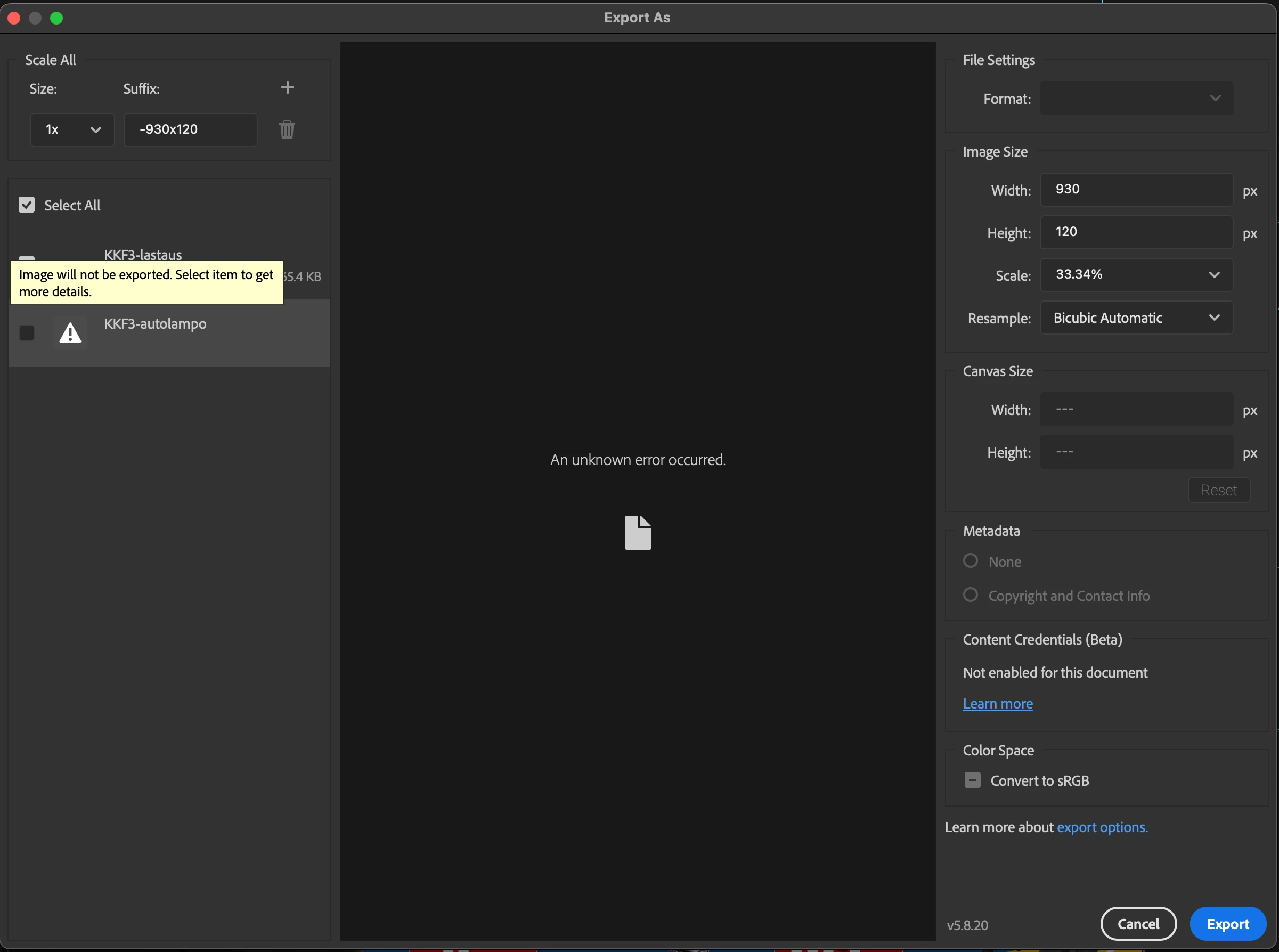
Export as... -command cannot bring all artboards for exporting

  • March 17, 2023
  • 8 replies
  • 633 views

When trying to export multiple artboards (currently only two) as once, the first artboard (on my workspace, the organization of artboards on the layer tab doesn't affect the result) doesn't appear on Export window. When changing the place of artboards on workspace, it is always the first artboard which doesn't appear. Restarting PS does not help. 

I have Photoshop 24.2.0 release updated last week. 
 

This topic has been closed for replies.

8 replies

piaahoAuthor
Participating Frequently
March 17, 2023

I use MacOS Ventura 13.0.1 with M1 chip, 27" 2020. But this has been working earlier with the same system/versions. 

Stephen Marsh
Community Expert
Community Expert
March 17, 2023

Thanks, yes, it is the same command, however, the result is contextually different...


With no artboards selected in the layers panel, File > Export As will bring in both artboards for export.


With a single artboard selected in the layers panel, right-click on the artboard name and Export As will only bring up the chosen artboard for export.


I was hoping that manually selecting the multiple artboards would force a different result.


All works for me in 2021. 


All works the same for me in 2023 (24.2.0).


I'm testing on Mac OS Montery and Intel Chip. Are you using an M1 or M2 chip?

piaahoAuthor
Participating Frequently
March 17, 2023

It is actually the same command. When exporting via artboards on the layers panel choosing the artboard itself, it goes to the same window as the keyboard shortcut or File/Export as.., and same problem occurs. The instructions work only when I try to export one artboard at the time.


The bug is somewhere in the Export as -command, because when trying the old save for web -command, it brings all the artboards with no problems in the image (but ofc all in one "artboard"). 

Stephen Marsh
Community Expert
Community Expert
March 17, 2023

Please follow my previous instructions again:


1) Select each artboard in the layers panel (multiple)


2) Right-click on one of the artboard names in the layers panel and select export as.. All selected, multiple artboards will appear in export as.


 I am not referring to the same command under the file menu.


piaahoAuthor
Participating Frequently
March 17, 2023

In this current document happens only to be 2 different layouts/artboards instead of your example of 20 artboards. But even if I have 6 artboards on same file, the first always cannot be exported because of that unknown error.


So.

1. When layouts are ready, I go to export as.. 

2. As the screenshot shows, one, or sometimes all the artboards, cannot be exported due to this unknown error. Only the arboards which can be cheked can also be exported. 


It doesn't matter how many or few artboards there is, because for that unknown error all artboards cannot be exported.

Stephen Marsh
Community Expert
Community Expert
March 17, 2023

I'm not following, the screenshot shows 2 artboards, both being exported in a single step. This could be 20 artboards being exported in a single step.


Please provide step by step instructions to reproduce the issue.

piaahoAuthor
Participating Frequently
March 17, 2023

It helps so I can export one at the time, but this projects has 16 sizes with 2-6 layouts each, so it would be nice to get the export as -function to work as intended. 

Stephen Marsh
Community Expert
Community Expert
March 17, 2023

Perhaps this will help?


In the layers panel, select the top-level artboards, but not the content of the artboards. Right-click on one of the artboard names and select Export As or Quick Export: