
Participant
November 19, 2018
Answered

Export in same folder as where the psd-file is

  • November 19, 2018
  • 3 replies
  • 3816 views

Hi,

Whenever I export a file, it always want to export to the last folder that I exported to, and not into the folder that the psd-file is already in.

This is annoying and pretty time consuming to find the right folder every time.

Is the an export setting that can help me, or is it just the way it works?

I see the same problem in indesign, after effects and illustrator too.
    Correct answer curtisdei

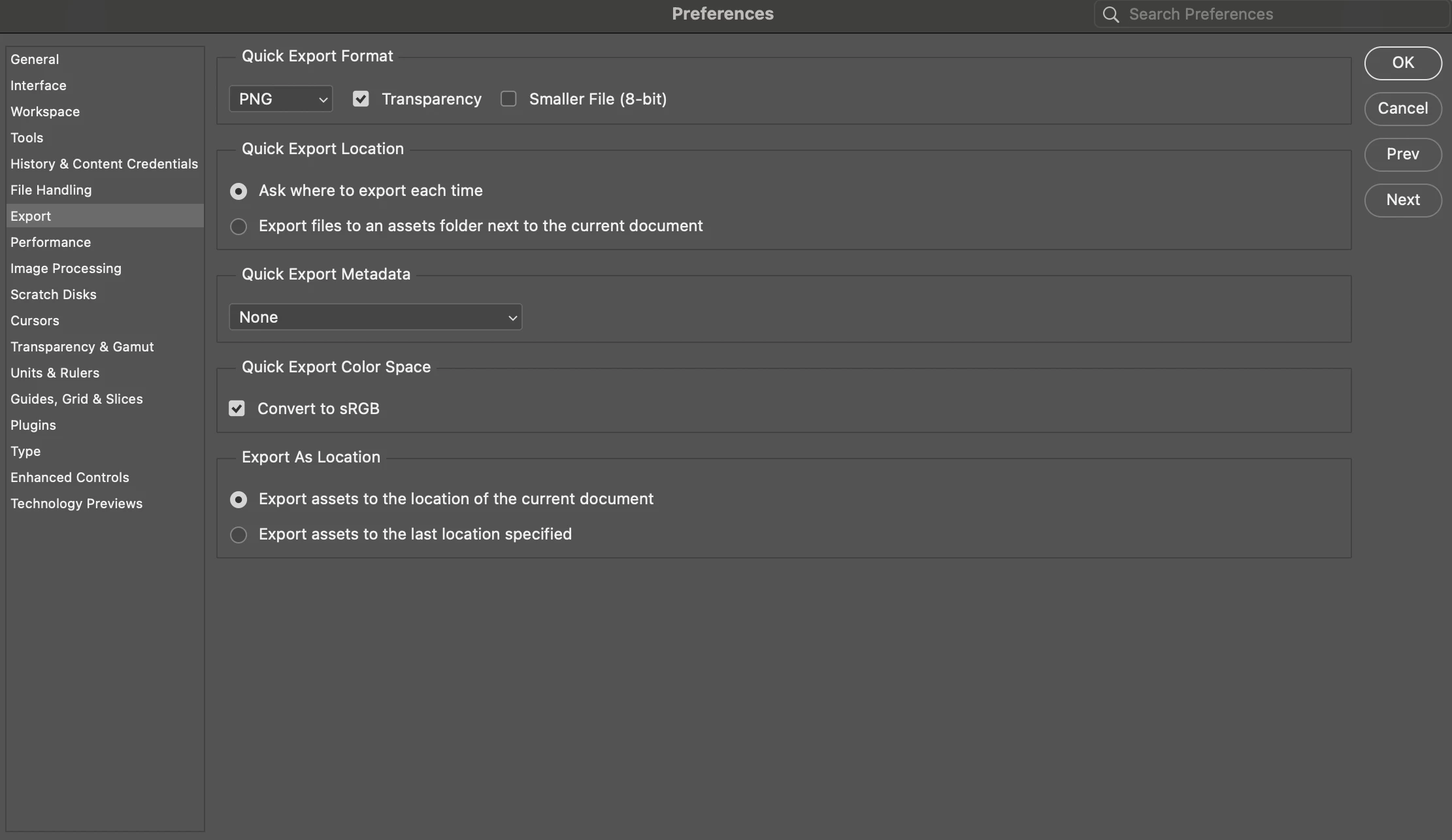
    Its an older thread, but for anyone experiencing this like i did. Under the "Export" settings you can change this from last location to the location of the current document. 

    3 replies

    Participant
    May 3, 2025

    For anyone searching for this in 2025, I found the fix.

    Edit > Prefrences > Export...  (This will bring up a menu) under "Export As Locaton"

    Select (Export assets to the location of the current document).


    Hope that helps. It has been frustrating me to no end, ever since it changed.

    And I had to figure it out myself, because this post was no help.

    curtisdei
    curtisdeiCorrect answer
    Participant
    April 29, 2024

    Its an older thread, but for anyone experiencing this like i did. Under the "Export" settings you can change this from last location to the location of the current document. 

    Participant
    June 19, 2024

    its doesnt help, I changed all preferences to current document and it still open last folder not current

    D Fosse
    Community Expert
    Community Expert
    November 19, 2018

    Preferences > File Handling > uncheck "Save As to Original Folder".

    Save For Web should always remember last destination.

    martins97988739
    Participant
    January 8, 2019

    It does not help. We WANT to export to "Original Folder". Anyway you mentioned "File Saving Options", but we want "Export options". Yes I know that there is the setting "Quick export location", but its about "Quick export" function. We want this for "Export" function.

    ArctisStudio
    Known Participant
    March 11, 2025

    Exporting to the same folder would defeat the purpose of an Export, which is to branch out a separate one-time copy from a master file. You can't risk overwriting the original. Which is also why the new Quick Export function to save next to original always puts it in a sub-folder. But you can't have that for normal exports.

    This is also the convention in all other applications that I know of. You're always asked where to export to, and the default is last location. This is what you expect. If you want it in the same folder, use "Save", which will overwrite the original if file formats are the same.


    Just dropped in to leave a message for everyone who may come across this thread. I don't know why so many so-called experts in the Adobe forums insist upon micromanaging and questioning what other people are trying to do. Just answer their question or ask them for more info if you need it. D Fosse, what you're saying is completely wrong. The whole point of an export is to create a file that can be used practically, and is usually not re-editable/destructable (unless you're going with PDF or vector formats etc.). So there'd be little danger of replacing your master file. Doing what curtisdei below instructed is exactly what Martin is trying to achieve, and works for me. Usually the master file is saved close to the exported one (e.g in a subfolder) and takes two clicks to get to where you want to be.