
TracyBrown
Participant
August 12, 2021
Answered

Export Layers to Files

  • August 12, 2021
  • 2 replies
  • 2542 views

I love the option to export layers to files especially when you have a ton of headshots that all need to be the same size. However, I wish you could turn off the feature of the layers being auto numbered. The result is your file name (File Name Prefix) and auto numbering. I then have to go to the exported files and delete the numbering out of the file names. Is there a work around for this. Just like there is a check box for Visible Layers Only there should be a check box for Auto Numbering Exported Files.
This topic has been closed for replies.
Correct answer Stephen Marsh

Further to my previous reply...


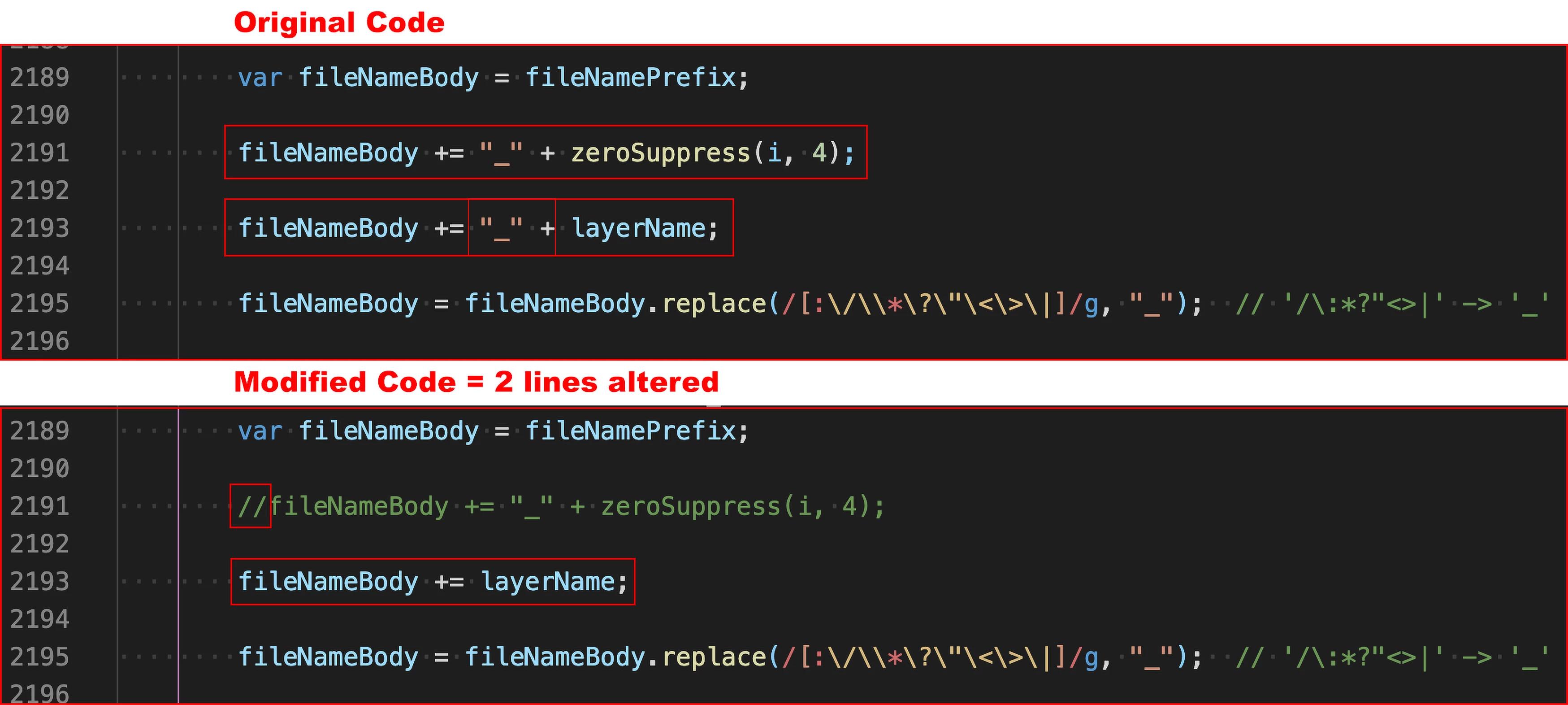
The Export Layers to Files.jsx script can be modified... Working on a copy of the original script, modify the following two lines of code as detailed in the following screenshot:


Mac:

/Applications/Adobe Photoshop 2021/Presets/Scripts


Win:

C:\Program Files\Adobe\Adobe Photoshop 2021\Presets\Scripts


The onus is on you to ensure that there are no duplicate layer names as dupes will be overwritten. Hope this helps!


EDIT: A related topic here –

https://community.adobe.com/t5/photoshop-ecosystem-bugs/how-to-export-with-layer-name-when-quot-export-layers-to-files-quot/idc-p/14433460

2 replies

Stephen Marsh
Community Expert
Stephen MarshCommunity ExpertCorrect answer
Community Expert
August 14, 2021

Further to my previous reply...


The Export Layers to Files.jsx script can be modified... Working on a copy of the original script, modify the following two lines of code as detailed in the following screenshot:


Mac:

/Applications/Adobe Photoshop 2021/Presets/Scripts


Win:

C:\Program Files\Adobe\Adobe Photoshop 2021\Presets\Scripts


The onus is on you to ensure that there are no duplicate layer names as dupes will be overwritten. Hope this helps!


EDIT: A related topic here –

https://community.adobe.com/t5/photoshop-ecosystem-bugs/how-to-export-with-layer-name-when-quot-export-layers-to-files-quot/idc-p/14433460

Participant
November 18, 2021

Can Export Layers to Files be modified so that when running the script in an action it will use the file name as the prefix?


Right now it continually overwrites the previous exports when I batch run the action it is in.

Stephen Marsh
Community Expert
Community Expert
November 18, 2021

I would think that a different script specifically written for the task at hand with no GUI would likely be better.

Known Participant
August 12, 2021

I realize this requires external software, but nonetheless you can try using a batch renaming software, like Batch Rename Utility.


If the only thing you want to remove from the names are numbers, then just tick this box:


(In Batch Rename Utility).


TracyBrown
Participant
August 12, 2021

Thank you. I will look into this software for the MAC. I still think that they should give us the option. 🙂

Stephen Marsh
Community Expert
Community Expert
August 14, 2021

You can also use Adobe Bridge if you are going to do a batch rename.


However, the sequential numbers are added to create unique filenames. Consider the following example where the source file had the same layer name in more than one layer. There will be a clash.


The Batch Rename preview shows that there will be 4 files of the same name, however, if one does actually go ahead with the rename, the clash has to be taken care of so that files are not overwritten and lost:


Before:

prefix__0001_Background.jpg

prefix__0000_Background.jpg

_0001_Background.jpg

_0000_Background.jpg


After:

Background (1).jpg

Background (2).jpg

Background (3).jpg

Background.jpg


So, as long as there are no duplicate layer names, it would be safe to remove the sequential numbers.