
Participant
May 24, 2020
Question

Exporting file as jpg scales down to a different size

  • May 24, 2020
  • 4 replies
  • 2659 views

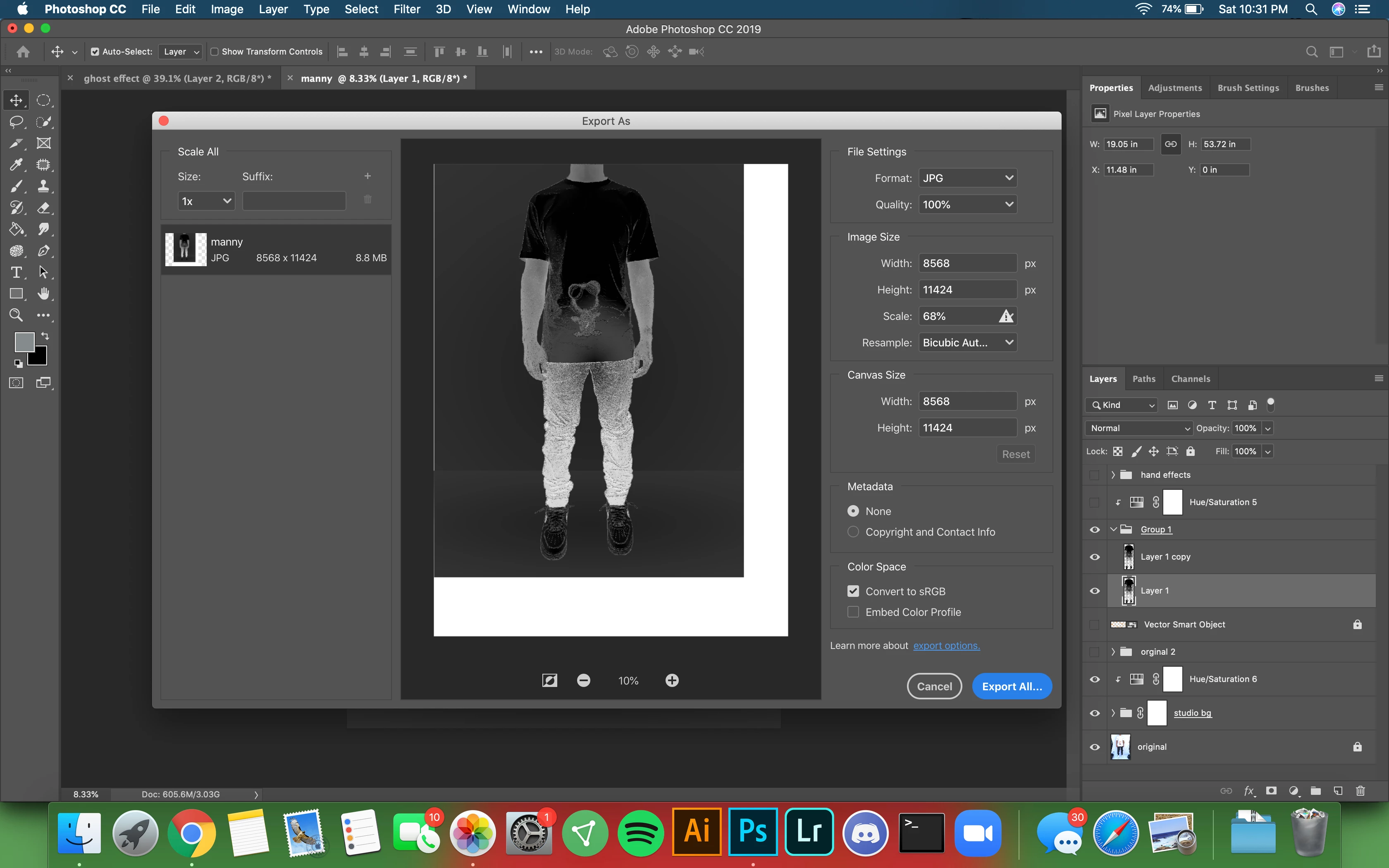
When I go to export my file as a jpeg I cannot export the file scaled to 100%. It scales the image down and puts a white border below and on the sides. How can I fix this? Any help will be appreciated.
This topic has been closed for replies.

4 replies

Participant
June 14, 2020

Hi Munoz,


It seems there are some files available outside your artboard, so delete those files which are outside of artboard.
Might be you have made more than 1 artboard in photoshop file, So in that case might be photoshop is saving both artboards.

If it doesn't work, kindly share your file and i will review it and get back to you.

Thanks

davescm
Community Expert
Community Expert
June 14, 2020

The OP is not using artboards. The issue is the pixel size limitation in Export As (which was designed to Export Files for web use). As stated earlier in the thread Save As does not have that limitation.


Dave

JohanElzenga
Community Expert
Community Expert
June 14, 2020

Export as has a size limitation. That is what is causing this. The warning triangle in the Resize box should give more info if you click it. As D_Fosse said, you should not use this option to save huge files. It's mainly meant for exporting for the web. Use 'Save as' and you should be fine.

-- Johan W. Elzenga
D Fosse
Community Expert
Community Expert
June 14, 2020

At 11 000 pixels this looks like a print file? You don't use Export for that, you use Save As.


Export is for web/screen/mobile devices, not print. 11 000 pixels is not something you would normally put to screen use. Yes, I know, in most other applications Export is the standard output command. Not so in Photoshop, where Export is special purpose.


If you look at the Export dialog again, you see that the image is scaled down to 68% but the canvas size remains full size. There may be a size limitation in Export (I have never tried to push it).


If this is not specifically for print, but a master file for storage, don't use jpeg. The jpeg compression degrades the file with every resave. That's the price for the small file size. Use PSD or TIFF.

SWBoatman25
Inspiring
June 13, 2020

Same thing happened with me, I couldn't get it fixed but I am following this thread so it gets traction to figure it out! If you did solve it, let me know.