Participating Frequently
February 21, 2019
Answered

Exporting images with Count Tool

  • February 21, 2019
  • 6 replies
  • 3951 views

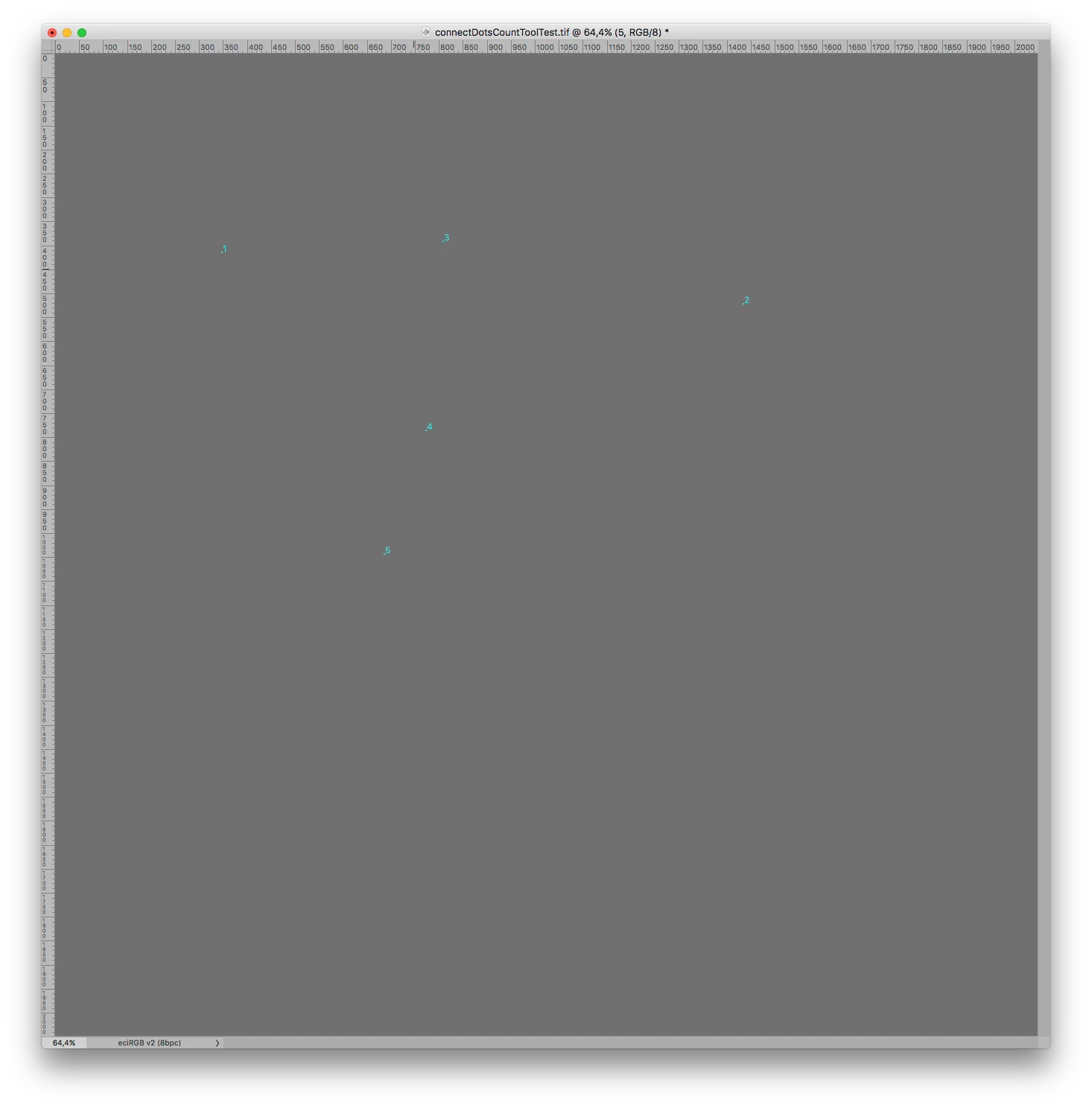
Hi, I'm trialing CC20.0.3 for manually counting objects on large files. The basic system works very well but I'm having difficulty in exporting the image with the count numbers in a format that others can use to verify my counts - ie prints or jpegs. I've tried several things including Merging all Layers, rasterising everything etc but can't get the numbers to be included in the image.

The only work around so far is using Print Screen and then stitiching the images together again but with the large files I'm using it's a tedious process!

If anyone has any ideas, I'd really appreciate the help.

Thanks

This topic has been closed for replies.
Correct answer c.pfaffenbichler

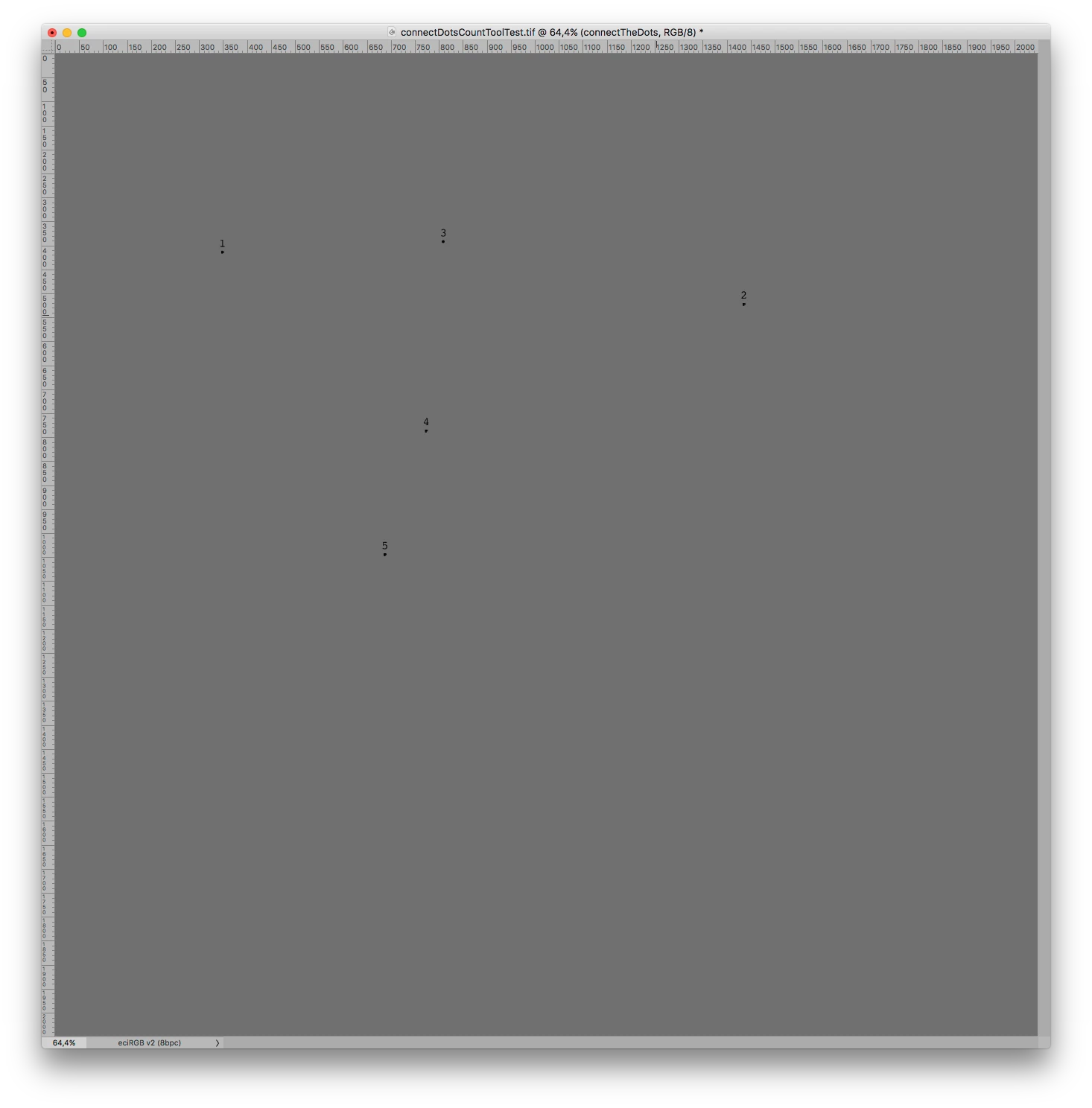
This (saved as a txt-file but with the extension »jsx« into the Presets/Scripts-Folder) might work:

// create text layers with numbers for count tool points;

// 2019, use it at your own risk;

#target photoshop

if (app.documents.length > 0) {

var ref = new ActionReference();

ref.putEnumerated( charIDToTypeID("Dcmn"), charIDToTypeID("Ordn"), charIDToTypeID("Trgt") );

var docDesc = executeActionGet(ref);

if (docDesc.hasKey(stringIDToTypeID("countClass")) == true) {

// set to 72dpi and pixels;

var originalRulerUnits = preferences.rulerUnits;

preferences.rulerUnits = Units.PIXELS;

var myDocument = app.activeDocument;

var originalResolution = myDocument.resolution;

myDocument.resizeImage(undefined, undefined, 72, ResampleMethod.NONE);

// get coordinates;

var counter =docDesc.getList(stringIDToTypeID("countClass"));

var thePoints = new Array;

for (var c = 0; c < counter.count; c++) {

var thisOne = counter.getObjectValue(c);

thePoints.push([thisOne.getUnitDoubleValue(stringIDToTypeID("x")), thisOne.getUnitDoubleValue(stringIDToTypeID("y"))])

};

// create a smart object;

theArray = [[[[0,-3],[1.66,-3],[-1.66,-3],"SMOOTH"],

[[3,0],[3,1.66],[3,-1.66],"SMOOTH"],

[[0,3],[-1.66,3],[1.66,3],"SMOOTH"],

[[-3,0],[-3,-1.66],[-3,1.66],"SMOOTH"], true]];

var aPath = createPath10 (theArray, "circle");

aPath.select;

makeFillLayer ("circle", 0, 0, 0);

// convert to smart object ;

var id557 = charIDToTypeID( "slct" );

var desc108 = new ActionDescriptor();

var id558 = charIDToTypeID( "null" );

var ref77 = new ActionReference();

var id559 = charIDToTypeID( "Mn  " );

var id560 = charIDToTypeID( "MnIt" );

var id561 = stringIDToTypeID( "newPlacedLayer" );

ref77.putEnumerated( id559, id560, id561 );

desc108.putReference( id558, ref77 );

executeAction( id557, desc108, DialogModes.NO );

var theSO = myDocument.activeLayer;

// remove path;

aPath.remove();

// create a set;

var theSet = myDocument.layerSets.add();

theSet.name = "connectTheDots";

// work through the path points;

for (var m = 0; m < thePoints.length; m++) {

  var theArray = thePoints;

// make circle;

  var theCircle = theSO.duplicate(theSet, ElementPlacement.PLACEATBEGINNING);

  myDocument.activeLayer = theCircle;

  theCircle.translate(theArray[0], theArray[1]);

  theCircle.name = (m+1)+"_circle";

// make texts;

  makeNumber (theSet, (m+1), theArray[0], theArray[1] - 12)

  };

theSO.visible = false;

// reset image size;

myDocument.resizeImage(undefined, undefined, originalResolution, ResampleMethod.NONE);

preferences.rulerUnits = originalRulerUnits;

}

};

////////////////////////////////////

////////////////////////////////////

////////////////////////////////////

////// create number //////

function makeNumber (myDocument, theNumber, theX, theY) {

  var textLayer = myDocument.artLayers.add();

  textLayer.kind = LayerKind.TEXT;

  textLayer.blendMode = BlendMode.NORMAL;

  textLayer.opacity = 100;

  var myTextRef = textLayer.textItem;

  myTextRef.size = 24;

  myTextRef.justification = Justification.CENTER;

  myTextRef.font = "Courier";

  var newColor = new SolidColor();

  newColor.rgb.red = 0;

  newColor.rgb.green = 0;

  newColor.rgb.blue = 0;

  myTextRef.color = newColor;

  myTextRef.position = new Array(theX, theY);

  myTextRef.contents = theNumber;

  };

////// the fill-layer-function //////

function makeFillLayer (theName, theHue, theSat, theBright) {

// =======================================================

var idsetd = charIDToTypeID( "setd" );

    var desc4 = new ActionDescriptor();

    var idnull = charIDToTypeID( "null" );

        var ref2 = new ActionReference();

        var idClr = charIDToTypeID( "Clr " );

        var idFrgC = charIDToTypeID( "FrgC" );

        ref2.putProperty( idClr, idFrgC );

    desc4.putReference( idnull, ref2 );

    var idT = charIDToTypeID( "T   " ); 

        var desc5 = new ActionDescriptor();

        var idH = charIDToTypeID( "H   " );

        var idAng = charIDToTypeID( "#Ang" );

        desc5.putUnitDouble( idH, idAng, theHue );

        var idStrt = charIDToTypeID( "Strt" );

        desc5.putDouble( idStrt, theSat );

        var idBrgh = charIDToTypeID( "Brgh" );

        desc5.putDouble( idBrgh, theBright );

    var idHSBC = charIDToTypeID( "HSBC" );

    desc4.putObject( idT, idHSBC, desc5 );

executeAction( idsetd, desc4, DialogModes.NO );

// =======================================================

var id212 = charIDToTypeID( "Mk  " );

var desc39 = new ActionDescriptor();

var id213 = charIDToTypeID( "null" );

var ref27 = new ActionReference();

var id214 = stringIDToTypeID( "contentLayer" );

ref27.putClass( id214 ); desc39.putReference( id213, ref27 );

var id215 = charIDToTypeID( "Usng" );

var desc40 = new ActionDescriptor();

var id216 = charIDToTypeID( "Type" );

var id217 = stringIDToTypeID( "solidColorLayer" );

desc40.putClass( id216, id217 );

var id218 = stringIDToTypeID( "contentLayer" );

desc39.putObject( id215, id218, desc40 );

executeAction( id212, desc39, DialogModes.NO );

app.activeDocument.activeLayer.name = theName;

return app.activeDocument.activeLayer

};

////// function to create path from array with one array per point that holds anchor, leftdirection, etc, 2010 //////

function createPath10 (theArray, thePathName) {

var originalRulerUnits = app.preferences.rulerUnits;

app.preferences.rulerUnits = Units.POINTS;

lineSubPathArray = new Array ();

if (theArray[theArray.length - 1].constructor != Array) {var numberOfPaths = theArray.length - 1}

else {var numberOfPaths = theArray.length};

for (var b = 0; b < numberOfPaths; b++) {

  var lineArray = new Array ();

  lineSubPathArray = new SubPathInfo();

  if (theArray[theArray.length - 1].constructor == Array) {

  lineSubPathArray.closed = true;

  var numberOfPoints = theArray.length

  }

  else {

  lineSubPathArray.closed = theArray[theArray.length - 1]

  var numberOfPoints = theArray.length - 1

  };

  for (c = 0; c < numberOfPoints; c++) {

  lineArray = new PathPointInfo;

  switch (theArray[3]) {

  case "CORNER":

  lineArray.kind = PointKind.CORNERPOINT;

  break;

  case "SMOOTH":

  lineArray.kind = PointKind.SMOOTHPOINT;

  break;

  default:

  lineArray.kind = PointKind.CORNERPOINT;

  break

  };

  lineArray.anchor = theArray[0];

  if (theArray[1].length == 2) {lineArray.leftDirection = theArray[1]}

  else {lineArray.leftDirection = theArray[0]};

  if (theArray[2].length == 2) {lineArray.rightDirection = theArray[2]}

  else {lineArray.rightDirection = theArray[0]};

  };

  lineSubPathArray.operation = ShapeOperation.SHAPEXOR;

  lineSubPathArray.entireSubPath = lineArray;

  };

var myPathItem = app.activeDocument.pathItems.add(thePathName, lineSubPathArray);

app.preferences.rulerUnits = originalRulerUnits;

return myPathItem

};

Edit: Example:

6 replies

Participant
January 20, 2022

hi, i am also facing the same issue, i cant get the numbers included in the image. is there other ways to export image without scripting? 

Tom Winkelmann
Inspiring
September 16, 2020

Fixed version of the second script:

#target photoshop

if (app.documents.length > 0) {
	var ref = new ActionReference();
	ref.putEnumerated(charIDToTypeID("Dcmn"), charIDToTypeID("Ordn"), charIDToTypeID("Trgt"));
	var docDesc = executeActionGet(ref);
	if (docDesc.hasKey(stringIDToTypeID("countClass")) == true) {
		// set to 72dpi and pixels;
		var originalRulerUnits = preferences.rulerUnits;
		preferences.rulerUnits = Units.PIXELS;
		var myDocument = app.activeDocument;
		var originalResolution = myDocument.resolution;
		myDocument.resizeImage(undefined, undefined, 72, ResampleMethod.NONE);
		// get coordinates;
		var countClass = docDesc.getList(stringIDToTypeID("countClass"));
		var thePoints = [
			[]
		];
		var thisGroup = 0;
		for (var c = 0; c < countClass.count; c++) {
			var thisOne = countClass.getObjectValue(c);
			var theGroup = thisOne.getInteger(stringIDToTypeID("group"));
			if (c == 0) {
				thisGroup = theGroup
			};
			if (thisGroup != theGroup) {
				thePoints.push([]);
				thisGroup = theGroup
			};
			//checkDesc2(thisOne);
			thePoints[thePoints.length - 1].push([thisOne.getUnitDoubleValue(stringIDToTypeID("x")), thisOne.getUnitDoubleValue(stringIDToTypeID("y"))])
		};
		// create a smart object;
		theArray = [[
                            [[0, -3],[1.66, -3],[-1.66, -3], "SMOOTH"],
                            [[3, 0],[3, 1.66],[3, -1.66], "SMOOTH"],
                            [[0, 3],[-1.66, 3],[1.66, 3], "SMOOTH"],
                            [[-3, 0],[-3, -1.66],[-3, 1.66], "SMOOTH"], true
                            ]];
		var aPath = createPath10(theArray, "circle");
		aPath.select;
		makeFillLayer("circle", 0, 0, 0);
		// convert to smart object ;
		var desc108 = new ActionDescriptor();
		var ref77 = new ActionReference();
		ref77.putEnumerated(charIDToTypeID("Mn  "), charIDToTypeID("MnIt"), stringIDToTypeID("newPlacedLayer"));
		desc108.putReference(charIDToTypeID("null"), ref77);
		executeAction(charIDToTypeID("slct"), desc108, DialogModes.NO);
		var theSO = myDocument.activeLayer;
		// remove path;
		aPath.remove();
		var theColorLabels = [[0, 0, 255],[0, 255, 0],[255, 0, 0],[0, 255, 255],[255, 255, 0],[255, 0, 255]];
		////////////////////////////////////
		for (var n = 0; n < thePoints.length; n++) {
			// create a set;
			var theSet = myDocument.layerSets.add();
			theSet.name = "group " + String(n + 1);
			colorOverlay(myDocument, theSet, theColorLabels[n][0], theColorLabels[n][1], theColorLabels[n][2]);
			// work through the path points;
			for (var m = 0; m < thePoints[n].length; m++) {
				var theArray = thePoints[n][m];
				// make circle;
				var theCircle = theSO.duplicate(theSet, ElementPlacement.PLACEATBEGINNING);
				myDocument.activeLayer = theCircle;
				theCircle.translate(theArray[0], theArray[1]);
				theCircle.name = (m + 1) + "_circle";
				// make texts;
				makeNumber(theSet, (m + 1), theArray[0], theArray[1] - 12)
			};
		};
		////////////////////////////////////
		theSO.visible = false;
		// reset image size;
		myDocument.resizeImage(undefined, undefined, originalResolution, ResampleMethod.NONE);
		preferences.rulerUnits = originalRulerUnits;
	}
};
////////////////////////////////////
////////////////////////////////////
////////////////////////////////////
////// create number //////
function makeNumber(myDocument, theNumber, theX, theY) {
	var textLayer = myDocument.artLayers.add();
	textLayer.kind = LayerKind.TEXT;
	textLayer.blendMode = BlendMode.NORMAL;
	textLayer.opacity = 100;
	var myTextRef = textLayer.textItem;
	myTextRef.size = 24;
	myTextRef.justification = Justification.CENTER;
	myTextRef.font = "Courier";
	var newColor = new SolidColor();
	newColor.rgb.red = 0;
	newColor.rgb.green = 0;
	newColor.rgb.blue = 0;
	myTextRef.color = newColor;
	myTextRef.position = new Array(theX, theY);
	myTextRef.contents = theNumber;
};
////// the fill-layer-function //////
function makeFillLayer(theName, theHue, theSat, theBright) {
	// =======================================================
	var idsetd = charIDToTypeID("setd");
	var desc4 = new ActionDescriptor();
	var idnull = charIDToTypeID("null");
	var ref2 = new ActionReference();
	var idClr = charIDToTypeID("Clr ");
	var idFrgC = charIDToTypeID("FrgC");
	ref2.putProperty(idClr, idFrgC);
	desc4.putReference(idnull, ref2);
	var idT = charIDToTypeID("T   ");
	var desc5 = new ActionDescriptor();
	var idH = charIDToTypeID("H   ");
	var idAng = charIDToTypeID("#Ang");
	desc5.putUnitDouble(idH, idAng, theHue);
	var idStrt = charIDToTypeID("Strt");
	desc5.putDouble(idStrt, theSat);
	var idBrgh = charIDToTypeID("Brgh");
	desc5.putDouble(idBrgh, theBright);
	var idHSBC = charIDToTypeID("HSBC");
	desc4.putObject(idT, idHSBC, desc5);
	executeAction(idsetd, desc4, DialogModes.NO);
	// =======================================================
	var id212 = charIDToTypeID("Mk  ");
	var desc39 = new ActionDescriptor();
	var id213 = charIDToTypeID("null");
	var ref27 = new ActionReference();
	var id214 = stringIDToTypeID("contentLayer");
	ref27.putClass(id214);
	desc39.putReference(id213, ref27);
	var id215 = charIDToTypeID("Usng");
	var desc40 = new ActionDescriptor();
	var id216 = charIDToTypeID("Type");
	var id217 = stringIDToTypeID("solidColorLayer");
	desc40.putClass(id216, id217);
	var id218 = stringIDToTypeID("contentLayer");
	desc39.putObject(id215, id218, desc40);
	executeAction(id212, desc39, DialogModes.NO);
	app.activeDocument.activeLayer.name = theName;
	return app.activeDocument.activeLayer
};
////// function to create path from array with one array per point that holds anchor, leftdirection, etc, 2010 //////
function createPath10(theArray, thePathName) {
	var originalRulerUnits = app.preferences.rulerUnits;
	app.preferences.rulerUnits = Units.POINTS;
	lineSubPathArray = new Array();
	if (theArray[theArray.length - 1].constructor != Array) {
		var numberOfPaths = theArray.length - 1
	} else {
		var numberOfPaths = theArray.length
	};
	for (var b = 0; b < numberOfPaths; b++) {
		var lineArray = new Array();
		lineSubPathArray[b] = new SubPathInfo();
		if (theArray[b][theArray[b].length - 1].constructor == Array) {
			lineSubPathArray[b].closed = true;
			var numberOfPoints = theArray[b].length
		} else {
			lineSubPathArray[b].closed = theArray[b][theArray[b].length - 1]
			var numberOfPoints = theArray[b].length - 1
		};
		for (c = 0; c < numberOfPoints; c++) {
			lineArray[c] = new PathPointInfo;
			switch (theArray[b][c][3]) {
			case "CORNER":
				lineArray[c].kind = PointKind.CORNERPOINT;
				break;
			case "SMOOTH":
				lineArray[c].kind = PointKind.SMOOTHPOINT;
				break;
			default:
				lineArray[c].kind = PointKind.CORNERPOINT;
				break
			};
			lineArray[c].anchor = theArray[b][c][0];
			if (theArray[b][c][1].length == 2) {
				lineArray[c].leftDirection = theArray[b][c][1]
			} else {
				lineArray[c].leftDirection = theArray[b][c][0]
			};
			if (theArray[b][c][2].length == 2) {
				lineArray[c].rightDirection = theArray[b][c][2]
			} else {
				lineArray[c].rightDirection = theArray[b][c][0]
			};
		};
		lineSubPathArray[b].operation = ShapeOperation.SHAPEXOR;
		lineSubPathArray[b].entireSubPath = lineArray;
	};
	var myPathItem = app.activeDocument.pathItems.add(thePathName, lineSubPathArray);
	app.preferences.rulerUnits = originalRulerUnits;
	return myPathItem
};
////// color overlay //////
function colorOverlay(myDocument, myLayer, theR, theG, theB) {
	myDocument.activeLayer = myLayer;
	// =======================================================
	var idsetd = charIDToTypeID("setd");
	var desc5 = new ActionDescriptor();
	var idnull = charIDToTypeID("null");
	var ref2 = new ActionReference();
	var idPrpr = charIDToTypeID("Prpr");
	var idLefx = charIDToTypeID("Lefx");
	ref2.putProperty(idPrpr, idLefx);
	var idLyr = charIDToTypeID("Lyr ");
	var idOrdn = charIDToTypeID("Ordn");
	var idTrgt = charIDToTypeID("Trgt");
	ref2.putEnumerated(idLyr, idOrdn, idTrgt);
	desc5.putReference(idnull, ref2);
	var idT = charIDToTypeID("T   ");
	var desc6 = new ActionDescriptor();
	var idScl = charIDToTypeID("Scl ");
	var idPrc = charIDToTypeID("#Prc");
	desc6.putUnitDouble(idScl, idPrc, 416.666667);
	var idSoFi = charIDToTypeID("SoFi");
	var desc7 = new ActionDescriptor();
	var idenab = charIDToTypeID("enab");
	desc7.putBoolean(idenab, true);
	var idMd = charIDToTypeID("Md  ");
	var idBlnM = charIDToTypeID("BlnM");
	var idNrml = charIDToTypeID("Nrml");
	desc7.putEnumerated(idMd, idBlnM, idNrml);
	var idOpct = charIDToTypeID("Opct");
	var idPrc = charIDToTypeID("#Prc");
	desc7.putUnitDouble(idOpct, idPrc, 100.000000);
	var idClr = charIDToTypeID("Clr ");
	var desc8 = new ActionDescriptor();
	var idRd = charIDToTypeID("Rd  ");
	desc8.putDouble(idRd, theR);
	var idGrn = charIDToTypeID("Grn ");
	desc8.putDouble(idGrn, theG);
	var idBl = charIDToTypeID("Bl  ");
	desc8.putDouble(idBl, theB);
	var idRGBC = charIDToTypeID("RGBC");
	desc7.putObject(idClr, idRGBC, desc8);
	var idSoFi = charIDToTypeID("SoFi");
	desc6.putObject(idSoFi, idSoFi, desc7);
	var idLefx = charIDToTypeID("Lefx");
	desc5.putObject(idT, idLefx, desc6);
	executeAction(idsetd, desc5, DialogModes.NO);
};
Participant
October 11, 2020

Hi,

Tom asked me to re-post the original script. This, I believe, is it:

// create text layers with numbers for count tool points;
// 2019, use it at your own risk;
#target photoshop
if (app.documents.length > 0) {
var ref = new ActionReference();
ref.putEnumerated( charIDToTypeID("Dcmn"), charIDToTypeID("Ordn"), charIDToTypeID("Trgt") ); 
var docDesc = executeActionGet(ref);
if (docDesc.hasKey(stringIDToTypeID("countClass")) == true) {
// set to 72dpi and pixels;
var originalRulerUnits = preferences.rulerUnits;
preferences.rulerUnits = Units.PIXELS;
var myDocument = app.activeDocument;
var originalResolution = myDocument.resolution;
myDocument.resizeImage(undefined, undefined, 72, ResampleMethod.NONE);
// get coordinates;
var counter =docDesc.getList(stringIDToTypeID("countClass"));
var thePoints = new Array;
for (var c = 0; c < counter.count; c++) {
var thisOne = counter.getObjectValue(c);
thePoints.push([thisOne.getUnitDoubleValue(stringIDToTypeID("x")), thisOne.getUnitDoubleValue(stringIDToTypeID("y"))])
};
// create a smart object;
theArray = [[[[0,-3],[1.66,-3],[-1.66,-3],"SMOOTH"],
[[3,0],[3,1.66],[3,-1.66],"SMOOTH"],
[[0,3],[-1.66,3],[1.66,3],"SMOOTH"],
[[-3,0],[-3,-1.66],[-3,1.66],"SMOOTH"], true]];
var aPath = createPath10 (theArray, "circle");
aPath.select;
makeFillLayer ("circle", 0, 0, 0);
// convert to smart object ;
var id557 = charIDToTypeID( "slct" );
var desc108 = new ActionDescriptor();
var id558 = charIDToTypeID( "null" );
var ref77 = new ActionReference();
var id559 = charIDToTypeID( "Mn  " );
var id560 = charIDToTypeID( "MnIt" );
var id561 = stringIDToTypeID( "newPlacedLayer" );
ref77.putEnumerated( id559, id560, id561 );
desc108.putReference( id558, ref77 );
executeAction( id557, desc108, DialogModes.NO );
var theSO = myDocument.activeLayer;
// remove path;
aPath.remove();
// create a set;
var theSet = myDocument.layerSets.add();
theSet.name = "connectTheDots";
// work through the path points;
for (var m = 0; m < thePoints.length; m++) {
  var theArray = thePoints[m];
// make circle;
  var theCircle = theSO.duplicate(theSet, ElementPlacement.PLACEATBEGINNING);
  myDocument.activeLayer = theCircle;
  theCircle.translate(theArray[0], theArray[1]);
  theCircle.name = (m+1)+"_circle";
// make texts;
  makeNumber (theSet, (m+1), theArray[0], theArray[1] - 12)
  };
theSO.visible = false;
// reset image size;
myDocument.resizeImage(undefined, undefined, originalResolution, ResampleMethod.NONE);
preferences.rulerUnits = originalRulerUnits;
}
};
////////////////////////////////////
////////////////////////////////////
////////////////////////////////////
////// create number //////
function makeNumber (myDocument, theNumber, theX, theY) {
  var textLayer = myDocument.artLayers.add();
  textLayer.kind = LayerKind.TEXT;
  textLayer.blendMode = BlendMode.NORMAL;
  textLayer.opacity = 100; 
  var myTextRef = textLayer.textItem;
  myTextRef.size = 24;
  myTextRef.justification = Justification.CENTER;
  myTextRef.font = "Courier";
  var newColor = new SolidColor();
  newColor.rgb.red = 0;
  newColor.rgb.green = 0;
  newColor.rgb.blue = 0;
  myTextRef.color = newColor;
  myTextRef.position = new Array(theX, theY);
  myTextRef.contents = theNumber;
  };
////// the fill-layer-function //////
function makeFillLayer (theName, theHue, theSat, theBright) {
// =======================================================
var idsetd = charIDToTypeID( "setd" );
    var desc4 = new ActionDescriptor();
    var idnull = charIDToTypeID( "null" );
        var ref2 = new ActionReference();
        var idClr = charIDToTypeID( "Clr " );
        var idFrgC = charIDToTypeID( "FrgC" );
        ref2.putProperty( idClr, idFrgC );
    desc4.putReference( idnull, ref2 );
    var idT = charIDToTypeID( "T   " );  
        var desc5 = new ActionDescriptor();
        var idH = charIDToTypeID( "H   " );
        var idAng = charIDToTypeID( "#Ang" );
        desc5.putUnitDouble( idH, idAng, theHue );
        var idStrt = charIDToTypeID( "Strt" );
        desc5.putDouble( idStrt, theSat );
        var idBrgh = charIDToTypeID( "Brgh" );
        desc5.putDouble( idBrgh, theBright );
    var idHSBC = charIDToTypeID( "HSBC" );
    desc4.putObject( idT, idHSBC, desc5 );
executeAction( idsetd, desc4, DialogModes.NO );
// =======================================================
var id212 = charIDToTypeID( "Mk  " );
var desc39 = new ActionDescriptor();
var id213 = charIDToTypeID( "null" );
var ref27 = new ActionReference();
var id214 = stringIDToTypeID( "contentLayer" );
ref27.putClass( id214 ); desc39.putReference( id213, ref27 );
var id215 = charIDToTypeID( "Usng" );
var desc40 = new ActionDescriptor();
var id216 = charIDToTypeID( "Type" );
var id217 = stringIDToTypeID( "solidColorLayer" );
desc40.putClass( id216, id217 );
var id218 = stringIDToTypeID( "contentLayer" );
desc39.putObject( id215, id218, desc40 );
executeAction( id212, desc39, DialogModes.NO );
app.activeDocument.activeLayer.name = theName;
return app.activeDocument.activeLayer
};
////// function to create path from array with one array per point that holds anchor, leftdirection, etc, 2010 //////
function createPath10 (theArray, thePathName) {
var originalRulerUnits = app.preferences.rulerUnits;
app.preferences.rulerUnits = Units.POINTS;
lineSubPathArray = new Array ();
if (theArray[theArray.length - 1].constructor != Array) {var numberOfPaths = theArray.length - 1}
else {var numberOfPaths = theArray.length};
for (var b = 0; b < numberOfPaths; b++) {
  var lineArray = new Array ();
  lineSubPathArray[b] = new SubPathInfo();
  if (theArray[b][theArray[b].length - 1].constructor == Array) {
  lineSubPathArray[b].closed = true;
  var numberOfPoints = theArray[b].length
  }
  else {
  lineSubPathArray[b].closed = theArray[b][theArray[b].length - 1]
  var numberOfPoints = theArray[b].length - 1
  };
  for (c = 0; c < numberOfPoints; c++) {
  lineArray[c] = new PathPointInfo;
  switch (theArray[b][c][3]) {
  case "CORNER":
  lineArray[c].kind = PointKind.CORNERPOINT;
  break;
  case "SMOOTH":
  lineArray[c].kind = PointKind.SMOOTHPOINT;
  break;
  default:
  lineArray[c].kind = PointKind.CORNERPOINT;
  break
  };
  lineArray[c].anchor = theArray[b][c][0];
  if (theArray[b][c][1].length == 2) {lineArray[c].leftDirection = theArray[b][c][1]}
  else {lineArray[c].leftDirection = theArray[b][c][0]};
  if (theArray[b][c][2].length == 2) {lineArray[c].rightDirection = theArray[b][c][2]}
  else {lineArray[c].rightDirection = theArray[b][c][0]};
  };
  lineSubPathArray[b].operation = ShapeOperation.SHAPEXOR;
  lineSubPathArray[b].entireSubPath = lineArray;
  };
var myPathItem = app.activeDocument.pathItems.add(thePathName, lineSubPathArray);
app.preferences.rulerUnits = originalRulerUnits;
return myPathItem
};


Stephen Marsh
Community Expert
Community Expert
February 22, 2019

Do others need to visually verify the position of each separate count, or just the total number of counts per image?

Participating Frequently
February 22, 2019

Hi,

Thanks for your question.

The population displayed in each image needs to be categorised into 6 different types with each object numbered, with the colour of the number identifying the category. The images are then sent off to have the totals and categorisation checked, so the moderators need to see everything in the image.

c.pfaffenbichler
Community Expert
c.pfaffenbichlerCommunity ExpertCorrect answer
Community Expert
February 22, 2019

This (saved as a txt-file but with the extension »jsx« into the Presets/Scripts-Folder) might work:

// create text layers with numbers for count tool points;

// 2019, use it at your own risk;

#target photoshop

if (app.documents.length > 0) {

var ref = new ActionReference();

ref.putEnumerated( charIDToTypeID("Dcmn"), charIDToTypeID("Ordn"), charIDToTypeID("Trgt") );

var docDesc = executeActionGet(ref);

if (docDesc.hasKey(stringIDToTypeID("countClass")) == true) {

// set to 72dpi and pixels;

var originalRulerUnits = preferences.rulerUnits;

preferences.rulerUnits = Units.PIXELS;

var myDocument = app.activeDocument;

var originalResolution = myDocument.resolution;

myDocument.resizeImage(undefined, undefined, 72, ResampleMethod.NONE);

// get coordinates;

var counter =docDesc.getList(stringIDToTypeID("countClass"));

var thePoints = new Array;

for (var c = 0; c < counter.count; c++) {

var thisOne = counter.getObjectValue(c);

thePoints.push([thisOne.getUnitDoubleValue(stringIDToTypeID("x")), thisOne.getUnitDoubleValue(stringIDToTypeID("y"))])

};

// create a smart object;

theArray = [[[[0,-3],[1.66,-3],[-1.66,-3],"SMOOTH"],

[[3,0],[3,1.66],[3,-1.66],"SMOOTH"],

[[0,3],[-1.66,3],[1.66,3],"SMOOTH"],

[[-3,0],[-3,-1.66],[-3,1.66],"SMOOTH"], true]];

var aPath = createPath10 (theArray, "circle");

aPath.select;

makeFillLayer ("circle", 0, 0, 0);

// convert to smart object ;

var id557 = charIDToTypeID( "slct" );

var desc108 = new ActionDescriptor();

var id558 = charIDToTypeID( "null" );

var ref77 = new ActionReference();

var id559 = charIDToTypeID( "Mn  " );

var id560 = charIDToTypeID( "MnIt" );

var id561 = stringIDToTypeID( "newPlacedLayer" );

ref77.putEnumerated( id559, id560, id561 );

desc108.putReference( id558, ref77 );

executeAction( id557, desc108, DialogModes.NO );

var theSO = myDocument.activeLayer;

// remove path;

aPath.remove();

// create a set;

var theSet = myDocument.layerSets.add();

theSet.name = "connectTheDots";

// work through the path points;

for (var m = 0; m < thePoints.length; m++) {

  var theArray = thePoints;

// make circle;

  var theCircle = theSO.duplicate(theSet, ElementPlacement.PLACEATBEGINNING);

  myDocument.activeLayer = theCircle;

  theCircle.translate(theArray[0], theArray[1]);

  theCircle.name = (m+1)+"_circle";

// make texts;

  makeNumber (theSet, (m+1), theArray[0], theArray[1] - 12)

  };

theSO.visible = false;

// reset image size;

myDocument.resizeImage(undefined, undefined, originalResolution, ResampleMethod.NONE);

preferences.rulerUnits = originalRulerUnits;

}

};

////////////////////////////////////

////////////////////////////////////

////////////////////////////////////

////// create number //////

function makeNumber (myDocument, theNumber, theX, theY) {

  var textLayer = myDocument.artLayers.add();

  textLayer.kind = LayerKind.TEXT;

  textLayer.blendMode = BlendMode.NORMAL;

  textLayer.opacity = 100;

  var myTextRef = textLayer.textItem;

  myTextRef.size = 24;

  myTextRef.justification = Justification.CENTER;

  myTextRef.font = "Courier";

  var newColor = new SolidColor();

  newColor.rgb.red = 0;

  newColor.rgb.green = 0;

  newColor.rgb.blue = 0;

  myTextRef.color = newColor;

  myTextRef.position = new Array(theX, theY);

  myTextRef.contents = theNumber;

  };

////// the fill-layer-function //////

function makeFillLayer (theName, theHue, theSat, theBright) {

// =======================================================

var idsetd = charIDToTypeID( "setd" );

    var desc4 = new ActionDescriptor();

    var idnull = charIDToTypeID( "null" );

        var ref2 = new ActionReference();

        var idClr = charIDToTypeID( "Clr " );

        var idFrgC = charIDToTypeID( "FrgC" );

        ref2.putProperty( idClr, idFrgC );

    desc4.putReference( idnull, ref2 );

    var idT = charIDToTypeID( "T   " ); 

        var desc5 = new ActionDescriptor();

        var idH = charIDToTypeID( "H   " );

        var idAng = charIDToTypeID( "#Ang" );

        desc5.putUnitDouble( idH, idAng, theHue );

        var idStrt = charIDToTypeID( "Strt" );

        desc5.putDouble( idStrt, theSat );

        var idBrgh = charIDToTypeID( "Brgh" );

        desc5.putDouble( idBrgh, theBright );

    var idHSBC = charIDToTypeID( "HSBC" );

    desc4.putObject( idT, idHSBC, desc5 );

executeAction( idsetd, desc4, DialogModes.NO );

// =======================================================

var id212 = charIDToTypeID( "Mk  " );

var desc39 = new ActionDescriptor();

var id213 = charIDToTypeID( "null" );

var ref27 = new ActionReference();

var id214 = stringIDToTypeID( "contentLayer" );

ref27.putClass( id214 ); desc39.putReference( id213, ref27 );

var id215 = charIDToTypeID( "Usng" );

var desc40 = new ActionDescriptor();

var id216 = charIDToTypeID( "Type" );

var id217 = stringIDToTypeID( "solidColorLayer" );

desc40.putClass( id216, id217 );

var id218 = stringIDToTypeID( "contentLayer" );

desc39.putObject( id215, id218, desc40 );

executeAction( id212, desc39, DialogModes.NO );

app.activeDocument.activeLayer.name = theName;

return app.activeDocument.activeLayer

};

////// function to create path from array with one array per point that holds anchor, leftdirection, etc, 2010 //////

function createPath10 (theArray, thePathName) {

var originalRulerUnits = app.preferences.rulerUnits;

app.preferences.rulerUnits = Units.POINTS;

lineSubPathArray = new Array ();

if (theArray[theArray.length - 1].constructor != Array) {var numberOfPaths = theArray.length - 1}

else {var numberOfPaths = theArray.length};

for (var b = 0; b < numberOfPaths; b++) {

  var lineArray = new Array ();

  lineSubPathArray = new SubPathInfo();

  if (theArray[theArray.length - 1].constructor == Array) {

  lineSubPathArray.closed = true;

  var numberOfPoints = theArray.length

  }

  else {

  lineSubPathArray.closed = theArray[theArray.length - 1]

  var numberOfPoints = theArray.length - 1

  };

  for (c = 0; c < numberOfPoints; c++) {

  lineArray = new PathPointInfo;

  switch (theArray[3]) {

  case "CORNER":

  lineArray.kind = PointKind.CORNERPOINT;

  break;

  case "SMOOTH":

  lineArray.kind = PointKind.SMOOTHPOINT;

  break;

  default:

  lineArray.kind = PointKind.CORNERPOINT;

  break

  };

  lineArray.anchor = theArray[0];

  if (theArray[1].length == 2) {lineArray.leftDirection = theArray[1]}

  else {lineArray.leftDirection = theArray[0]};

  if (theArray[2].length == 2) {lineArray.rightDirection = theArray[2]}

  else {lineArray.rightDirection = theArray[0]};

  };

  lineSubPathArray.operation = ShapeOperation.SHAPEXOR;

  lineSubPathArray.entireSubPath = lineArray;

  };

var myPathItem = app.activeDocument.pathItems.add(thePathName, lineSubPathArray);

app.preferences.rulerUnits = originalRulerUnits;

return myPathItem

};

Edit: Example:

Participating Frequently
February 22, 2019

Hi,

I hope this message gets through to you as I’m having a real problem in working out how to reply to posts in response to my original query. Think that might be something to do with Firefox which I’ll have to look into.

Just wanted to say a huge thank you for this script. I’m not particularly tech-minded but I’ll pluck up my courage and give it all a go!

Thanks again,

Malcolm

Chuck Uebele
Community Expert
Community Expert
February 21, 2019

You might be able to do this using a script that gets the location of the counts, then replacing them with a actual text layer. I'm not sure how to capture this data, but if you post on the scripting forum, someone might know.

c.pfaffenbichler
Community Expert
Community Expert
February 21, 2019

If you want to convert the count points to pixel data you might have to use Scripting.

Chuck Uebele
Community Expert
Community Expert
February 21, 2019

Just saw your post, c.pfaffenbichler after I posted mine. Any idea on a script that would capture the note location? The rest would be fairly easy, but I'm not too good with modifying AM code.

Participating Frequently
February 22, 2019

Thank you very much for this.