Answered
You have to either install existing Extensions, or use the Find Extensions link to look for extensions on Adobe Exchange. Once you have done that, Window > Extensions (legacy) will become available, and show you whatever extensions you have installed.
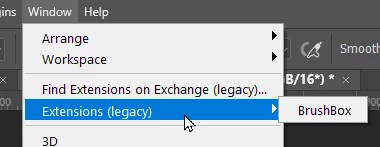
Note: Some extensions can be tricky to install, so make sure you read any instructions on how to do that.
Sign up
Already have an account? Login
To post, reply, or follow discussions, please sign in with your Adobe ID.
Sign inSign in to Adobe Community
To post, reply, or follow discussions, please sign in with your Adobe ID.
Sign inEnter your E-mail address. We'll send you an e-mail with instructions to reset your password.
 AdChoices