

Trevor.Dennis
Community Expert
Community Expert
April 21, 2023
Answered

Eye Candy 7 — Windows 11

  • April 21, 2023
  • 2 replies
  • 6383 views

Does anyone have Eye Candy 7 running on Windows 11?  My first issue is that I only have the option of Photoshop (Beta) as the host app. 
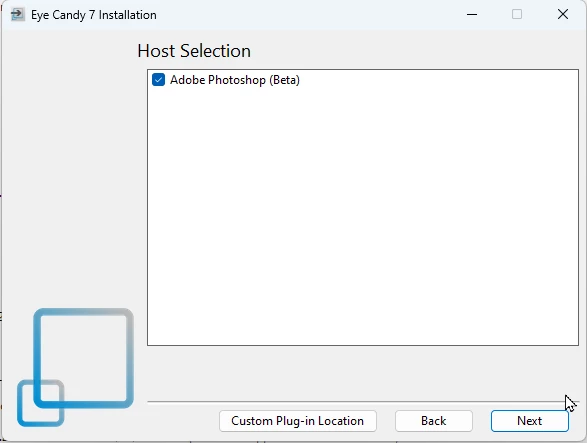


Unchecking Photoshop beta still allows the installation to complete.  I have installed the app with and without Photoshop (Beta) checked, but neither way has Eye Candy showing in Photoshop 24.3 or Photoshop beta.


The installation does appear to have worked, but there are no .8bf  files I can move.  There's nothing under appdata\Roaming.
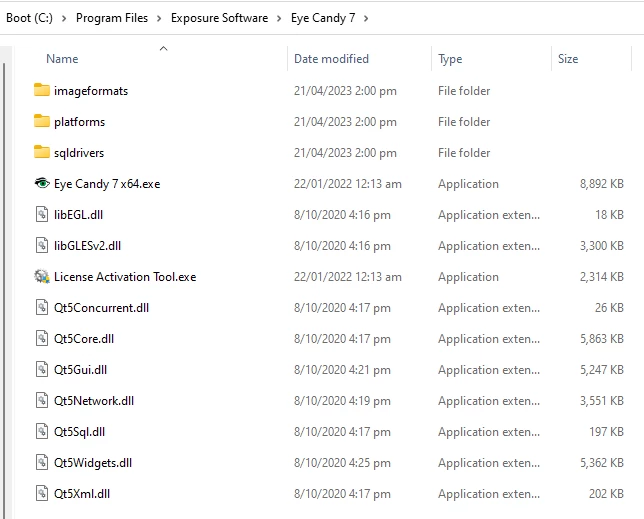


If it was a Windows 11 issue you'd think I'd have found a bunch of hits when searching with Google, but I found nothing.  I have put in a help request with Exposure Software Support (I hate the new name).  


Correct answer Ged_Traynor

Hi Trevor

When I had Windows 11 on my PC, Eye Candy 7 was working fine, I did the upgrade from Windows 10 to 11 and not a clean install, I think that was Photoshop version 24.2.1 at the time, reverted back to Windows 10 cause I don't really like Windows 11, Eye Candy 7 still works fine with Photoshop version 24.4.1 on Windows 10, so it should work on Windows 11, might be something to do with the Beta insall that you had, maybe try the Adobe cleaner tool

https://helpx.adobe.com/ie/creative-cloud/kb/cc-cleaner-tool-installation-problems.html

2 replies

Ged_Traynor
Community Expert
Ged_TraynorCommunity ExpertCorrect answer
Community Expert
April 21, 2023

Hi Trevor

When I had Windows 11 on my PC, Eye Candy 7 was working fine, I did the upgrade from Windows 10 to 11 and not a clean install, I think that was Photoshop version 24.2.1 at the time, reverted back to Windows 10 cause I don't really like Windows 11, Eye Candy 7 still works fine with Photoshop version 24.4.1 on Windows 10, so it should work on Windows 11, might be something to do with the Beta insall that you had, maybe try the Adobe cleaner tool

https://helpx.adobe.com/ie/creative-cloud/kb/cc-cleaner-tool-installation-problems.html

Trevor.Dennis
Community Expert
Community Expert
April 22, 2023

You need to reach behind you, and give yourself a pat on the back, because that worked.  Photoshop 23 showed in the Eye Candy Installation Host window after using the Cleaner Tool, and is there under Filters.  What's more, all of the already installed plugins were still there and working after reinstalling Photoshop, and I really didn't expect that.


The only downside is that I'd hoped that Filter Forge might install because it had the same issue.  The user guide shows a similar version selection window in the Installer to Eye Candy's, and like Eye Candy, the Filter Forge window was also empty when I ran its installer.  That was still the case after running the Cleaner Tool though.  I rarely use Filter Forge, but I use Eye Candy a lot, so not the end of the world.  If all else fails, I can still use Filter Forge as a stand-alone app.


Thanks again for the genius idea buddy.  I'll leave it a day to see if the thread gets any more input, and mark your post Correct.

Ged_Traynor
Community Expert
Community Expert
April 22, 2023

Glad you got it sorted Trevor 👍

Trevor.Dennis
Community Expert
Community Expert
April 21, 2023

I have now tried uninstalling Photoshop (Beta), restarting the computer, and reinstalling Eye Candy 7 but it still doesn't show.


The latest Eye Candy 7 install file is eye-candy-7-7.2.3.189.exe, but I also have and have tried eye-candy-7-7.2.3.143.exe but no change.