
Known Participant
March 22, 2020
Answered

Eye Dropper Tool Not Selecting color outside of Photoshop

  • March 22, 2020
  • 3 replies
  • 8918 views

I've recently purchased a new 2019 Macbook Pro with specs below.

macOS Catalina 10.15.3

2.4 GHz 8-Core Intel Core i9

64 GB 2667 MHz DDR4

AMD Radeon Pro 5500M 8 GB


I'm currently running Photoshop 21.1.1 and when I try to choose the eyedropper tool click and drag outside photoshop to choose a color from the web or anything else on my desktop photoshop isn't recognizing anything outside of photoshop. Anyone else having this issue? 
Correct answer Michael J. Hoffman

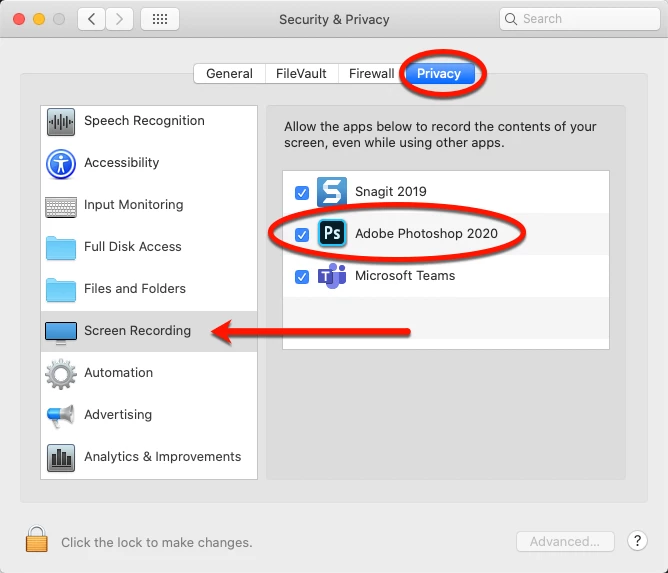
With Catalina, you'll have to give Photoshop permission to access the screen outside of the application. Go to System Settings > Security & Privacy > Privacy, and click the Screen Recording section and make sure Photoshop is enabled:


3 replies

c.pfaffenbichler
Community Expert
Community Expert
March 22, 2020

Just to make sure: The initial click is on the Photoshop Canvas? 

Participant
January 7, 2025

Yes, you need to click and hold it, then take it wherever you need to.

Michael J. Hoffman
Community Expert
Michael J. HoffmanCommunity ExpertCorrect answer
Community Expert
March 22, 2020

With Catalina, you'll have to give Photoshop permission to access the screen outside of the application. Go to System Settings > Security & Privacy > Privacy, and click the Screen Recording section and make sure Photoshop is enabled:


minglessis
Inspiring
July 17, 2022

Hi,

NVIDIA GeForce GT 755M 1

Catalina 10.15.7 


I was able to do this with PS 2022 but I had to downgrade to PS2021 because some features were not working well (I guess due to my old processor) but now I don't see the way to add PS 2021 to the Screen Recording in Security and Privacy. Any advice?

Shown in picture: I was able to use the color dropper outside PS with PS2022, but I can't add PS 2011 to give permission to the app. 


silk-m
Community Expert
Community Expert
July 17, 2022

Hi,

All versions of Photoshop are allowed by registering only one version.
However, in Illustrator, you need to register multiple versions.
If you don't need Photoshop 2022, uninstall it and Photoshop 2021 should appear in the list.

--Susumu Iwasaki
silk-m
Community Expert
Community Expert
March 22, 2020

Hi,

Register Photoshop in Security & Privacy / Screen Recording in System Preferences.
Are you also registered for Accessibility and Full Disk Access?

--Susumu Iwasaki