
Known Participant
August 8, 2018
Question

Eyedropper tool selection bug (re: clipping masks)

  • August 8, 2018
  • 4 replies
  • 2005 views

I've been struggling against this bug for about a year now, and I've finally reached the point that it has gone beyond simply a nuisance, and into production-sapping territory. Here's the gist of it:

When I try to color-pick from a layer nested in a group that has adjustment layers set to clip to that group, the color picker will select colors not from the current layer's pixels, but from those belonging to the layers below it.

Repro Steps:

1. create a layer group with multiple layers with art on each

2. create one or more adjustment layers (I don't think type matters, but for repro you might try hue/sat, or levels, as I have below), and set them to clip to the group from step 1.

3. select the topmost layer with art, and attempt to color-pick with the eyedropper tool (Sample Size: Point Sample | Sample: Current and Below) from that layer's pixels. If you are able to repro, it will not select from the current layer, but from the layers below.
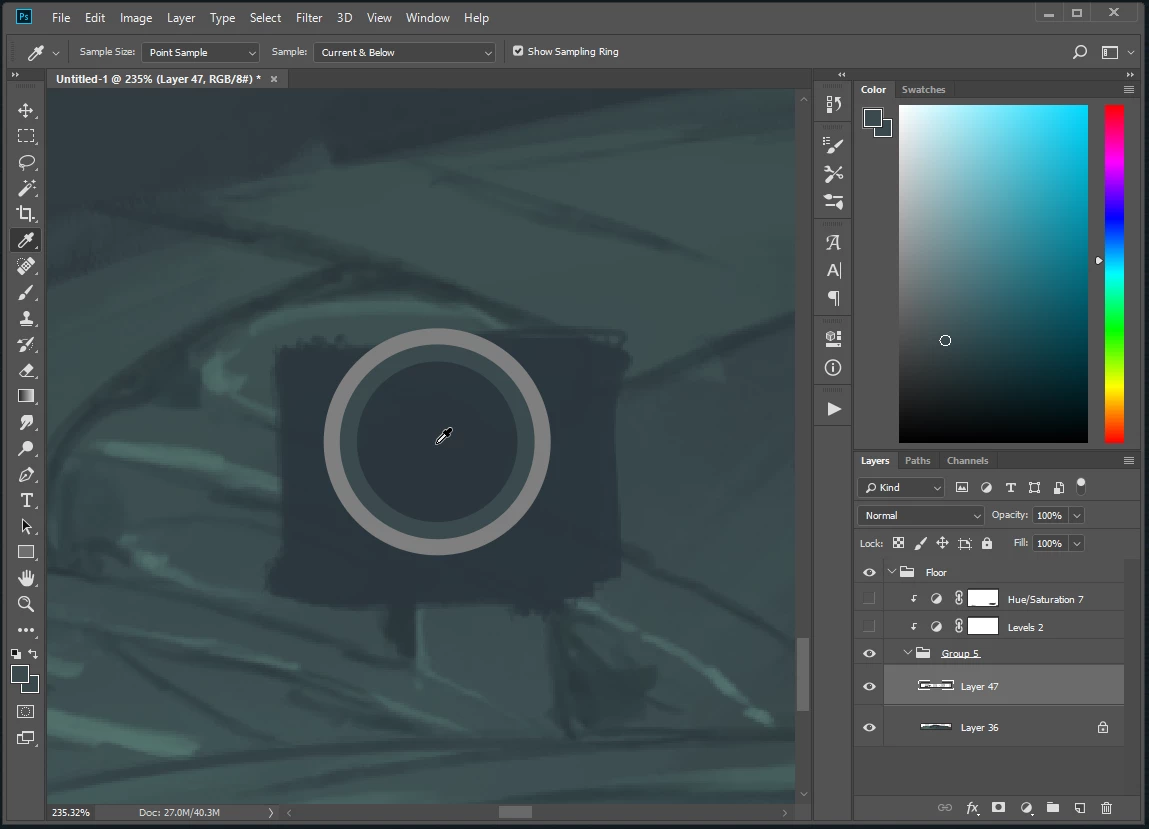
The dark green area I am selecting from is on the currently selected layer. Note the lighter-than-current-layer selection

4. Now unclip the adjustment layers, and select from the same point on the topmost layer and it will select the color correctly.
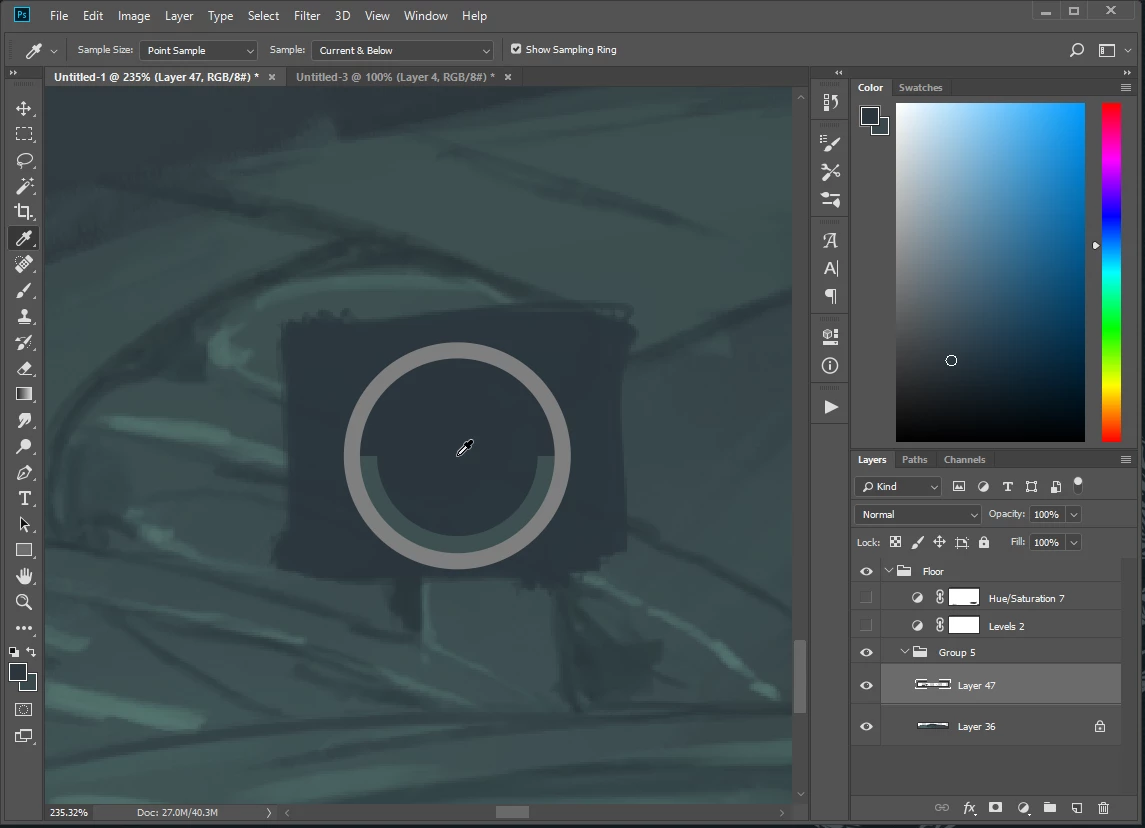
Note the correct selection.

This is behaviour unaffected by the visibility of the adjustment layers, and the bug seems to only be directly influenced by the clipping-mask state change. The bug has survived several setting resets/experiments, so unless it is local to my machine, I assume others are running into this.

Other Details:

Windows 8.1 Pro

File is 8-Bit RGB

On release CC 19.1.5

Anyone able to repro, or have any insights?

4 replies

David Mohr
Participating Frequently
August 10, 2018

Howdy Matt,

The file size was the "secret sauce" to triggering this (weird) bug.  I can now reproduce this and am logging a bug.  Good catch!  Sorry for the headache.  Hopefully, it'll get fixed soon.

Thanks,

David

p.s. -- this is what my Adjustment Layers icons look like...

Bug # is PS-19754

Known Participant
August 10, 2018

No worries, David; thanks for looking into it!

David Mohr
Participating Frequently
August 9, 2018

Hi Matt,

Okay, I'm not doing something the same as you, since I'm trying with the same release on Windows but not seeing the problem.  I'm curious, when your Eye Dropper tool is active, what's the Sample set to?  "All Layers" or "Current Layer" or ???

I'm also curious about the EXACT steps that you used to create your file.  I conferred with a colleague and she too is scratching her head.  I'm not seeing the same layer icons you are, so I'm wondering if I'm doing something differently.  Basically, I'm:

1) launch PS

2) new file

3) add a new layer group

4) add three artwork layers within that group

5) add a hue/sat and a level adjustment layer that clips the group -- my icons show the arrow but not the "yin/yang" symbol you've got

Do these steps match your own?

Thanks,

David

davescm
Community Expert
Community Expert
August 9, 2018

David
Thanks for joining in here.

I can also reproduce this bug here - with the same settings as Matt. I am happy to test anything to narrow it down.

I am on Windows 10 Pro (v1803) and using Nvidia GTX1080 driver 398.11

Dave

melissapiccone
Community Expert
Community Expert
August 8, 2018

Mine works just fine... I can't reproduce you issue, but I'm on a Mac.

Melissa Piccone | Adobe Trainer | Online Courses Author | Fine Artist
melissapiccone
Community Expert
Community Expert
August 8, 2018

First of all, you should set your eye dropper to 3x3, not the default point sample. Point sample selects the exact pixel you click on. 3 by 3 will average 9 pixels giving you a better sample. It’s also a tolerance setting for making selections.

I will see if I can reproduce your problem. Change the settings and see if it helps.

Melissa Piccone | Adobe Trainer | Online Courses Author | Fine Artist
Known Participant
August 8, 2018

It's not related to any of the user-changeable tool settings, unfortunately. Thanks for giving it a whirl on Mac, but I suspect it is a build-specific issue.

davescm
Community Expert
Community Expert
August 8, 2018

Yes - I can reproduce it here.

I suggest you raise it as a bug here, where it will be seen by developers:

Photoshop Family Customer Community

Dave