Known Participant
September 7, 2022
Question

Faking A Metallic Look

  • September 7, 2022
  • 4 replies
  • 1416 views

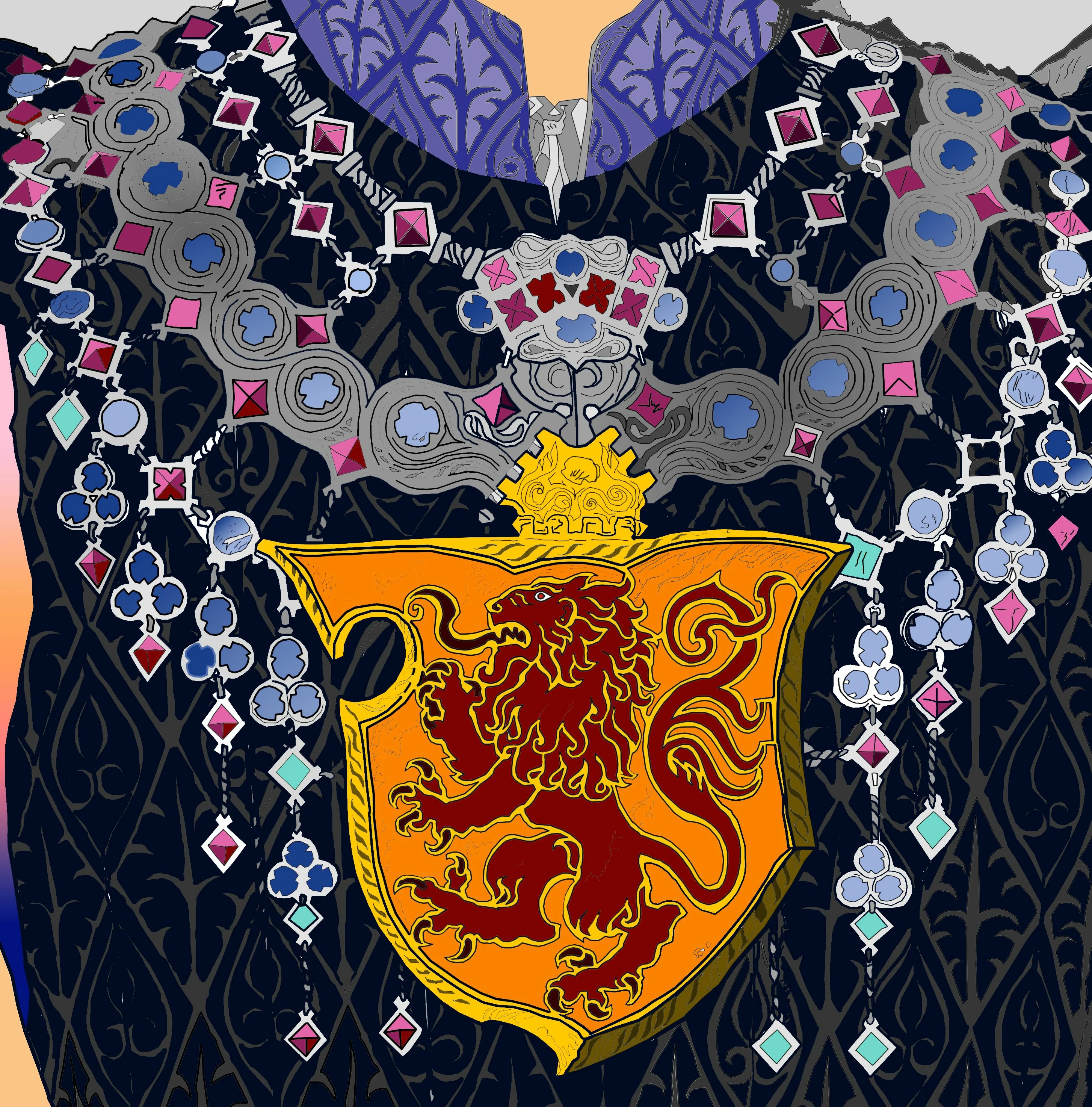
Is it possible to render the dark gray portion of the image below to imitate a metallic look in PS? I learned my chops in the 3D world and totally suck at digital painting. So, here I am, learning. Dabbling.
This topic has been closed for replies.

4 replies

davescm
Community Expert
September 8, 2022

After masking, try a combination of a chrome effect layer style (found in legacy styles)  and then adjust the result with a fairly aggresive curve set to luminosity to enhance the metallic effect

Dave

Nancy OShea
Community Expert
September 7, 2022

This graphic looks like an illustration (vector) instead of a photograph (raster). As such, Illustrator would be the better tool here. 


You can give shapes a metalic finish with strategic application of highlights, shadows, grain and gradients.  As with painting & drawing, it's critical to identify the source and angle of  light first.


Nancy O'Shea— Product User & Community Expert
RicebugAuthor
Known Participant
September 8, 2022

That's what I'm talking about, Leslie. I'll get to work on it.

The image was scanned from one of those "adult" coloring books, in this case, from Game of Thrones. I "placed" it, and then traced over it from a blank layer. Strictly a bitmap. I wanted to use Illustrator but had problems defining shapes and outlines.

@436298: I used reflection maps in 3D apps to achieve a metallic look. I didn't know if Photoshop could pull it off. But I've got enough gold from the forum help to do a better job.

New Participant
September 7, 2022

You can make a fake metalic look by finding out readymade links on royality free photos on illustration or photoshop if you have illustrator it will work well then you may move it to photoshop. I was designing body of car's wheel in illustrator and I wanted to export it in jpeg, which was not possible so I moved it to photoshop and did it and it gave amazing tire look which was totally metalic look.

Leslie Moak Murray
Community Expert
September 7, 2022

This can easily be done with layer styles. It would help if the gray area were on its own layer. Google "Photoshop Layer Styles Metal" and all kinds of free ones come up:

https://creativevore.com/freebies/free-photoshop-styles/ 

Leslie Moak Murray
Community Expert
September 7, 2022

Here, I isolated the gray part with the magic wand tool and added a metal layer style to it, then merged them:

-EDIT:

-Select gray area with the Magic Wand Tool

-Layer>New Layer

-Edit>Fill>Foreground Color (after you've made gray your Foreground Color)

-Apply Style to the New Layer.