
December 28, 2019
Question

Fehlermeldung Unbekannter Betriebssystemfehler

  • December 28, 2019
  • 3 replies
  • 645 views

Hello everybody,


I hope you can help me. I use Photoshop CC (21.0.2) and always get the error message when exporting for web:

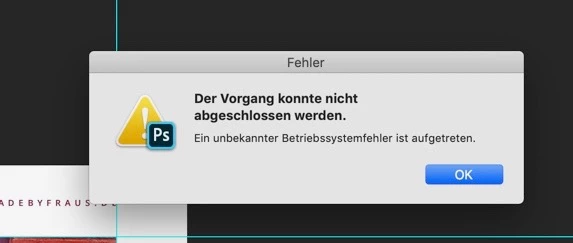
The operation could not be completed.

An unknown operating system error has occurred.


The error only occurs in the 21.x version. I have now installed version 20.0.8 and the error does not appear here.

A new installation, such as the production of the hard disk rights, was unsuccessful. I also tried to delete the save for Web.prefs. Unfortunately, here too, no success. Can you maybe help someone here and tell me what to do best?


I am grateful for every tip.


[Moving from generic Start/Help forum to the specific Program forum... Mod]
[To find a forum for your program please start at https://community.adobe.com/]

This topic has been closed for replies.

3 replies

oceay1311
Participant
July 7, 2020

Here the same problem. Not everytime, but very often. 

Participant
June 6, 2020

Same issue on my Macbook Pro 15, 2017, since months... Even with latest update Photoshop 21.1.3.

Catalina 10.15.5

16 GB Ram

2,9 Quadcore

Radeon Pro 560 4GB

Akash Sharma
Legend
December 29, 2019

Hi there,


We are sorry about the issue you are facing with Photoshop 2020 and getting an error message "

An unknown operating system error has occurred". Let us help make this right.


Would you mind going to the System Preferences for Mac then navigate to Security and Privacy > select the Privacy Tab > Select Accessibility from the list on the left and add Photoshop to the list. Also, grant Photoshop permissions to the Files and Folders then restart the computer to check if that helps.


You can also try to reset the preferences of Photoshop to check if that helps. You can check the steps in the link mentioned below.

https://helpx.adobe.com/in/photoshop/using/preferences.html


Note: Please take a backup of your Actions, Presets, Plug-ins, etc. before resetting the Preferences.


Regards,

Akash

Participant
January 24, 2020

Same error here.


Preferences reseted: doesn't work

Updating to 21.0.3. -> Doesnt work


Operating system: MacOS Catalina

Participant
February 24, 2020

Same here, same System, same Version of Photoshop.

I tried all, till 20.0.8, still the same problem. .