Participant
April 11, 2021
Question

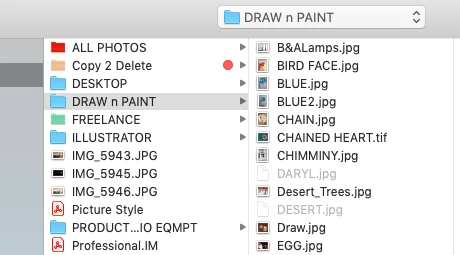
File>Open> Greyed out for JPEG files in Photoshop

  • April 11, 2021
  • 1 reply
  • 846 views

When I go to file, open there are some files that are greyed out.

Only some but not all.


What is up with those files?

This topic has been closed for replies.

1 reply

Akash Sharma
Legend
April 12, 2021

Hi there,


Sorry that some of the JPEG files in the File> Open menu in Photoshop are grayed out. 


Please share the version of Photoshop along with macOS version. 


It seems that the Jpeg files are corrupt. Are you able to drag and drop images from that folder in Finder to Photoshop?


Thanks,

Akash

Participant
April 12, 2021
Hello.
Thank you for replying.

The files CAN be opened in Photoshop.
I Can click on them, then right click and click on Open with photoshop.

Yes I CAN drag and drop the files into photoshop and they open.

I have Adobe Photoshop 2021
OS is Mojave
Akash Sharma
Legend
April 15, 2021

Would you mind restoring the preferences for Photoshop & see if it helps? See this article for reference: https://t.co/ulJI7cGn1G You may want to backup your settings beforehand: https://t.co/4dX7gkr36D


Thanks,

Akash