
robertpatrick88
Participating Frequently
November 6, 2019
Question

File New Dialog in Photoshop 2020 Brings up Flashing Window

  • November 6, 2019
  • 1 reply
  • 9760 views

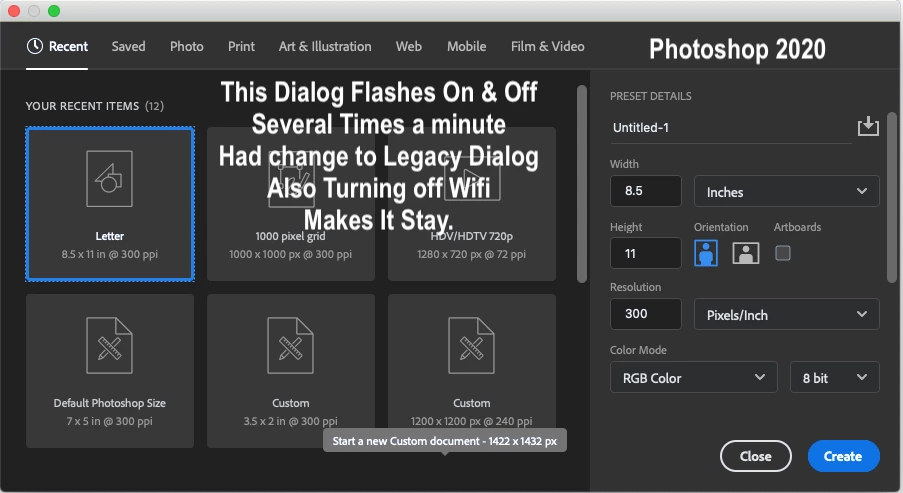
Selecting FILE NEW Dialog in Photoshop 2020 Brings up a “Flashing” Page Window with the Square Previews of Documents Types & Sizes. So I Had to Change to "Use Legacy New Document Interface" Setting in General Preferences Pane.

(Strange... Turning off WiFi Stops this from Happening) but Legacy setting is fine for now anyways. ~ RpH


{Thread renamed by modeator}

This topic has been closed for replies.

1 reply

Sahil.Chawla
Adobe Employee
Adobe Employee
November 6, 2019

Hi Robert,

Sorry to hear that the New Document Dialog flashes in Photoshop, could you please try deselecting "Use Graphics Processor" located in Photoshop's Preferences > Performance, then relaunch Photoshop and let us know if it helps?


Regards,
Sahil

robertpatrick88
Participating Frequently
November 6, 2019

I Unchecked “Use Graphics Processor” and Unchecked "Use Legacy New Document Interface." Still Flashing at New Doument Window. That was a Very Good idea to try that though. It does Stop Flashing when I Turn Wifi Off Temporarily. Thank you for the idea!.. I'll use the "Legacy" work-around for now. I Actually Like The Legacy Setting Better than hunting through all those Boxes with the Tiny Type for the right New document. It's quicker and easier to see.

~Robert


Participant
January 8, 2020

THank Robert :)))