Participant
February 18, 2023
Answered

File not opening

  • February 18, 2023
  • 1 reply
  • 798 views

I became an Adobe subscriber for the first time and a file I saved as pdf 'desktop > right click > open with > photoshop' gives an error as in the image below. I can't enter programs from the 'open with' command. Also, PSD-AI files thrown by others do not open this way either.

What should I do? 

This topic has been closed for replies.
Correct answer J E L

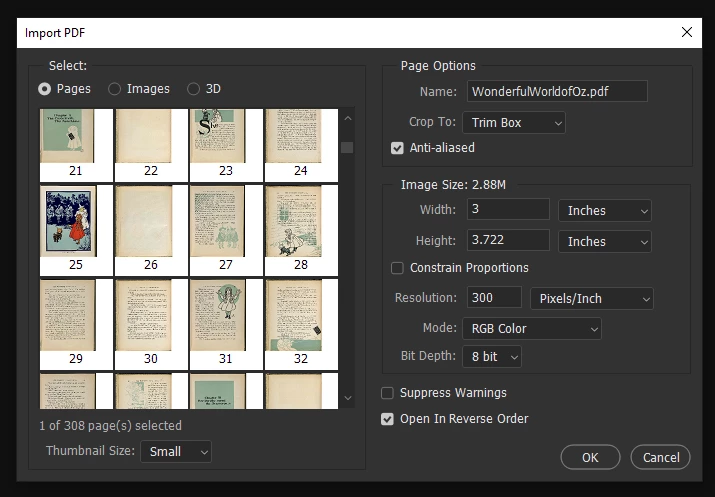
Hi @Esma Sude284751890prl, if I understand correctly, you are trying to open a PDF file with Photoshop from a file on your desktop. Instead, open Photoshop first, then go to “File > Open” from the top menu and navigate to your desktop to open the PDF. That will open an “Import PDF” screen, and you can open the page or image you want from there.


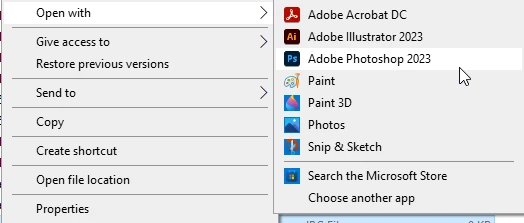
Also, from your desktop, you can right-click on any image file and choose “Open with” from the menu. If you don't see Photoshop or Adobe Illustrator on the menu, then select “Choose another app” and navigate to those apps. You can also check a box to always open that type of file with a particular app. You may want to go to Windows settings under Apps & features > Default apps and assign apps by file type. Let us know if this helps or if you are having some other issues.
 

1 reply

J E L
Community Expert
J E LCommunity ExpertCorrect answer
Community Expert
February 20, 2023

Hi @Esma Sude284751890prl, if I understand correctly, you are trying to open a PDF file with Photoshop from a file on your desktop. Instead, open Photoshop first, then go to “File > Open” from the top menu and navigate to your desktop to open the PDF. That will open an “Import PDF” screen, and you can open the page or image you want from there.


Also, from your desktop, you can right-click on any image file and choose “Open with” from the menu. If you don't see Photoshop or Adobe Illustrator on the menu, then select “Choose another app” and navigate to those apps. You can also check a box to always open that type of file with a particular app. You may want to go to Windows settings under Apps & features > Default apps and assign apps by file type. Let us know if this helps or if you are having some other issues.


Participant
February 21, 2023

very thank you..
