
Known Participant
November 13, 2019
Answered

File Save As has new dialogue box - how do I remove it? [2019]

  • November 13, 2019
  • 1 reply
  • 3273 views

The latest version has introduced a new dialogue box that opens when using File Save As. It gives the option of saving to the cloud or saving to your computer. This is annoying, as it opens for every photo.


When I click an option it immediately goes to the dialogue box we are used to, so I am loathe to tick the option to not show this again, in case it defaults to saving to the cloud.There is a comment that this choice can be changed later, but I can't see where.


2 questions:

How do I set it up to not show this dialogue again? Is it to tick the Don't show again option, then tick the option to save to computer?

If I change my mind, where do I do that?


Thanks.
Correct answer JJMack

Yes


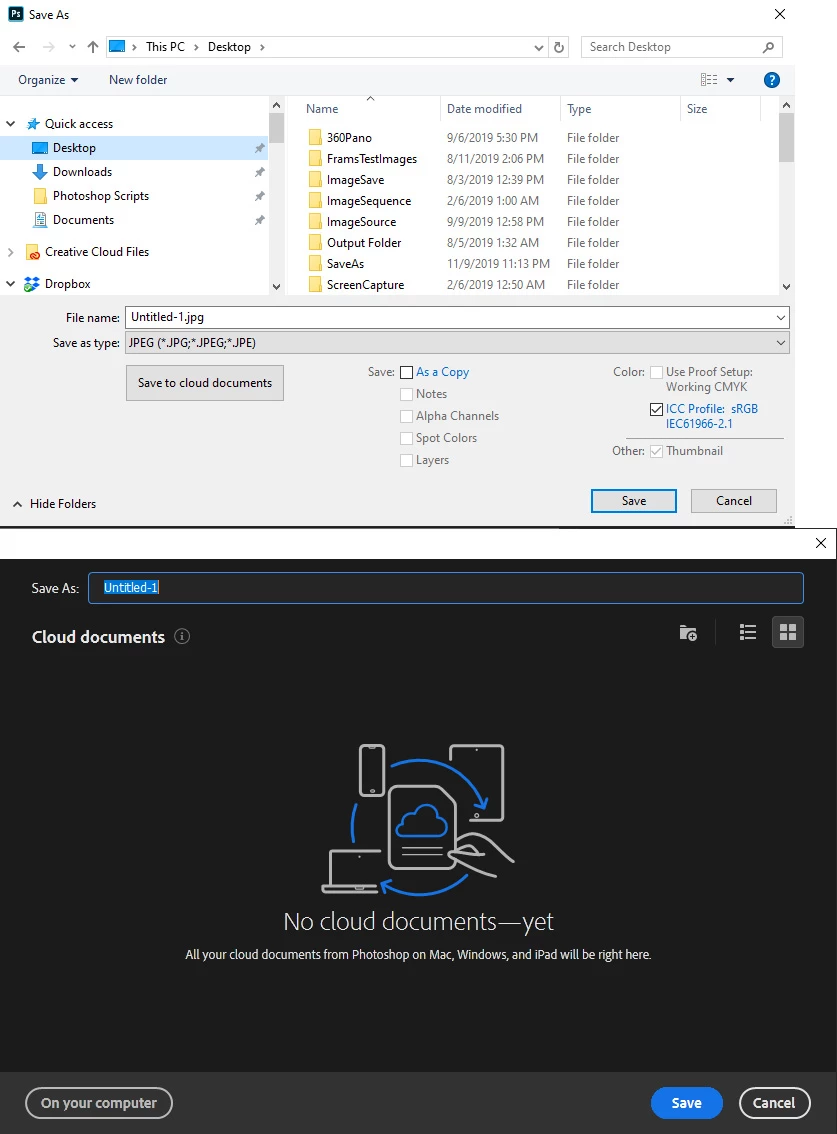
The first time I used Save As in Photoshop 2020 I got a very large dialog that allowed me to save to the cloud or to my local disk. There was also a check box for don't show again.   I do not use Adobe Cloud Space so I checked that box  don't show again and chose on my computer.  The file was saved to my computer.  Now when I use Save as I get the normal windows save as dialog.  However, it does have an additional button ( save to cloud documents). If I accidentally click on that  button I get an Adobe dialog showing I have nothing in the cloud yet and I can click on  (on your computer) or (Camcel) toe keep my files out of Adobe's cloud.


1 reply

JJMack
Community Expert
JJMackCommunity ExpertCorrect answer
Community Expert
November 13, 2019

Yes


The first time I used Save As in Photoshop 2020 I got a very large dialog that allowed me to save to the cloud or to my local disk. There was also a check box for don't show again.   I do not use Adobe Cloud Space so I checked that box  don't show again and chose on my computer.  The file was saved to my computer.  Now when I use Save as I get the normal windows save as dialog.  However, it does have an additional button ( save to cloud documents). If I accidentally click on that  button I get an Adobe dialog showing I have nothing in the cloud yet and I can click on  (on your computer) or (Camcel) toe keep my files out of Adobe's cloud.


JJMack
FlybridgeAuthor
Known Participant
November 14, 2019

Thanks for the replies.