
Participant
March 23, 2023
Answered

Files won't open in new Version, flickering images, then black, HELP!

  • March 23, 2023
  • 6 replies
  • 2338 views

With the recent update 24.3.0, I can't open any files in Photoshop anymore. When trying to open a file, the image window opens, flickers extremely fast from black to white and then stays black. No image to be seen. I can't work anymore, help!


Windows 10 Home

Intel(R) Core(TM) i7-4790K CPU @ 4.00GHz 4.00 GHz

64-Bit-Betriebssystem, x64-basierter Prozessor

NVIDIA GeForce GTX 750 Ti
This topic has been closed for replies.
Correct answer Ged_Traynor

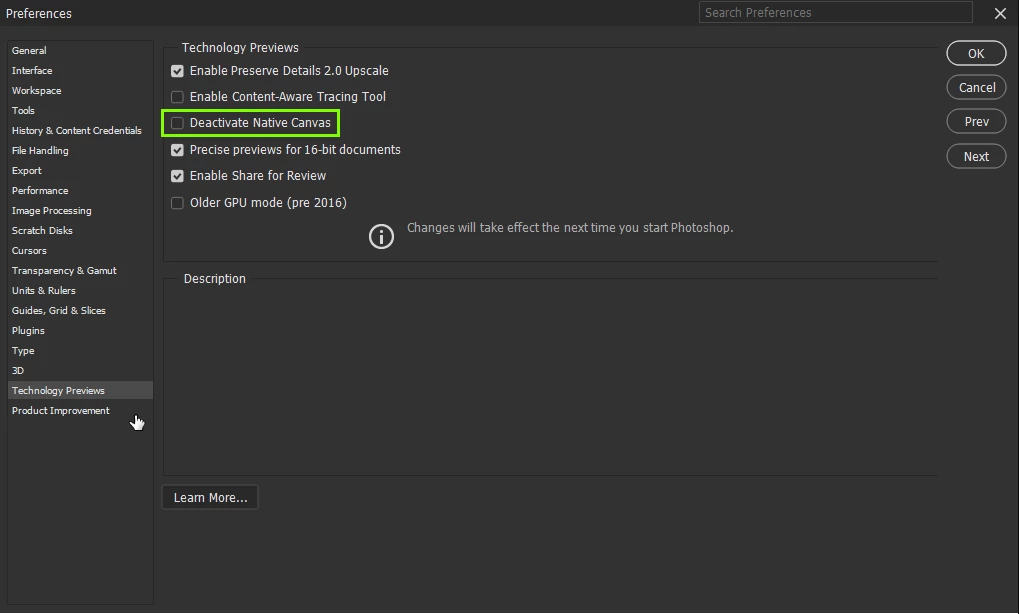
@RoarkyGer enable this option in preferences and restart Photoshop

6 replies

Participant
April 18, 2023

Thanks, this fixed this problem, but I think it is something that has to be addressed with an upgrade since not all users are going to find this solution - and should not have to. This is a first time that a file won't open in PS in over 20 years that I have had this nice program. Hopefully this will not repeat itself. 

Nancy OShea
Community Expert
Community Expert
April 18, 2023

@Svanur Sigurbjornsson,

Upgrades are always a mixed bag of tricks.  It comes under the heading of unknown surprises. Everyone's system is different.  Adobe can't predict what will & won't work for everyone. 😉


There's no hard & fast rule that says you must update every time a new version's released.  If you're receiving automatic updates, you can turn that off from Preferences in Creative Cloud Desktop App. 


Nancy O'Shea— Product User & Community Expert
Participating Frequently
May 1, 2023

So glad I saw this thread. Thanks for solving that. I was beginning to panic.....

Debra Lloyd
Participant
April 13, 2023

Thanks for the fix; it worked!

Work environment:

Windows 11

PS 2023

JPG image file flashing would not open.

Participant
March 23, 2023

Same here Fix worked

youthful_Dazzle0D45
Inspiring
March 23, 2023

Had the same issue, this fix worked.  Thanks.

RoarkyGerAuthor
Participant
March 23, 2023

Thanx, that did it. Made my day!

Ged_Traynor
Community Expert
Ged_TraynorCommunity ExpertCorrect answer
Community Expert
March 23, 2023

@RoarkyGer enable this option in preferences and restart Photoshop

Participant
March 24, 2023

Awesome. Fix worked. 

At first I thought I was having a seizure.