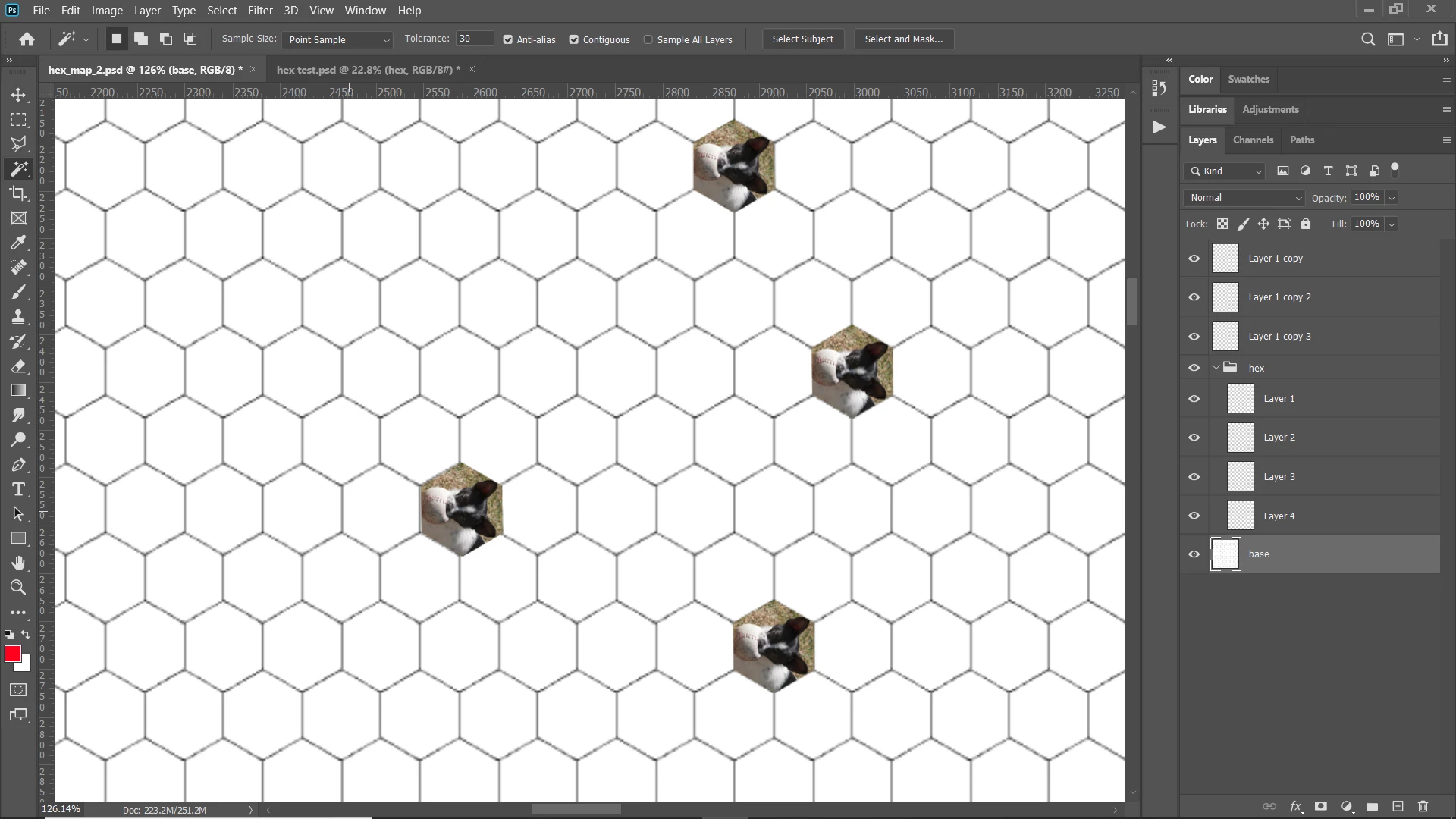
You can try this script. You need to name your layer in a certain way. the layer with your hexes on it needs to be named "base." You need a layerset named "hex.' Inside the layerset you put your patterns. They need to be sized to the size of your hexes. the script will only select the first layer in that layerset, but you can move them as you do different patterns. Assign the script to an action with a hotkey so that it's quicker to use. Select the base layer and with the magic wand tool, select a hexagon. Then run the script. Here's an example:
#target Photoshop
var layerUse = 0//change to hex pattern you want to use 0 is the top layer of the group.
var dLayer
var doc = activeDocument
var base = doc.layers.getByName ('base')
var gp = doc.layers.getByName('hex');
var x1 = (doc.selection.bounds[0] + doc.selection.bounds[2])/2
var y1 = (doc.selection.bounds[1] + doc.selection.bounds[3])/2
doc.selection.deselect();
doc.activeLayer = gp.layers[layerUse];
dupLayer ();
var x2 = (gp.layers[layerUse].bounds[0] + gp.layers[layerUse].bounds[2])/2
var y2 = (gp.layers[layerUse].bounds[1] + gp.layers[layerUse].bounds[3])/2
dLayer.translate(x1-x2,y1-y2)
dLayer.move(gp,ElementPlacement.PLACEBEFORE)
doc.activeLayer = base;
function dupLayer(){
//.activeLayer = doc.layers.getByName(nam)
var layName = doc.activeLayer.name
doc.activeLayer.duplicate()
layerUp ();
dLayer = doc.activeLayer
};//end function dupLayer
function layerUp(){
var idslct = charIDToTypeID( "slct" );
var desc2 = new ActionDescriptor();
var idnull = charIDToTypeID( "null" );
var ref1 = new ActionReference();
var idLyr = charIDToTypeID( "Lyr " );
var idOrdn = charIDToTypeID( "Ordn" );
var idFrwr = charIDToTypeID( "Frwr" );
ref1.putEnumerated( idLyr, idOrdn, idFrwr );
desc2.putReference( idnull, ref1 );
var idMkVs = charIDToTypeID( "MkVs" );
desc2.putBoolean( idMkVs, false );
var idLyrI = charIDToTypeID( "LyrI" );
var list1 = new ActionList();
list1.putInteger( 14 );
desc2.putList( idLyrI, list1 );
executeAction( idslct, desc2, DialogModes.NO );
}


 AdChoices