
Participant
February 27, 2018
Answered

Filter gallery previews not showing

  • February 27, 2018
  • 3 replies
  • 10804 views

Hello,

I am working in Photoshop CC and I have a picture open and the layer is selected (it is the only layer). I open the filter gallery and the image opens in the gallery just fine. But as I click on different filters, nothing happens to the image in the preview. It stays the same, even when I close the filter gallery, there are no changes to the image on the layer. It is as if the filters are not working.

I have heard of people having issues with filter previews being white or blank or the filter gallery not being available, but that is not my problem. Everything works, except once you click a filter style, nothing changes. Does anyone know what the problem might be?

I am working out of windows 8.1

Please help,

Thank you,

Nikoya Moses
This topic has been closed for replies.
Correct answer Jeff Arola

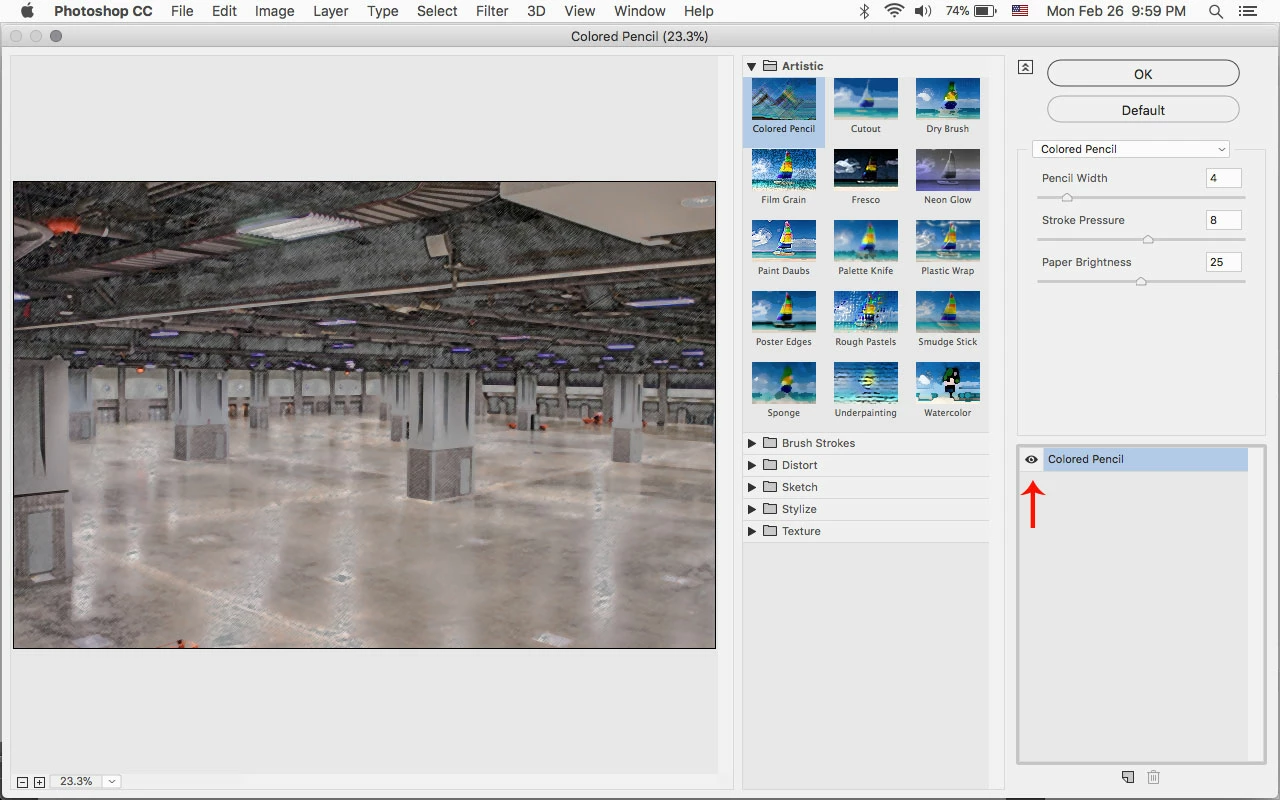
Make sure the eye is on next to the list of applied filters.

3 replies

antinet_smo
Participating Frequently
April 10, 2018

Not working still for me.....eyeball on or not....not happening. In fact, I don't think it's even engaging when I hit OK. Something extra to install, perhaps? I';ve really enjoyed the decades with zero free updates in the filter gallery while the free competition is buried in filters.

Jeff Arola
Community Expert
Community Expert
April 10, 2018

What's not happening?

What version of photoshop and operating system are you using?

Please share a screenshot.

scoovas2115177
Participant
October 15, 2018

I've been adjusting the distortion, smoothness, and scaling sliders but the effect doesn't show even after I click "OK."

I think it's an issue with my selection but I'm not sure what the issue is exactly.  Any help would be greatly appreciated.  Thanks

mglush
Community Expert
Community Expert
February 27, 2018

If turning on the eye doesn't fix the issue, can you post a picture of your image, layers panel and the open Filter Gallery window so we can get a better picture of what is going on?

Thanks!

Participant
September 16, 2022

I do not have an eye to select with Win 10 


Jeff Arola
Community Expert
Community Expert
September 16, 2022

kdm4662,


Can you post a screenshot of what your seeing?

Jeff Arola
Community Expert
Jeff ArolaCommunity ExpertCorrect answer
Community Expert
February 27, 2018

Make sure the eye is on next to the list of applied filters.

koyagirlAuthor
Participant
February 28, 2018

Thank you so much Jeff! That fixed it!