RajivC60
Participating Frequently
November 11, 2024
Answered

Filters Disappeared!

  • November 11, 2024
  • 1 reply
  • 277 views

My filters have suddenly stopped working in the latest version of Photoshop. 


I have attached screenshots. Does anyone know why this is happening?


I have a Mac 15.0.1 Sequoia with an M1 Chip, and I use Photoshop 26.0.0

This topic has been closed for replies.
Correct answer Jeff Arola

Yes it looks like your document is 32 Bits/Channel.


Go to Image >Mode and change to 16 Bits/Channel and see if the filters work.
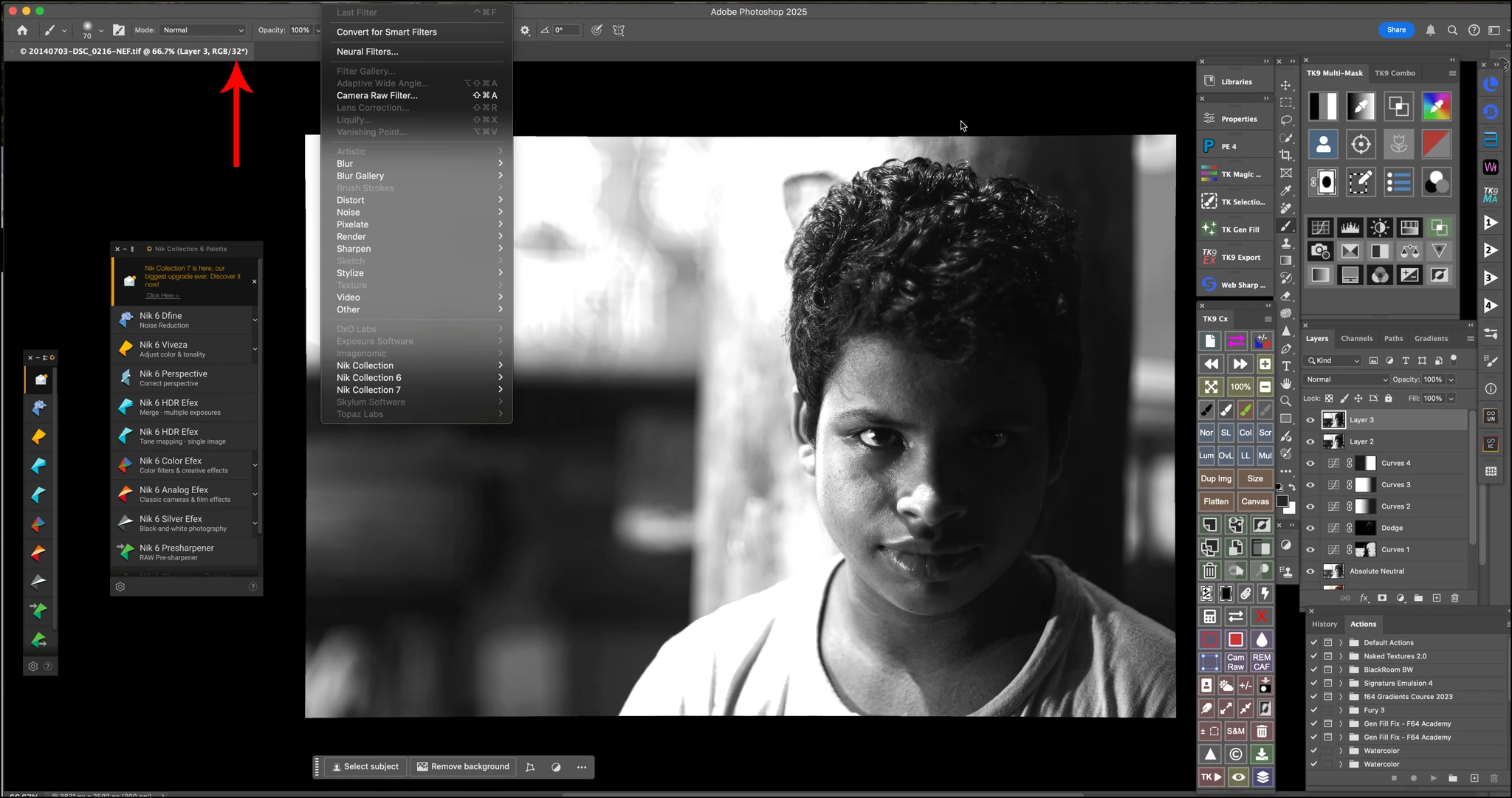


If you need any of the Filter Gallery filters then you'll have to go to Image>Mode>8 Bits/Channel.

1 reply

Jeff Arola
Community Expert
Jeff ArolaCommunity ExpertCorrect answer
Community Expert
November 11, 2024

Yes it looks like your document is 32 Bits/Channel.


Go to Image >Mode and change to 16 Bits/Channel and see if the filters work.


If you need any of the Filter Gallery filters then you'll have to go to Image>Mode>8 Bits/Channel.
