
Known Participant
July 30, 2019
Answered

Find a brush used previously from history in Photoshop

  • July 30, 2019
  • 3 replies
  • 28822 views

I'm really frustrated atm because in the process of trying to figure this out I accidentally deleted what I was working on.

So I was using a brush to paint some moss, then I moved on to other parts of my painting. later I decided I wanted some more moss, but for the life of me I cannot remember what brush I used. Recent brushes doesn't go far back enough, is there any way to get this out of the history tab??? when I clicked on the state I was using that brush in it wouldn't switch the brush tool to that brush. I'd really like to avoid this in the future because this has happened to me countless times, if anyone could help me that would be great.

Message was edited by: Sahil Chawla
This topic has been closed for replies.
Correct answer gener7

Try Preferences > History Log and check it on. Choose "Detailed" and select "Metadata", "Text file" or Both.

In this file I tried a few brushes, but the size was not recorded, but it did keep a record of what I used:

    Brush Tool

    Brush Tool

        Select brush “Kyle's Ultimate Pastel Palooza”

    Brush Tool

        Select brush “Pencil-Chisel Tip Hard Opaque”

    Mixer Brush

2019-07-30 19:09:37    File Untitled-1.jpg saved

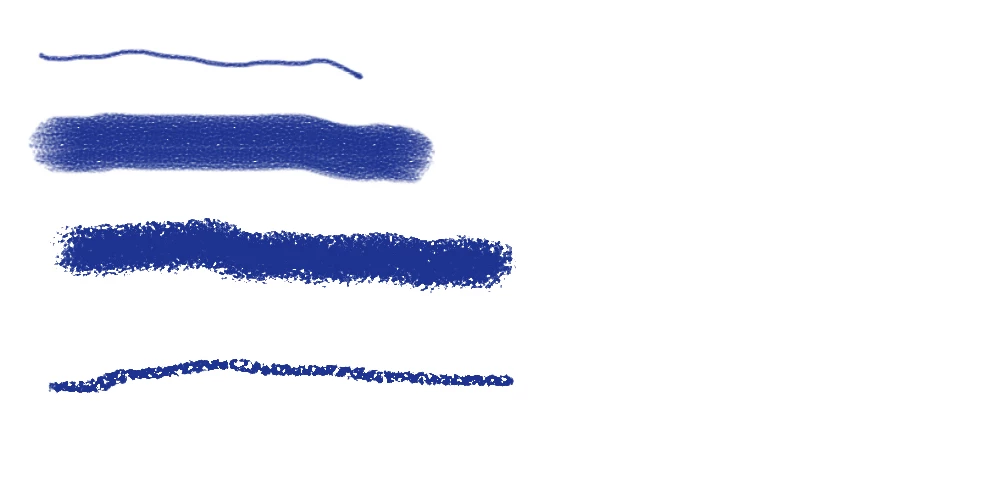
And included is the sample:

3 replies

Participant
April 7, 2020

I'm also really struggling. I've made a separate layer for the brush but I naively thought if I click back on that layer, the brush would automatically reassign itself. It didn't. So now I'm really disappointed. It can only be one of the "Kyle" brushes, but no idea which one. I've gone back through them but none of them are what I was using. So confused. Is there a possibility of drawing out the brush from the layer at all?

Participant
April 7, 2020

This is the brush. Anybody any ideas how I can get it back? 

Trevor.Dennis
Community Expert
Community Expert
July 31, 2019

Hi Alyssarose  It's always nice to find people who use Photoshop for more than cleaning up their photographs.  I love the Aaron Blaise brushes. I have six of his packs, and think them the very best of their kind bar none.  It's useful that he has videos that describe how he uses them.

OK, so we can't look back beyond the half dozen recent brushes, which is indeed a pity.  I like the CC2017 update to brush management, but it is surely a work in progress, as it needs a lot more work.  So all I can suggest in your situation is to make Project Folders, and drag presets to that folder as you use them.

That approach will lose the preset from its original folder, but reloading the original folder will bring moved presets back.

Another approach would be to select the preset, use it, and then click on the new preset icon.  This is slightly clunky in that you can't select and immediately save it, as Photoshop does not consider the preset selected, until you close the right click menu. But if you double click and close, then right click again, it only takes a moment.

I don't use these ideas myself, but now you have highlighted the problem, I think I am going to in future.  However I do make favourites brush groups with presets from different sources, plus my own related presets.   I said how much I like the Aaron brushes, but before I discovered them, I used the Castrochew hair and skin presets.

BTW  I like to rename my .abr files to make them appear in more meaningful alphabetical order.  That's why my Aaron Blaise groups have names starting with 'AB'.  It speeds up your workflow just a tiny bit when you have a lot of brushes.

https://creatureartteacher.com/product-category/tutorials-lessons/brush-texture-sets/

An example video

joanH
Inspiring
July 31, 2019

Trevor, this reply is a kindness not often seen in help threads. You go beyond the norm to

give the extra that is like gold. Thank you for all of your great input in every day of the forums.

I am pleased to be associated with you. Just a pat on the back. But sincere. JH

Sahil.Chawla
Adobe Employee
Adobe Employee
July 30, 2019

Hi Alyssa,

As you're not able to find the previously used brush in Photoshop, could you please provide some more detail about how the brush looked?

Also, if you a have a screenshot of the brush, it would really help us identify it.

Regards,
Sahil

Known Participant
July 30, 2019

I have a lot of brushes I downloaded from other websites like Aaron Blaise's website, It just got lost in the huge amount of brushes I have in Photoshop. I don't think there's any way to find it other than me going through each brush individually until I can identify it.

I was only wondering if there is some way to save your brush history or if you could make the brush tool switch to a brush if you go back to the history state you used it in. Having the brush tab display "Recent Brushes" is sometimes helpful, but updates even if you just change the size of the brush. Coupled with the fact that it only saves 8 most recent brushes, it's practically useless. If there was some way to extend how many "recent brushes" that tab saves. Something that would allow me to more easily find a brush I had previously used.

Known Participant
July 31, 2019

Try Preferences > History Log and check it on. Choose "Detailed" and select "Metadata", "Text file" or Both.

In this file I tried a few brushes, but the size was not recorded, but it did keep a record of what I used:

    Brush Tool

    Brush Tool

        Select brush “Kyle's Ultimate Pastel Palooza”

    Brush Tool

        Select brush “Pencil-Chisel Tip Hard Opaque”

    Mixer Brush

2019-07-30 19:09:37    File Untitled-1.jpg saved

And included is the sample:


This is super helpful, thank you!!! I'd really love to use this to keep track of what I'm doing but for some reason I cannot scroll down to see all of it (and it seems I'm not the only one with this issue: Cannot scroll metadata history / Photoshop - cannot scroll through history ) I'll try contacting support and see if they can do anything about this.