Participating Frequently
February 14, 2019
解決済み

Find extrema of an irregular shape to place guides

  • February 14, 2019
  • 返信数 1.
  • 609 ビュー

Hi,

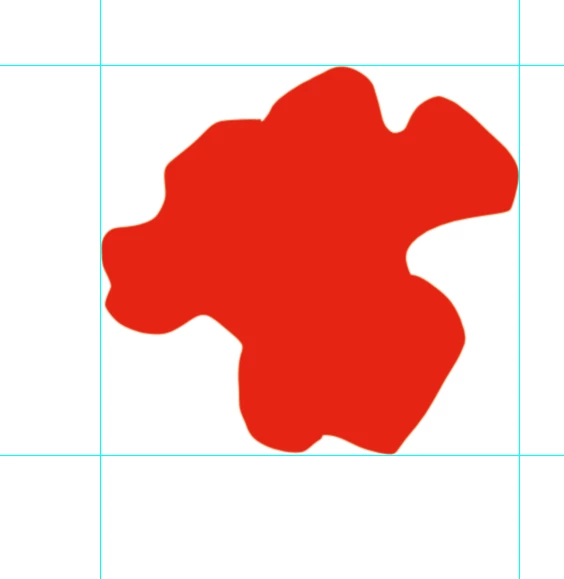
I want to use a script to find the extrema (x,y) of irregular shapes (on a white background) to place four guides automatically (inscribing the shape in a rectangle).

My idea is to scan the RGB values line per line horizontally and vertically - the position of the top horizontal guide therefore

should be the one, where the values are continously 255, 255, 255 through the entire width of the image for the last time (from the top) and so forth.

This is how it should look finally:

What would the code for such a task look like?

Thanks.

このトピックへの返信は締め切られました。
解決に役立った回答 r-bin

Direct function for scanning pixels is not in Photoshop.

But you can do something like this.

// click magicwand at point [0,0] px

var d = new ActionDescriptor();

var r = new ActionReference();

r.putProperty(stringIDToTypeID("channel"), stringIDToTypeID("selection"));

d.putReference(stringIDToTypeID("null"), r);

var d1 = new ActionDescriptor();

d1.putUnitDouble(stringIDToTypeID("horizontal"), stringIDToTypeID("pixelsUnit"), 0);

d1.putUnitDouble(stringIDToTypeID("vertical"),   stringIDToTypeID("pixelsUnit"), 0);

d.putObject(stringIDToTypeID("to"), stringIDToTypeID("point"), d1);

d.putInteger(stringIDToTypeID("tolerance"), 0);

d.putBoolean(stringIDToTypeID("antiAlias"), false);

d.putBoolean(stringIDToTypeID("merged"), true);

executeAction(stringIDToTypeID("set"), d, DialogModes.NO);

// invert selection

activeDocument.selection.invert();

// create guides

if (preferences.rulerUnits == Units.PERCENT) preferences.rulerUnits = Units.CM;

activeDocument.guides.add(Direction.HORIZONTAL, activeDocument.selection.bounds[1]);

activeDocument.guides.add(Direction.VERTICAL,   activeDocument.selection.bounds[0]);

activeDocument.guides.add(Direction.HORIZONTAL, activeDocument.selection.bounds[3]);

activeDocument.guides.add(Direction.VERTICAL,   activeDocument.selection.bounds[2]);

// deselect selection

activeDocument.selection.deselect();

返信数 1

r-bin解決!
Legend
February 14, 2019

Direct function for scanning pixels is not in Photoshop.

But you can do something like this.

// click magicwand at point [0,0] px

var d = new ActionDescriptor();

var r = new ActionReference();

r.putProperty(stringIDToTypeID("channel"), stringIDToTypeID("selection"));

d.putReference(stringIDToTypeID("null"), r);

var d1 = new ActionDescriptor();

d1.putUnitDouble(stringIDToTypeID("horizontal"), stringIDToTypeID("pixelsUnit"), 0);

d1.putUnitDouble(stringIDToTypeID("vertical"),   stringIDToTypeID("pixelsUnit"), 0);

d.putObject(stringIDToTypeID("to"), stringIDToTypeID("point"), d1);

d.putInteger(stringIDToTypeID("tolerance"), 0);

d.putBoolean(stringIDToTypeID("antiAlias"), false);

d.putBoolean(stringIDToTypeID("merged"), true);

executeAction(stringIDToTypeID("set"), d, DialogModes.NO);

// invert selection

activeDocument.selection.invert();

// create guides

if (preferences.rulerUnits == Units.PERCENT) preferences.rulerUnits = Units.CM;

activeDocument.guides.add(Direction.HORIZONTAL, activeDocument.selection.bounds[1]);

activeDocument.guides.add(Direction.VERTICAL,   activeDocument.selection.bounds[0]);

activeDocument.guides.add(Direction.HORIZONTAL, activeDocument.selection.bounds[3]);

activeDocument.guides.add(Direction.VERTICAL,   activeDocument.selection.bounds[2]);

// deselect selection

activeDocument.selection.deselect();
black_square作成者
Participating Frequently
February 14, 2019

Kudos, that does exactly what I want. Thank you.

One more question:

If I selected the rectangular formed by the guides automatically,

how would it be done?

Legend
February 14, 2019

Instead of

activeDocument.selection.deselect(); 

use

preferences.rulerUnits = Units.PIXELS; 

var x0 = activeDocument.selection.bounds[0];

var y0 = activeDocument.selection.bounds[1];

var x1 = activeDocument.selection.bounds[2];

var y1 = activeDocument.selection.bounds[3];

activeDocument.selection.select([[x0,y0], [x1,y0], [x1,y1], [x0,y1]]);