Participant
March 17, 2017
Answered

Finding the actual colour of a pantone code in Photoshop

  • March 17, 2017
  • 2 replies
  • 1707 views

Hi guys,

Should hopefully be an easy one, I seem to be struggling to find the answer to it though unfortunately.

I've been given a few pantone colour codes (286C, 137C, 2905C, etc.), just wondering whether there is a way in Photoshop to insert these codes in order to find the actual colours?

Thanks,

Chris

This topic has been closed for replies.
Correct answer davescm

Hi

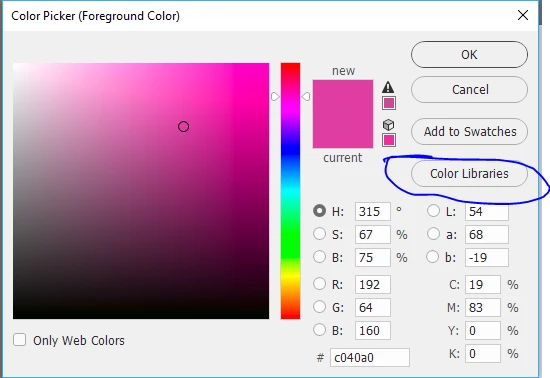
Click on the Foreground/Background squares to open the color picker

Choose Color Libraries

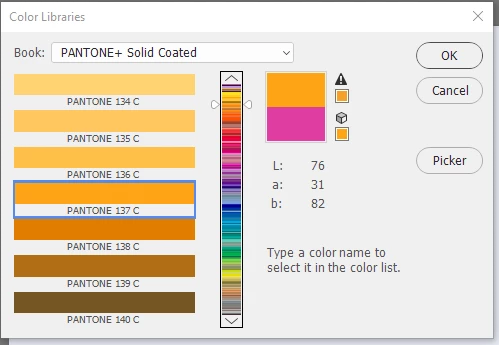
Choose a book (for your examples PANTONE+Solid Coated)

Click on one of the rectangles and type the number e.g. 137C

Dave

2 replies

davescm
Community Expert
davescmCommunity ExpertCorrect answer
Community Expert
March 17, 2017

Hi

Click on the Foreground/Background squares to open the color picker

Choose Color Libraries

Choose a book (for your examples PANTONE+Solid Coated)

Click on one of the rectangles and type the number e.g. 137C

Dave

Participant
March 17, 2017

Awesome, thanks!

c.pfaffenbichler
Community Expert
Community Expert
March 17, 2017

What do you mean by »actual colours«?

In which Color Space do you work?

Have you tried  using the Color Picker, setting it to »Color Libraries« and selecting the appropriate one?