Participating Frequently
February 26, 2019
Answered

Finding yesterday's file

  • February 26, 2019
  • 3 replies
  • 1637 views

I know I did a dumb thing. I saved a file in cs6 yesterday. I can't remember what I titled it and what folder it went into. I thought I knew where it was- but it isn't. Is there a way to see a list of worked on files?  I have opened more than the thirty files in recent files- so I can't use that.  I need to go back to yesterday's files which are more than the thirty in preferences. Thanks in advance,

Phyllis
This topic has been closed for replies.
Correct answer Trevor.Dennis

Hi Phyllis

Do you know what file extension you used?

What operating system are you using?

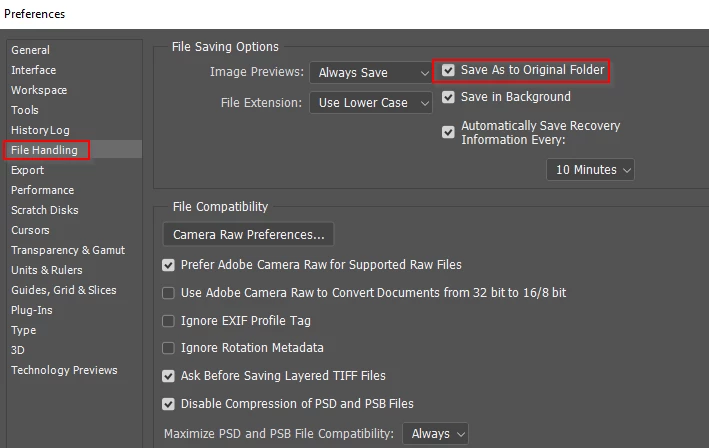
In Preferences > File handling, is Save as to the original folder checked?  Or was this a document you started from scratch as a new document rather than opened?

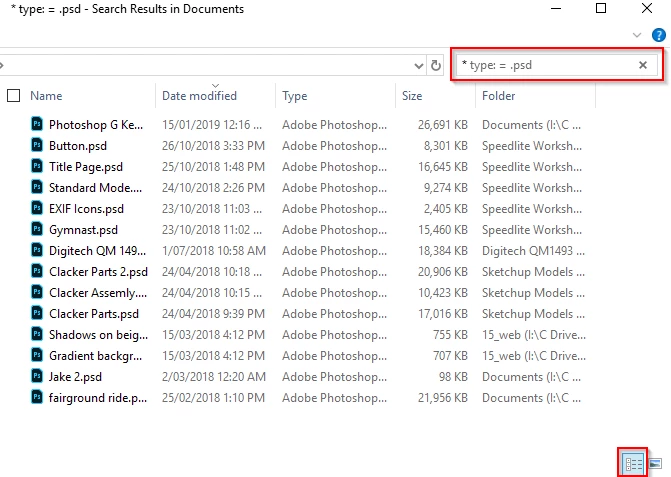
If Windows, open File Explorer, and click on This PC if you have more than drive, and in the search field type:

* type: = .psd

Obviously use the extension you think you saved the file as.

Then click on the icon in the bottom right corner (my red highlight) which will change the view to Details

Then click on Date Modified to order the files with the most recent at the top of the list

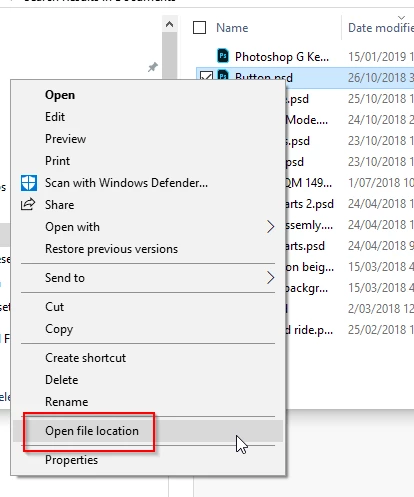
When you find the file, right click and choose Open file location

I'm sorry, but I don't know how to do it with a Mac, except that I imagine you'd start with the Finder

Good luck

3 replies

phylcappAuthor
Participating Frequently
February 27, 2019

Got it. Thanks!

Trevor.Dennis
Community Expert
Trevor.DennisCommunity ExpertCorrect answer
Community Expert
February 26, 2019

Hi Phyllis

Do you know what file extension you used?

What operating system are you using?

In Preferences > File handling, is Save as to the original folder checked?  Or was this a document you started from scratch as a new document rather than opened?

If Windows, open File Explorer, and click on This PC if you have more than drive, and in the search field type:

* type: = .psd

Obviously use the extension you think you saved the file as.

Then click on the icon in the bottom right corner (my red highlight) which will change the view to Details

Then click on Date Modified to order the files with the most recent at the top of the list

When you find the file, right click and choose Open file location

I'm sorry, but I don't know how to do it with a Mac, except that I imagine you'd start with the Finder

Good luck

phylcappAuthor
Participating Frequently
February 26, 2019

Hmmm. Windows 10 on a pc. The file was absolutely a psd. It was a new file-

not a modified one. When I follow your instructions, it isn't there. I

wonder if I mistakenly closed it without saving. There was no original

folder (though it is checked) because it was a new file.

On Tue, Feb 26, 2019 at 6:38 PM Trevor.Dennis <forums_noreply@adobe.com>

Nancy OShea
Community Expert
Community Expert
February 26, 2019

Use your operating system's file manager and search for Date Modified > Yesterday.

Nancy O'Shea— Product User & Community Expert