
Inspiring
July 12, 2023
Answered

Fix "the command get is not currently available" in CS6

  • July 12, 2023
  • 2 replies
  • 1096 views
I want use Photoshop CS6 for batch editing because it is lite and can be used in sandboxie software

following script is fully execute in the latest version of Photoshop (2023): 


#target photoshop

/* Check for selection - from jazz-y */
var selectionBounds = null;
try {
    selectionBounds = activeDocument.selection.bounds
} catch (e) {}
if (selectionBounds) {

        /* Start Process selected layers - from jazz-y */
        var s2t = stringIDToTypeID;
        (r = new ActionReference()).putProperty(s2t('property'), p = s2t('targetLayersIDs'));
        r.putEnumerated(s2t('document'), s2t('ordinal'), s2t('targetEnum'));
        var lrs = executeActionGet(r).getList(p),
            sel = new ActionReference();
        for (var i = 0; i < lrs.count; i++) {
            sel.putIdentifier(s2t('layer'), p = lrs.getReference(i).getIdentifier(s2t('layerID')));
            (r = new ActionReference()).putIdentifier(s2t('layer'), p);
            (d = new ActionDescriptor()).putReference(s2t("target"), r);
            executeAction(s2t('select'), d, DialogModes.NO);
        /* End Process selected layers - from jazz-y */

        /* Clear selected layers */
        try {
            activeDocument.selection.clear()
        } catch (e) {}
    }

} else {
    alert("This script requires a selection!");
}


but when i run above script in CS6 i get following error: 
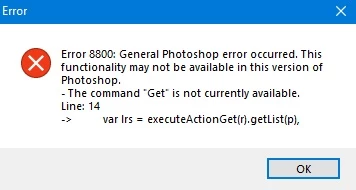


how to fix this error in CS6? 

This topic has been closed for replies.
Correct answer r-bin

I checked and found that only scripts that use following code not working with CS6 and other scripts working! 

#target photoshop

/* Start Process selected layers - from jazz-y */
var s2t = stringIDToTypeID;
(r = new ActionReference()).putProperty(s2t('property'), p = s2t('targetLayersIDs'));
r.putEnumerated(s2t('document'), s2t('ordinal'), s2t('targetEnum'));
var lrs = executeActionGet(r).getList(p),
    sel = new ActionReference();

for (var i = 0; i < lrs.count; i++) {
    sel.putIdentifier(s2t('layer'), p = lrs.getReference(i).getIdentifier(s2t('layerID')));
    (r = new ActionReference()).putIdentifier(s2t('layer'), p);
    (d = new ActionDescriptor()).putReference(s2t("target"), r);
    executeAction(s2t('select'), d, DialogModes.NO);
/* End Process selected layers - from jazz-y */

// Your code here:
alert(activeDocument.activeLayer.name);

}


var nn = 0;
try { activeDocument.backgroundLayer } catch(e) { nn = 1; }

var s2t = stringIDToTypeID;
(r = new ActionReference()).putProperty(s2t('property'), p = s2t('targetLayers'));
r.putEnumerated(s2t('document'), s2t('ordinal'), s2t('targetEnum'));
var lrs = executeActionGet(r).getList(p),
    sel = new ActionReference();

for (var i = 0; i < lrs.count; i++) {
    sel.putIndex(s2t('layer'), p = lrs.getReference(i).getIndex(i));
    (r = new ActionReference()).putIndex(s2t('layer'), p+nn);
    (d = new ActionDescriptor()).putReference(s2t("target"), r);
    executeAction(s2t('select'), d, DialogModes.NO);

// Your code here:
alert(activeDocument.activeLayer.name);

}

2 replies

Inspiring
July 12, 2023

@Stephen Marsh 

can you fix script error for cs6?

c.pfaffenbichler
Community Expert
Community Expert
July 12, 2023

I can’t remember in which version the selected layers finally became addressable in a meaningful manner, but prior to that there used to be work-arounds using DOM-code. 

This example provides an Array of ArtLayers – in DOM, not AM!

So you would need to adapt the whole for-clause 

        for (var i = 0; i < lrs.count; i++) {

accordingly. 


This example might give you a start: 

#target photoshop
var myDocument = app.activeDocument;
alert (getSelectedArtLayers(myDocument))


////// adapted from an xbytor script, thanks to xbytor //////
function getSelectedArtLayers (doc) {
	var layerSets = collectLayerSets(doc);
	var visibleSets = [];
	for (var m = 0; m < layerSets.length; m++) {
		var theSet = layerSets[m];
		visibleSets[m] = theSet.visible;
		theSet.visible = true;
		};	
	var layers = collectArtLayers(doc);
	var visible = [];
	var selLayers = [];
	for (var i = 0; i < layers.length; i++) {
		var l = layers[i];
		visible[i] = l.visible;
		l.visible = true;
		};
////// hide selected;
	var id807 = charIDToTypeID( "Hd  " );
	var desc161 = new ActionDescriptor();
	var id808 = charIDToTypeID( "null" );
	var ref116 = new ActionReference();
	var id809 = charIDToTypeID( "Lyr " );
	var id810 = charIDToTypeID( "Ordn" );
	var id811 = charIDToTypeID( "Trgt" );
	ref116.putEnumerated( id809, id810, id811 );
	desc161.putReference( id808, ref116 );
	executeAction( id807, desc161, DialogModes.NO );
// show all layersets;
	for (var m = 0; m < layerSets.length; m++) {
		var theSet = layerSets[m];
		theSet.visible = true;
		};
//////
	for (var i = 0; i < layers.length; i++) {
		var l = layers[i];
		if (!l.visible) {
			selLayers.push(l);			
			};
		l.visible = visible[i];
		};
// reset layerset visibility;
	for (var m = 0; m < layerSets.length; m++) {
		var theSet = layerSets[m];
		theSet.visible = visibleSets[m];
		};
	return selLayers;
	};


Inspiring
July 12, 2023
quote

I

By @c.pfaffenbichler

tnq, if it possible plz re-write my script for working by CS6

c.pfaffenbichler
Community Expert
Community Expert
July 12, 2023

It seems you want to use Photposhop Scripts for highly specific tasks and, in this case, in a highly specific set-up (on obsolete software). 

I think it is time for you to familiarize yourself with Photoshop Scripting so you don’t need to rely on others to create or adapt them for you.