
Participant
August 19, 2020
Answered

Fixed: Photoshop creating a debug.log file when you open a PSD File

  • August 19, 2020
  • 66 replies
  • 37022 views

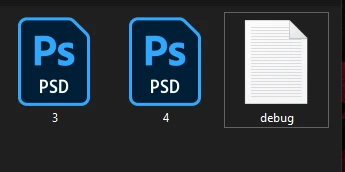
I just updated my photoshop to the latest version, 21.2.2.289, and I noticed that everytime I open a PSD file. Photoshop creates a debug.log file in the same folder as the PSD file. How do I turn this off?
[Moderator note: PS-55193]

This topic has been closed for replies.
Correct answer Pete.Green

Good news! Tonight's 21.2.4 update should fix the issue with new debug.log file creation. 
Look for the Photoshop update in the Updates section of the Creative Cloud desktop. For help, see Update Creative Cloud apps

Let us know if the update fixes it for you as well!

Regards,

Pete

66 replies

moreiter
Participating Frequently
September 10, 2020

update to v21.2.3 today didn't change anything 

Participant
September 10, 2020

Same here.

Rulexy
Participant
September 10, 2020

Yesterday there was an update to v21.2.3, but the problem with debug.log is not resolved.

Known Participant
September 9, 2020

Yes me too, today another update and with this update Canvas Size no longer works!!!
Adobe you do understand I cannot afford to have such a week link in my business, this is my living, deadlines only disappear when the client says F%*K-you!!!!!  Very shoddy work lately!  very shoddy!

Adobel
Participant
September 9, 2020

Same here.
Just as sad as back then with acrobat.

Participant
September 9, 2020

Just in case someone would like to know...


I just updated Photoshop to v21.2.3 and the error ist still there...

Known Participant
September 8, 2020

Renaming the folder Spaces to ~Spaces seems to work, do not see an issue yet with Photoshop.

ronmanke
Known Participant
September 8, 2020

Yes, but Spaces is there for a reason...  Not everyone uses Photoshop for the same things...

Participating Frequently
September 8, 2020

I'll jump in here with some help in Adobe's absence.  First, here are two workarounds:

A) Manually disable the "Spaces" plugin by renaming the folder.  On my computer it can be found at: C:\Program Files\Adobe\Adobe Photoshop 2020\Required\Plug-ins\Spaces.  Rename the folder to something like "~Spaces" and restart Photoshop.  I don't know the exact purpose of this plugin but disabling it hasn't affected my Photoshop usage at all.  If it does interfere with your usage, or if you're scared to mess with the program files, use the other workaround:


B) Don't start Photoshop by opening a file.  This causes the debug.log file to be generated in the file's folder.  Instead, if you first open Photoshop from your apps menu and THEN open your file(s) as usual it doesn't create the debug.log files.  Just keep it open.


My interpretation of the problem:

The error code we're all seeing (warning X3571) seems like it's being generated by a sloppy implementation of WebGL code within the Spaces plugin.  Digging into those files a little bit, it looks like that plugin actually uses a lightweight build of Chrome which might have the sloppy code -- So Adobe might actually be at the Google community's mercy for a fix!  Just speculation anyway.

ronmanke
Known Participant
September 8, 2020

Good tip, thanks!


Does anyone know what Spaces is for?  I am nervous about disabling functionlity I may need in Photoshop.

ronmanke
Known Participant
September 8, 2020

This is happening to me as well, with the latest version of Photoshop.


Also, it is completely empty!

Al3sim
Participant
September 7, 2020

Hi! Photoshop is still creating debug files in every folder I work in. It is a big trouble. Please give a solution!


Participant
September 7, 2020

I also have this problem. Any fixes yet?!?!