
Torgeir J
Participant
March 10, 2021
Answered

Fixed: Unable to export Save for Web in Photoshop 22.3 Windows 10

  • March 10, 2021
  • 23 replies
  • 63618 views

After update to Photoshop 22.3.0 today export to Save for Web (Legacy) stopped working. Opens up a error message: The operation could not be completed.

Quick export is working ok. 
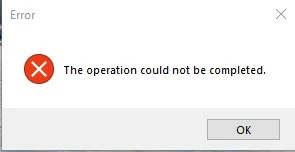
{Moderator note: Edited the thread title, PS-60637}

This topic has been closed for replies.
Correct answer Akash Sharma

Hi there,


This issue should be fixed in the Photoshop 22.3.1 update that went live today. This update includes fixes to some of the top customer reported issues among other bug fixes. See Bug fixes and security updates


To update Photoshop to 22.3.1, click "Update" in the Creative Cloud desktop app next to Photoshop. See: More detailed instructions for updating


Let us know how it goes.

Thanks,

Akash

23 replies

onewavedesigns
Participant
March 11, 2021

I just updated my Photoshop to 22.3, the most recent version and now whenever I try to "Save for web" either through the keyboard shortcut alt, cntrl, shift, S or through the menu File, export, save for web (legacy mode) I get this error

"Operation could not be completed" (Please see screenshot attached)

I'm on Windows 10

I have tons of ram (128gb), I7 extreme processor and GTX Titan Black video card, so I know it's not for lack of power.

Anyone?

Thanks!

JJMack
Community Expert
Community Expert
March 12, 2021

Save for Web is Broken in 22.3.

JJMack
onewavedesigns
Participant
March 12, 2021

That sux. Now I have to rollback. Do you know if Adobe is aware of the bug?

Xavietch
Participant
March 10, 2021

Same problem here!

I tried to reset the preferences but it did not work...

Torgeir J
Torgeir JAuthor
Participant
March 10, 2021

Yes, reset the preferences did not work. I have updated graphic card driver and tried without graphic processor enabled.

Without success. 

But I can use quick export or save as.

Error is on my workstation with Windows 10 Pro for Workstations (20H2), on my laptop with Windows 10 Pro (20H2) it is working ok.  

This issue is also reported to support. They said I have to go back to previous version.


Xavietch
Participant
March 11, 2021

I had the issue with the 22.3 version, by going back to the 22.2  the "save for the web" work

davescm
Community Expert
Community Expert
March 10, 2021

Working OK here with 22.3 in Windows 10. Have you tried resetting preferences?

Dave