

gtsolid
Known Participant
August 11, 2018
Answered

Flattening a 360º

  • August 11, 2018
  • 2 replies
  • 6834 views

Hi everyone!

i've done some good photos about the top of a mountain, and i wish to merge them all in a flat panorama.

Using photomerge in automatic way, i obtain this:
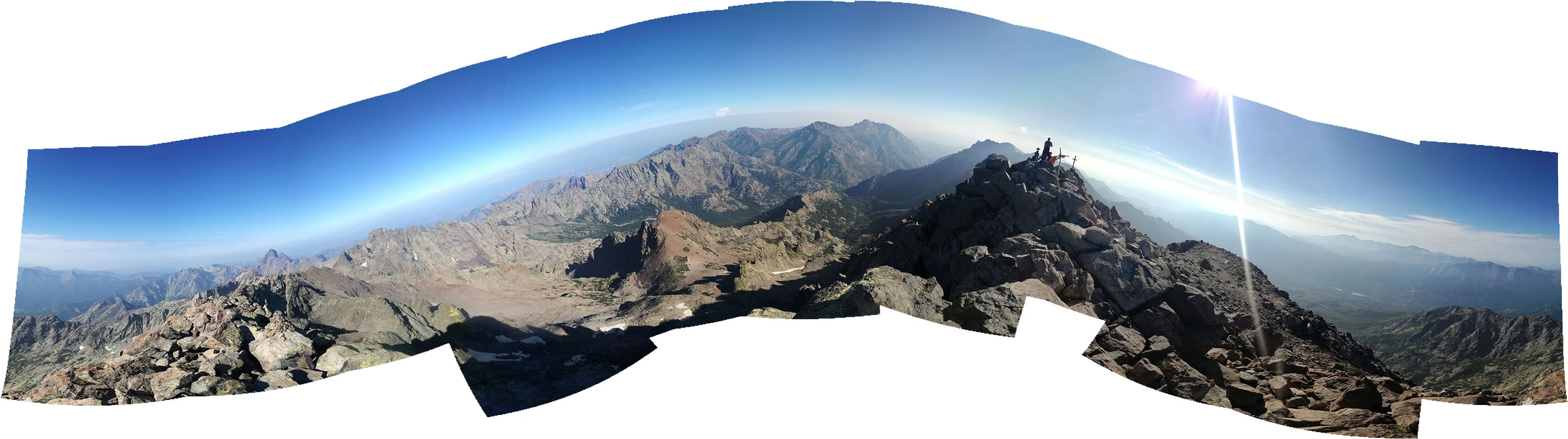
How can i obtain a flat horizon with the 22 photos i have?

Correct answer Norman Sanders

The Filter >  Liquify...Forward Warp tool set to a huge size may help. That was followed by a Quick Selection tool applied to the white areas created by the Warp, then Edit > Content Aware Fill. You may spend more time than I did in straightening the white sky streak.

2 replies

Norman Sanders
Norman SandersCorrect answer
Legend
August 11, 2018

The Filter >  Liquify...Forward Warp tool set to a huge size may help. That was followed by a Quick Selection tool applied to the white areas created by the Warp, then Edit > Content Aware Fill. You may spend more time than I did in straightening the white sky streak.

JJMack
Community Expert
Community Expert
August 11, 2018

Norman you can use liquify much better than I can,  Now I know I need more pratice....

JJMack
JJMack
Community Expert
Community Expert
August 11, 2018

I got lucky. You're still the champ,


I just keep seeing all the warping the filter does and see how much I messed up the image mesh know the so much distortion though the image may not look all the bad I know its bad.

JJMack
JJMack
Community Expert
Community Expert
August 11, 2018

Photoshop is not the best application to stitch images.    The are applications that are designed  speciality for stitch images.  Also If you want to stitch a perfect  cylinder, or spherical panorama You need to use the right equipment to capture the required image all image capture image should all have exactly the same camera manual settings no automatic settings.

If you hand held you came taking the pictures and did a good job rotating your camera around a single point and keep the camera level.  An application designed for stitching images will  have many more stitching tools and features then Photoshop to correct all sort of stitching problems set the focal point level the horizon patch spherical projections etc.

With Photoshop and the way that image is stitched you would need to warp the heck out of that image to straighten the horizon there would be too much distortion.

IMO you need to start over with the image you captured and see what an application designed for stitching images can do with them.

For a 360 panorama you should at least use a tripod or a Phone in autopano mode.  On top of a mountain I would not think anyone would do a good  job of hand holding a camera level  360 degrees around a single point and capture the required number of images.

JJMack