jespera84579981
Participant
October 26, 2019
Answered

Focus stack blurring parts of image

  • October 26, 2019
  • 6 replies
  • 7429 views

So, I experimented a little with a macro lens, taking 6 photos of a flower, and then focus stacking them in Photoshop CC.

I was very dissappointed to find that parts of the image is blurred at the edges. Notice for instance around the leaf of the lilly, how there is a space of a few milimeters that is completely blurred. What to do?

/Jesper

Correct answer D Fosse

Chuck is right about the optical laws. No software can do anything about that, short of inventing sharp pixels where there aren't any.


But there is one thing that will at least reduce the problem. Instead of focusing the lens with the camera fixed, use a focusing rail to move the camera with fixed focus. The problem with focusing just the lens is that it changes the distance between lens optical center and subject. This changes the whole angle of view slightly. In addition, many lenses are so constructed that focal length varies with focus distance. This is strictly a flaw, but so expensive to fully correct that it's usually not done.


If you move the whole rig, on a focusing rail, none of this happens.


Even more effective is a bellows system where only the camera body is moved, and the lens stays fixed. That's pretty specialized equipment, though.
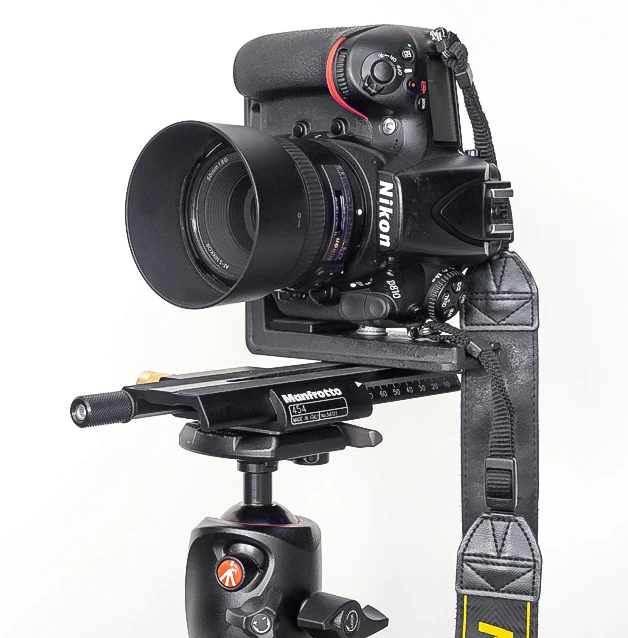


A focusing rail can also be used to eliminate parallax error in panos, so it's a very useful investment.

6 replies

waynee61264534
Participant
July 5, 2025

I know it's 6 years on, but I will agree with the idea that it's a limit with optics. 6 images just isn't enough for such a limited area of focus a macro lens may have provided at this distance from subject. 20 would have given plenty of focal range.


..... and it could be a limit of PS at the time and now (2025)

Having done quite a bit of stacking over the years, PS doesn't always get it right, even with enough images. 

For instance: today I was working on a 20 image stack of a subject and it to had blurred areas. I went back to look at my original images and they were sharp at every point. PS was just getting it wrong! I stacked the images in smaller groups and then stacked the stacks and the final image it turned out fine. 

Chuck Uebele
Community Expert
Community Expert
July 5, 2025

Years ago, I worked on a large stacking project of wave guides. Photoshop did a horrible job. We ended up using Zerene stacker, which worked much better. We were getting blurred areas in some of the flat metal areas where PS couldn't seem to pick the right area from the sharpest exposure. 

davescm
Community Expert
Community Expert
July 5, 2025

It may be six years on but it is still relevant advice. Incidentally, I now use Zerene Stacker, mentioned above by Chuck, for stacking microscope images. It enables both the grouping you mention, called slabbing, as well as retouching from original images,, slabs or from alternative stacks mafe with different settings. 


Dave

Chuck Uebele
Community Expert
Community Expert
October 26, 2019

Photoshop also doesn't do the best job at stacking. It does have a hard time with areas of similar color and density with fine detail. I was shooting a job with hundreds of stacked images and PS was leaving blurred areas where there was good detail. I ended up buying Zerene Stacker, which did a much better job.

davescm
Community Expert
Community Expert
October 26, 2019

Looking closely at your image , I'm not sure that this is a case of simple optics and no sharp pixels available. Go through and view each layer individually with the masks temporarily disabled and check if one of them is sharp in the circled area. Sometimes I find I have to tweak the masks a bit after focus stacking to address any small areas like this.


Dave

Chuck Uebele
Community Expert
Community Expert
October 26, 2019

As Dag said, camera rails are really nice - bellows even better.

D Fosse
Community Expert
D FosseCommunity ExpertCorrect answer
Community Expert
October 26, 2019

Chuck is right about the optical laws. No software can do anything about that, short of inventing sharp pixels where there aren't any.


But there is one thing that will at least reduce the problem. Instead of focusing the lens with the camera fixed, use a focusing rail to move the camera with fixed focus. The problem with focusing just the lens is that it changes the distance between lens optical center and subject. This changes the whole angle of view slightly. In addition, many lenses are so constructed that focal length varies with focus distance. This is strictly a flaw, but so expensive to fully correct that it's usually not done.


If you move the whole rig, on a focusing rail, none of this happens.


Even more effective is a bellows system where only the camera body is moved, and the lens stays fixed. That's pretty specialized equipment, though.


A focusing rail can also be used to eliminate parallax error in panos, so it's a very useful investment.

Chuck Uebele
Community Expert
Community Expert
October 26, 2019

That, unfortunately is plain optics. There is a transition area between two objects of different distances that a camera can't record things in focus. For example, when the leaf is in focus, the background is blurred. They the bg is in focus, the leaf blurs out into the bg. If you camera can't record a sharp image in that fine area, PS can't create it.

jespera84579981
Participant
October 26, 2019

Thank you Chuck, makes sense.

Well, that seems to be a bit of a setback with regard to focus stacking. I used a wide open aperture, F3.2 I think. Perhaps usung a higher DOF by increasing to, say, F8 could reduce the blur?

Chuck Uebele
Community Expert
Community Expert
October 26, 2019

Yes, a smaller f-stop will help. I know some software like Helicon focus says to use a wide f-stop, but I've found that I get less that pleasant results. It all depends on what you're shooting. If you really want a bg to go blurry, then use a wide aperture. You might even try using both a wide and small aperture and see how that works. or do two stacks and blend them with mask.