
Font Drop-Down Menu Samples Stop Aligning When Scrolling
Issue: The sample text displayed in the font selection drop-down menu stops aligning when the mouse is moved.
Adobe Photoshop Version: 23.3.2 20220503.r.458 d8a9c44 x64
OS: Windows 10 Pro (19044.1466)
Steps to reproduce ( (beavis) heh heh (/beavis) )
1. Open Photoshop. No files need to be open; bug occurs whether files are open or not.
2. Select the Text tool.
3. Pull down the Fonts drop-down menu at the top of the screen.
4. Scroll the mouse wheel *without* moving the mouse. The list will scroll through fonts with all samples aligned within the window.
5. Stop scrolling.
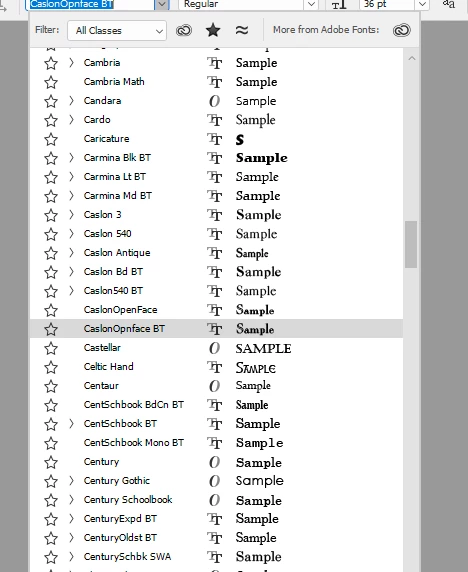
6. Move the mouse within the boundaries of the drop-down menu. The fonts near the top of the list will have their samples shifted to the left; see the images below for an example.
The first image shows the menu after step 5:
This image shows the same menu as it looks after step 6:
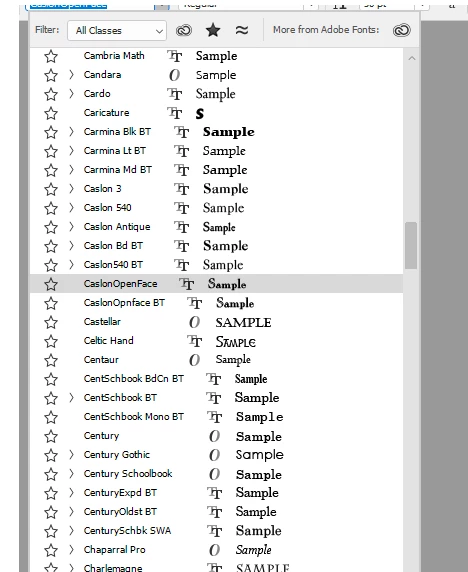
Expected result: Font samples should stay aligned
Actual result: They don't.
This happens throughout the Fonts drop-down menu; no matter which fonts are being displayed, the bug occurs. Bug has been present since at least version: 22.5.7 20220331.r.859 fe06861 x64
Apologies if this has already been posted; I tried searching, but didn't get any hits on what I thought would be a good description.
 AdChoices