Exit
  • Global community
    • Language:
      • Deutsch
      • English
      • Español
      • Français
      • Português
  • 日本語コミュニティ
  • 한국 커뮤니티
0

Font is using a different glyph for apostrophe even though the correct one is assigned to it

Community Beginner ,
Aug 10, 2021 Aug 10, 2021

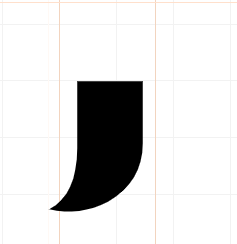
This is what the apostrophe should look like

T3kwabz_0-1628613746013.png


But instead it chooses this one

T3kwabz_2-1628613792751.png

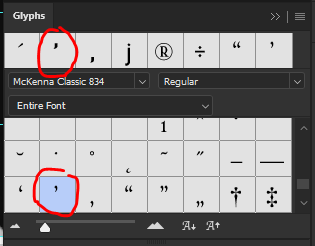
The correct one is present in the glyphs list (top circle), but it is still using the other one (lower circle), weirdly. Any suggestions?

T3kwabz_4-1628613998569.png


TOPICS
Windows
225
Translate
Report
Community guidelines
Be kind and respectful, give credit to the original source of content, and search for duplicates before posting. Learn more
community guidelines
Adobe
Community Beginner ,
Aug 10, 2021 Aug 10, 2021

Problem solved, please delete this post,


thank you.

Translate
Report
Community guidelines
Be kind and respectful, give credit to the original source of content, and search for duplicates before posting. Learn more
community guidelines
Community Expert ,
Aug 10, 2021 Aug 10, 2021
LATEST

If you would tell how you solved it, that may help other users in the future.

Translate
Report
Community guidelines
Be kind and respectful, give credit to the original source of content, and search for duplicates before posting. Learn more
community guidelines