
Font size in version 26.0.0 20240927.r.26 a733fda x64 cannot be changed.
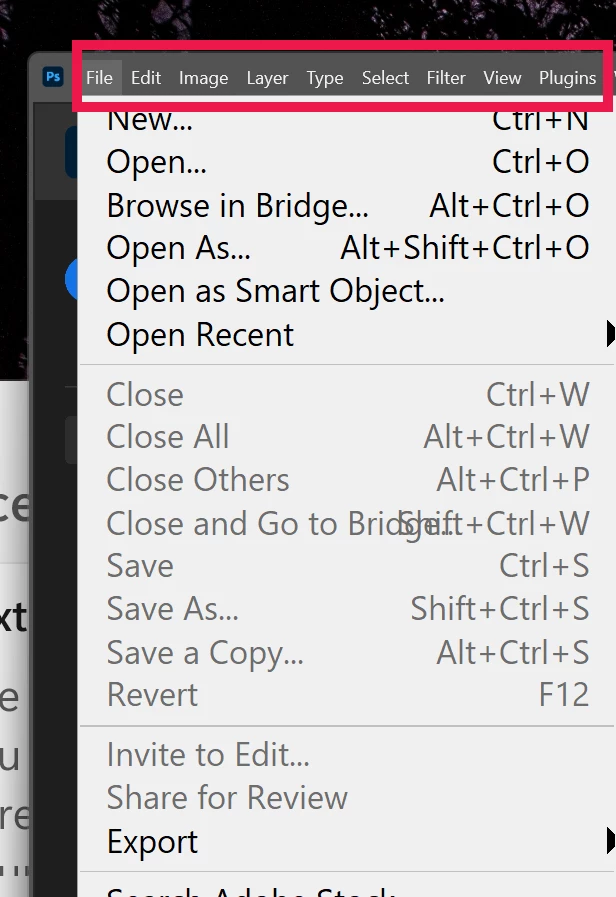
Is this a Windows 11 glitch or is it PS?
I am trying to change the Interface font size for my menu bar as well as in Preferences on Adobe PS. I have tried to delete the Adobe font cache but cannot, the message being that it is being used in dwm.exe. Preferences>Interface>Presentation and selecting UI Font Size:Large and Scale UI to font + a reboot changes nothing. The font size in my menu bar - File, Edit, Image, etc - remains miniscule. It does, however, change the font size in the drop-down menus, under those headings. Going through the Windows settings seems to have no effect on the PS menu bar either, but does affect the menu bar on some other applications.
Adobe Photoshop Version: 26.0.0 20240927.r.26 a733fda x64
Number of Launches: 24
Operating System: Windows 11 64-bit
Version: 11 or greater 10.0.22631.4317
System architecture: AMD CPU Family:15, Model:4, Stepping:1 with MMX, SSE Integer, SSE FP, SSE2, SSE3, SSE4.1, SSE4.2, AVX, AVX2, HyperThreading
Physical processor count: 8
Logical processor count: 16
Processor speed: 3194 MHz
Built-in memory: 31956 MB
Free memory: 20484 MB
 AdChoices