


Participant
November 1, 2021
Question

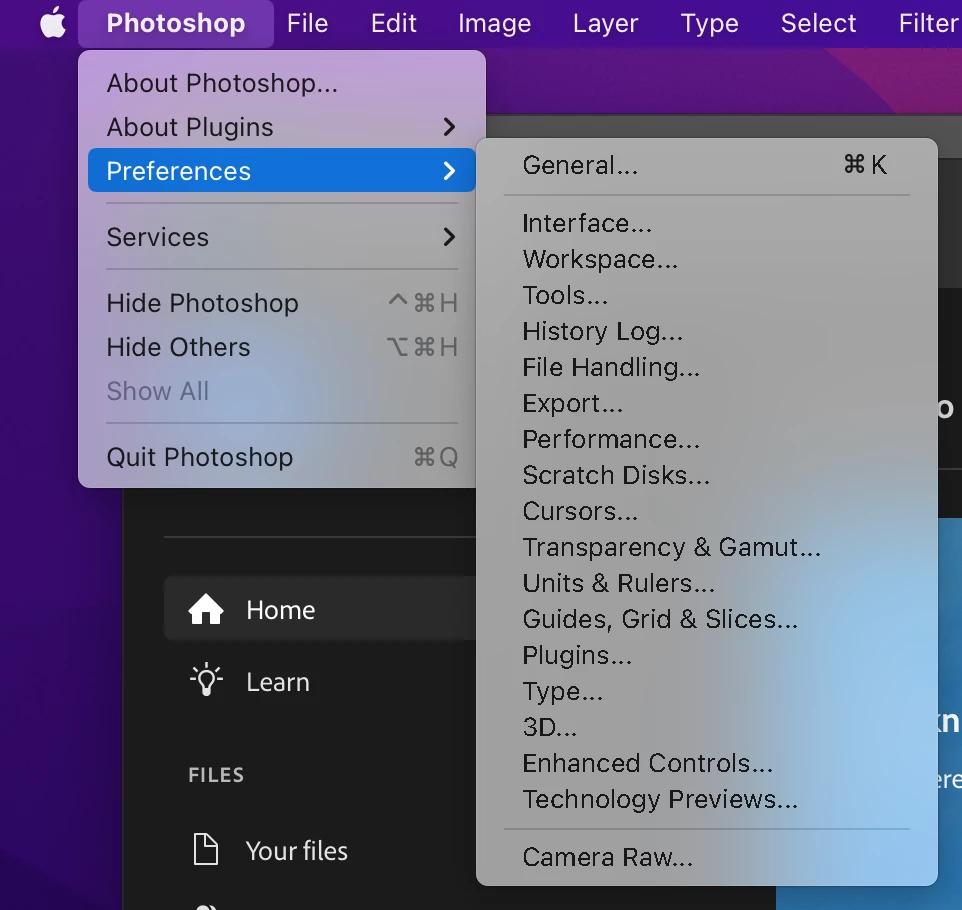
Font smoothening inconsistency in menu

  • November 1, 2021
  • 2 replies
  • 163 views

I noticed that some photoshop menu texts are not smooth. The macOS default menu items are rendered correctly (see the left menu panel in attached screenshot), but photoshop native ones (right menu panel) are not. I would really appreciate it if someone could help me with this issue.

  • This happens on both of the MacBook display and the external display.
  • I have notices this since macOS Big Sur and now on Monterey.
  • Both current version and the previous version of Photoshop have the issue.
  • Other CC apps (e.g. Illustrator) don't have this issue.

===

Photshop version: 23.0.0

Platform: MacBook Pro (16-inch, 2019)

OS: macOS 12.0.1
This topic has been closed for replies.

2 replies

chrish111Author
Participant
November 2, 2021

Hi @Mohit Goyal,


Thanks for the reply.


I noticed this since last MacOS (Big Sur). It also happens in the new OS (Monterey). Both the old Photoshop version and the new version have the same issue.


I tried different resolutions. It is less noticeable when the texts are smaller, but still Photoshop-specific menu items are not rendered correctly.


This only happens to Photoshop. Apps like Illustrator and XD are fine.


Thanks,

Chris

Mohit Goyal
Community Manager
Community Manager
November 2, 2021

Hi @chrish111 


Thanks for reporting this issue. Are you seeing this problem after the latest MacOS update Or Photoshop update? Could you please adjust the screen resolution and check if that helps to resolve this problem for you?


Also, are you seeing the similar problem in any other Adobe apps?


Thanks,

Mohit