
BlueCat55
Known Participant
April 14, 2020
Answered

Force CMYK Image to Black Plate?

  • April 14, 2020
  • 4 replies
  • 8426 views

Hello!

I have an image that I need to prepare in Photoshop for an offset printing workflow. It's a black and white image, currently rendered in 4 colour greys and blacks, and I need to be able to edit/convert it so that the image is still in cmyk mode, but only contains data on the black plate, with the entire image made up of k values.

I've tried converting to greyscale and back to cmyk, in hopes of discarding the cmy data, but bringing the image back into cmyk mode just re-separates the image onto all four plates. I've also tried forcing the image to the black plate with the Channel Mixer monochrome settings- it does work, but the quality of the image suffers enough that it doesn't seem worth it.

So far, my preferred method has been a workaround with InDesign. I've found that if I convert the image to greyscale, place it in InDesign, and export the indd file as a PDFx-1a with US Web Coated SWOP v2 output intent, (part of my workflow setup) the resulting image in the PDF only contains k values. (According to Acrobat's output preview). This has worked in our workflow so far, but I want to know if there's a better way to do this in Photoshop. I'd be surprised if you couldn't create a cmyk image containing only k black ... unless it's good practice to just use Acrobat or another program for converting black and white images like this. I'd appreciate any input!
Correct answer D Fosse

Here's how you do it:


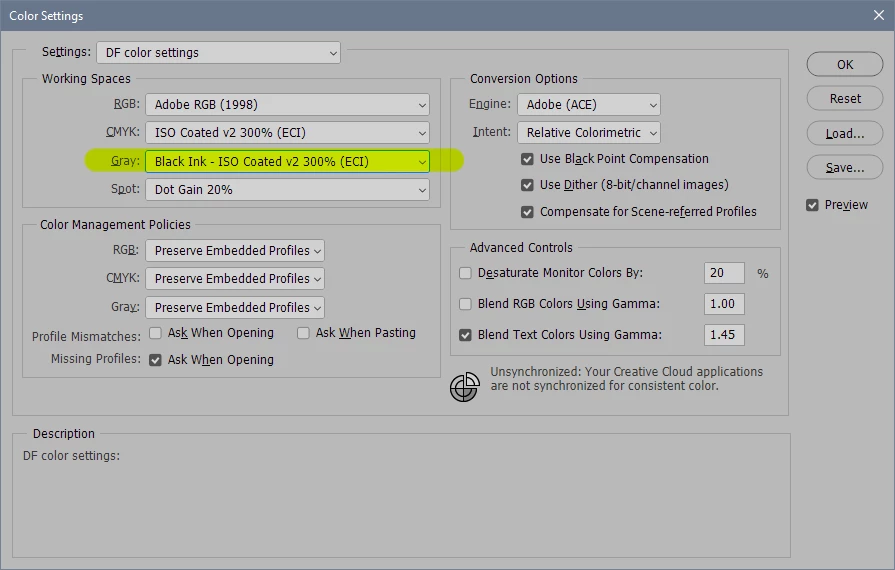
Open the working gray rolldown and click "load gray". Then navigate to whatever CMYK profile you're using in the final separation.


Then convert your Photoshop document to this gray profile. Use Edit > Convert to Profile, not Image Mode > Grayscale.


Make a new document in your target CMYK profile. Click the K channel and paste your image. Empty the CMY channels by filling them with white.


The result is a print ready K-only CMYK file, which will output exactly as you see it on screen. No tonal shifts.


Alternatively, if you're using InDesign, you can just Place your grayscale file. It will output on the black plate only when you make a press-ready PDF.

4 replies

D Fosse
Community Expert
Community Expert
April 25, 2020

BTW copy/pasting between channels is just like copy/pasting everywhere else.


When you click a channel in the Channels panel, that channel is targeted and the others hidden. To copy, select all and copy. To paste - just paste.

BlueCat55
BlueCat55Author
Known Participant
April 25, 2020


"From what you've said, it seems I've been doing the right thing by creating gresycale images, placing them in InDesign, and then exporting with my desired output intent. Maybe I'm fundamentally confused about how greyscale vs cmyk colour data are treated within the same file- if I understand correctly, a PDF/X-1a can contain greyscale and cmyk data, but only has one output intent. If the output intent is a cmyk profile, and you export the (InDesign) file with "Preserve Numbers", does that mean that k values from a greyscale image will be mapped to the black plate by default in the pdf?"


Thank you!!!

This is what I was looking for- and this appears to answer the other question that I had too. 

D Fosse
Community Expert
D FosseCommunity ExpertCorrect answer
Community Expert
April 25, 2020

Here's how you do it:


Open the working gray rolldown and click "load gray". Then navigate to whatever CMYK profile you're using in the final separation.


Then convert your Photoshop document to this gray profile. Use Edit > Convert to Profile, not Image Mode > Grayscale.


Make a new document in your target CMYK profile. Click the K channel and paste your image. Empty the CMY channels by filling them with white.


The result is a print ready K-only CMYK file, which will output exactly as you see it on screen. No tonal shifts.


Alternatively, if you're using InDesign, you can just Place your grayscale file. It will output on the black plate only when you make a press-ready PDF.

Participant
June 29, 2023

But did Adobe so something about this, did they repair it?
its 2023 and it seems o do the same thing when you want to convert from cmyk to grayscale

Thanks!

c.pfaffenbichler
Community Expert
Community Expert
June 29, 2023

Did Adobe do something about what? 

Which post are you referring to exactly? 

c.pfaffenbichler
Community Expert
Community Expert
April 15, 2020

One can copy/paste the grayscale version (or, as some people seemed to like, the L-Channel) into the K-Channel (edit: and fill the CMY-Channels with white), one can use a Hue/Saturation Layer set to »Colorize« and Saturation 0, … 


What issue do grayscale images pose in your workflow that makes you want to avoid them? 

BlueCat55
BlueCat55Author
Known Participant
April 25, 2020

c_pfaffenbichler, can you describe to me in a little more detail how to do this? I've tried copy/pasting between channels, but couldn't get it to work- I feel like there's some picky setting or technical detail that I'm missing.


Also, greyscale images aren't an issue. I'm just curious if there's any way to use Photoshop to make a CMYK mode image containing only K data, (that looks good).

Derek Cross
Community Expert
Community Expert
April 15, 2020

There are lots of ways of converting am image to grayscale in Photoshop - do an online search - then Place the image in InDesign. For colour images always work in RGB color mode and Place these in InDesign, do not covert your colour images to CMYK (unless there's a very specific reason). Export your files from InDesign to PDF/X-4 for your commercial printer (unless they have another spec).