
Inspiring
November 22, 2017
Answered

Force-Justify Text

  • November 22, 2017
  • 1 reply
  • 1651 views

I teach Photoshop and haven't worked in 5.5 in many years. A student has this version, though, and is trying to force justify his text. He is also unable to make a text box - clicking and dragging in the canvas didn't work. I couldn't see a type menu, paragraph panel, etc. Can he create a text box and/or force-justify text using this version? He believe that he once did this before.

Thank you!!

Chava
This topic has been closed for replies.
Correct answer Jeff Arola

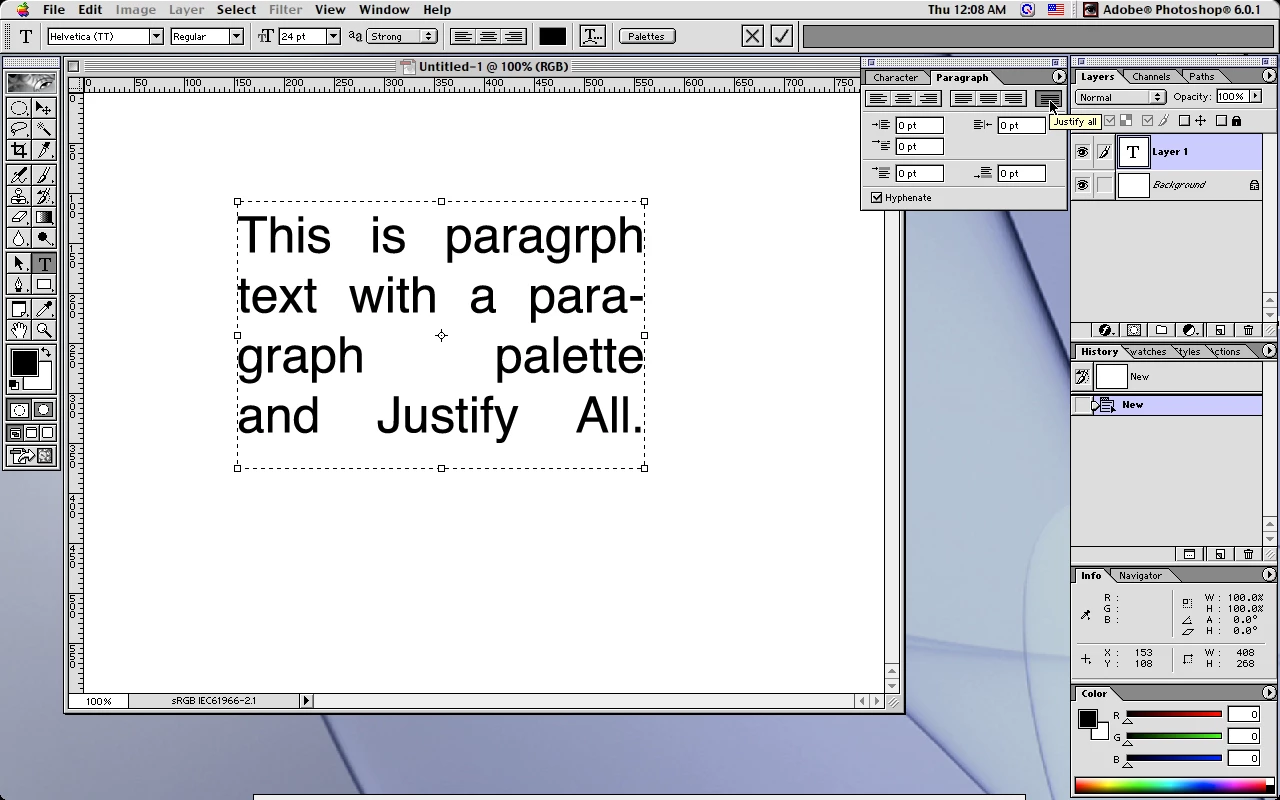
As far as i remember, photoshop 6 was the first to have paragraph text and Justify All.

Sorry it doesn't really help in your students case.

Unfortunately none of the text plugins i have for early versions of photoshop like Extensis PhotoGraphics

or Extensis PhotoText Solo 2.0 have Justify All either.

1 reply

November 22, 2017

Version 5.5 is from 1999 - stone-age so to speak.

In version 5 they integrated the editable text layer, but without text-box features. I don't remember if you could align the text, but I assume so.

Paragraph / character styles came with the CS 6 edition.

Fenja

Inspiring
November 22, 2017

Thank you so much, Fenja! So no textboxes. And the Paragraph Panel (not just Paragraph Styles) also came with a later version to your knowledge? There are Left/Right/Center options, but I don't see Force-Justify, which I assumed could pretty much only be accessed through the Paragraph Panel.

Just want to confirm - thanks!

Chava

Jeff Arola
Community Expert
Jeff ArolaCommunity ExpertCorrect answer
Community Expert
November 23, 2017

As far as i remember, photoshop 6 was the first to have paragraph text and Justify All.

Sorry it doesn't really help in your students case.

Unfortunately none of the text plugins i have for early versions of photoshop like Extensis PhotoGraphics

or Extensis PhotoText Solo 2.0 have Justify All either.