
Inspiring
December 13, 2018
Question

Foreground to Transparent GRADIENT layer mask does not work at all CC2018

  • December 13, 2018
  • 1 reply
  • 8199 views

Hi all,

The other gradients will work, but for some odd reason, when I try to apply the one called "Foreground to Transparent" (white to fade) nothing happens. Its weird because the black to fade works. This gradient will work when I use gradient fill layer, but not on the mask, and I need to use the gradient layer mask.

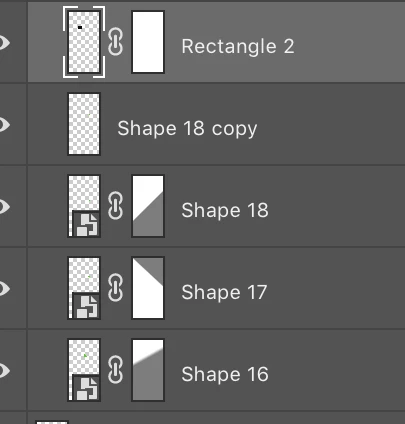
Notice the difference between other layers-the mask shows just white, no indication of any gradient

As an aside, if I try to save a gradient, then load it, the name of it comes up, but nothing happens/actually loads.

I have tried to search for the answer everywhere, but can't find it. I have tried to reset the tool several times. All settings are as they should be-transparency checked, opacity 100%

Thanks for your help

This topic has been closed for replies.

1 reply

Chuck Uebele
Community Expert
Community Expert
December 13, 2018

The mask is white to start with, so white, fading to white is still white. What are you trying to do with a transparent gradient on the mask?

Inspiring
December 13, 2018

Maybe gradient overlay is better, I just liked using with layer mask because it’s easier to control where you want the gradient

Chuck Uebele
Community Expert
Community Expert
December 13, 2018

Masks are just white, gray and black. Use can change the mask by filling it with black: have your background color set to black and press ctrl/cmd-backspace. However, with mask, I would just use a straight solid gradient. You can change the blending mode of the gradient: lighten for just applying lighter color so other white areas aren't affected, or darken for the opposite.