Exit
  • Global community
    • Language:
      • Deutsch
      • English
      • Español
      • Français
      • Português
  • 日本語コミュニティ
  • 한국 커뮤니티
0

Format of saved file

Explorer ,
Jul 22, 2022 Jul 22, 2022

When I save a file in PS it saves it as a TIFF.


I want it saved as a PSD, but see no way to change this default. How do I change it? There seems to be no option in Preferences under "File Handling."


I am running on a Mac under OS 12.1 (Monterey).

TOPICS
macOS
331
Translate
Report
Community guidelines
Be kind and respectful, give credit to the original source of content, and search for duplicates before posting. Learn more
community guidelines

correct answers 1 Correct answer

Community Expert , Jul 22, 2022 Jul 22, 2022

Are these files coming from Lightroom? In that case you set it there (preferences > external editing).

Translate
Adobe
Community Expert ,
Jul 22, 2022 Jul 22, 2022

Photoshop should default to last used format assuming that other requirements are present like layered document.


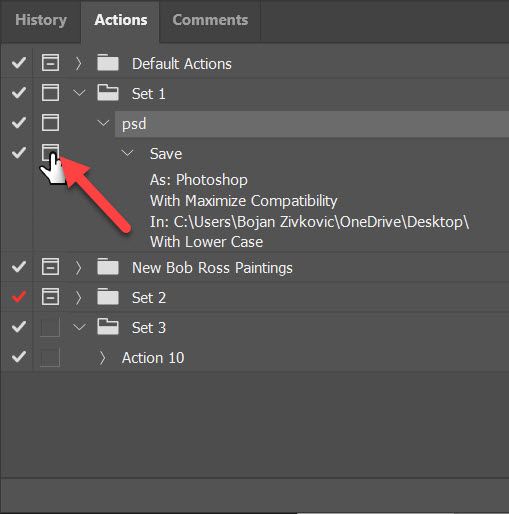
Try to reset preferences Preferences in Photoshop (adobe.com)or record simple action to save as PSD (As: Photoshop) then turn modal dialogue on for Save step. You can assign keyboard shortcut to play action or to display actions as buttons.

modal for save step.jpg


Translate
Report
Community guidelines
Be kind and respectful, give credit to the original source of content, and search for duplicates before posting. Learn more
community guidelines
Community Expert ,
Jul 22, 2022 Jul 22, 2022

Are these files coming from Lightroom? In that case you set it there (preferences > external editing).

Translate
Report
Community guidelines
Be kind and respectful, give credit to the original source of content, and search for duplicates before posting. Learn more
community guidelines
Explorer ,
Jul 23, 2022 Jul 23, 2022
LATEST

That works. Thanks.

Translate
Report
Community guidelines
Be kind and respectful, give credit to the original source of content, and search for duplicates before posting. Learn more
community guidelines