Known Participant
March 26, 2022
Answered

Fractions — Please help!

  • March 26, 2022
  • 3 replies
  • 10760 views

Hello,


Does anybody know if it is possible to write arbitrary fractions (i.e. any numbers I want) in Photoshop (or other Adobe software... or Microsoft Word?) with any font that I want?


Thank you.

This topic has been closed for replies.
Correct answer jane-e

Does anybody know if it is possible to write arbitrary fractions  in Photoshop with any font that I want?

By @Thomas22842972ml5u


No, you cannot create fractions in any typeface you want — you can only do so if the type designer created a numerator, denominator, and solidus. Only OpenType fonts will have fractions, and even then not all of them do.


Character panel > OpenType > Fractions OR click select the fraction and click the fraction button (1/2) at the bottom right of the Character panel.
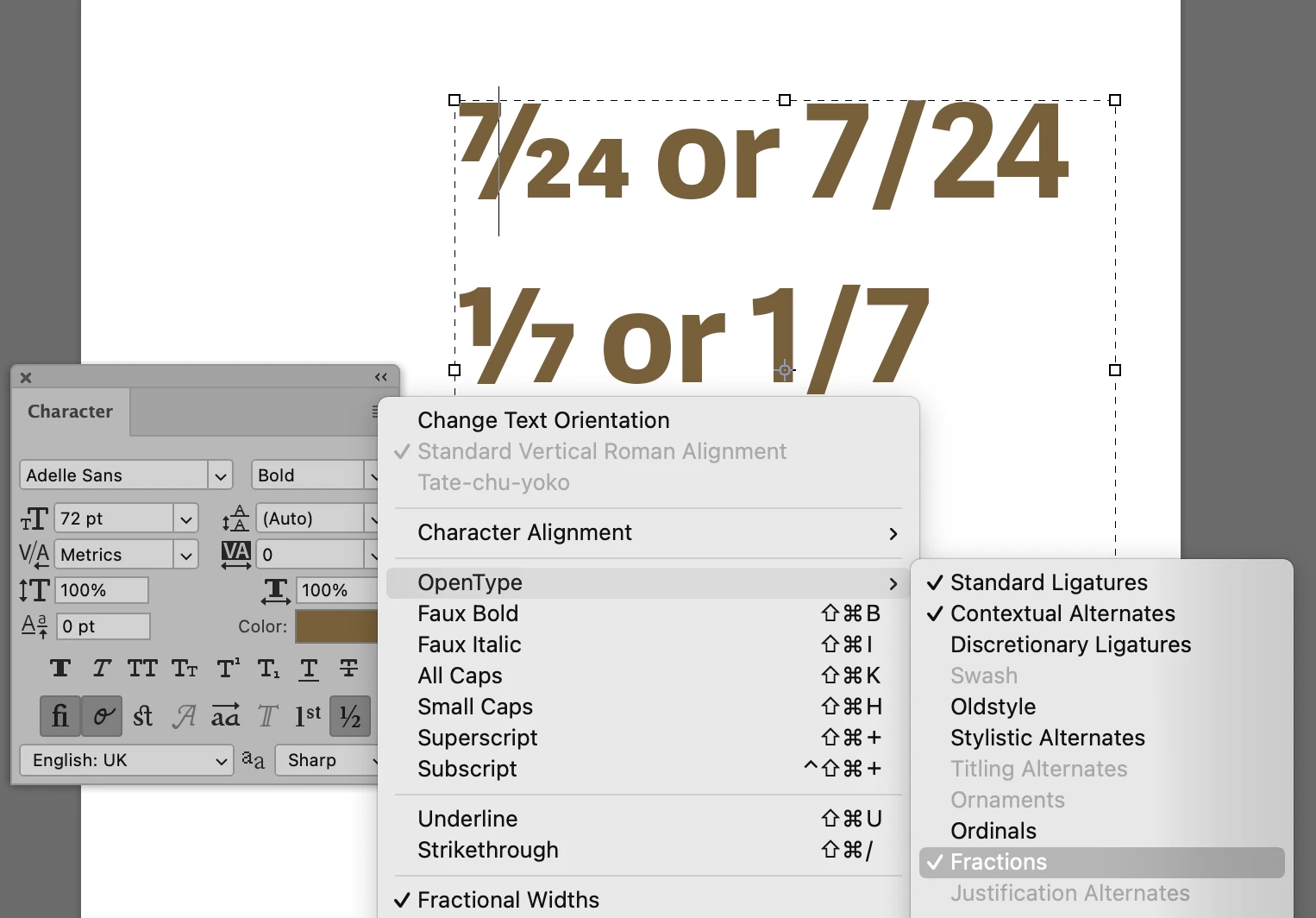


You can also do real fractions in InDesign and Illustrator.


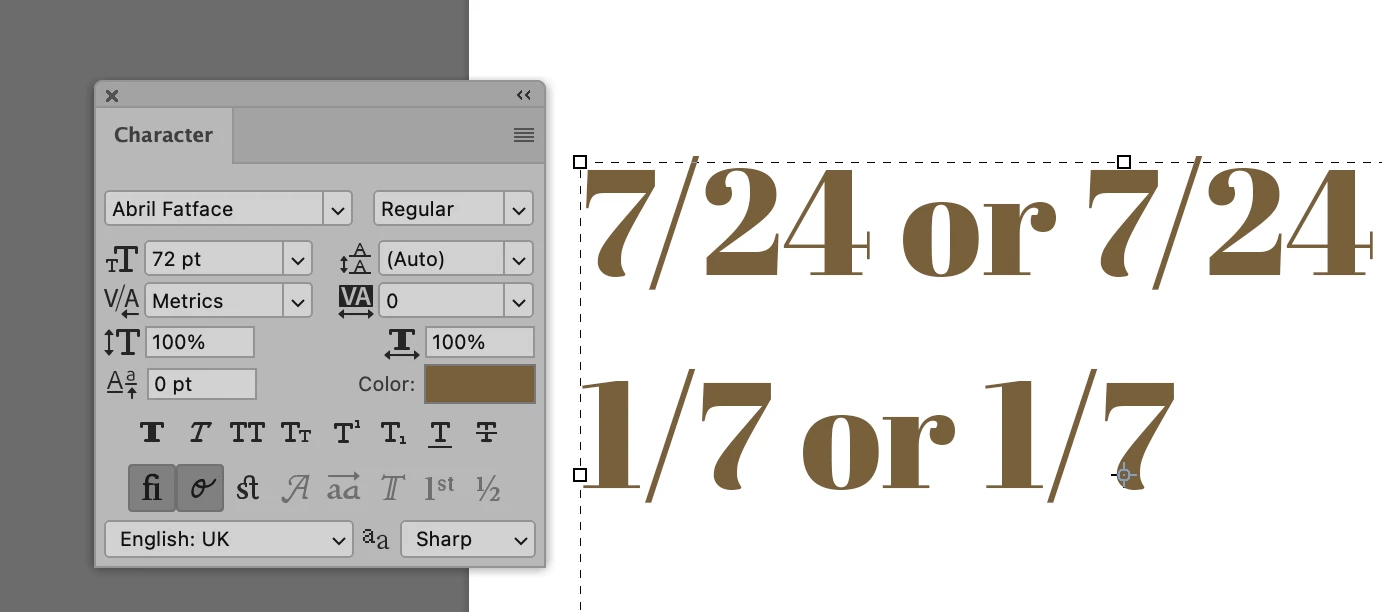
If the fraction button (1/2) is grayed out as in this next screenshot, then the designer did not create it.


Jane

3 replies

Trevor.Dennis
Community Expert
Community Expert
March 27, 2022

It sounds like you are looking for complete flexibility with fractions. i.e. 17/32 so this would not be helpful, but Windows Alt can be useful.  I use them constantly. 


The Ariel font range can do ¼ , ½  and ¾ as apparently can this forum's default font.  You use them by Holding down the Alt key and typing the code.  I have no idea if they work with OSX using the Opt key (Google tells me that they do).  This list shows all the Alt codes


In Photoshop I used the Type tool directly to produce


My most used Alt codes are

M dash Alt 0151 —

Degrees symbol Alt 0176 °

GB pound Alt 0163 £


Would it be too inconvenient to create the fractions as shapes and save them to a CC Library?  Type layers can be converted to vector shapes and edited, so it would be easy to do.

Known Participant
March 31, 2022

Hi Trevor,


Thanks for your answer. I'm working on a Mac. 


I'm curious about your suggestion regarding the CC library. Does this also work in Illustrator? What stepsw would this involve?


All best,

Thomas

Legend
March 31, 2022

Create the graphic you want and save it as a Library item. https://helpx.adobe.com/creative-cloud/help/libraries.html

jane-e
Community Expert
jane-eCommunity ExpertCorrect answer
Community Expert
March 26, 2022

Does anybody know if it is possible to write arbitrary fractions  in Photoshop with any font that I want?

By @Thomas22842972ml5u


No, you cannot create fractions in any typeface you want — you can only do so if the type designer created a numerator, denominator, and solidus. Only OpenType fonts will have fractions, and even then not all of them do.


Character panel > OpenType > Fractions OR click select the fraction and click the fraction button (1/2) at the bottom right of the Character panel.


You can also do real fractions in InDesign and Illustrator.


If the fraction button (1/2) is grayed out as in this next screenshot, then the designer did not create it.


Jane

Known Participant
March 27, 2022

Hello,


Thanks for your informative response. Here is what I can see when I open the character panel:


Does this mean that the font doesn't support arbitrary fractions? Or have I not accessed the correct tools in Illustrator? (I have the .otf version of this font installed.)  


Thank you.


jane-e
Community Expert
Community Expert
March 27, 2022

Hi @Thomas22842972ml5u 

You asked about fractions in Photoshop before and now you are in Illustrator.


In Illustrator, you need the OpenType panel (Window menu > Type > OpenType) and not the Character panel. The fraction button is in the bottom right and the fraction command is in the panel menu.


Notice in the panel menu below that some OpenType attributes are gray. Those are the ones the type designer did not include when he/she designed the typeface. If either is gray, then your typeface does not support fractions.


In macOS you can open the Character Viewer, then start to type "fraction" in Spotlight and choose common fractions (and the solidus) from this list.

⅞    ⅜   ⅓   ⁄


There are no keyboard shortcuts as @Trevor.Dennis gave for Windows, but there are more choices in macOS.


Jane


Leslie Moak Murray
Community Expert
Community Expert
March 26, 2022
Known Participant
March 31, 2022

Thanks, Leslie. I'm trying to do custom fractions and make them look as nice as the default ones.


Kind regards,

Thomas