-aki-
Participating Frequently
July 3, 2020
Question

frames don't zoom in PS CS6
  • July 3, 2020
  • 4 replies
  • 1009 views


Hi,


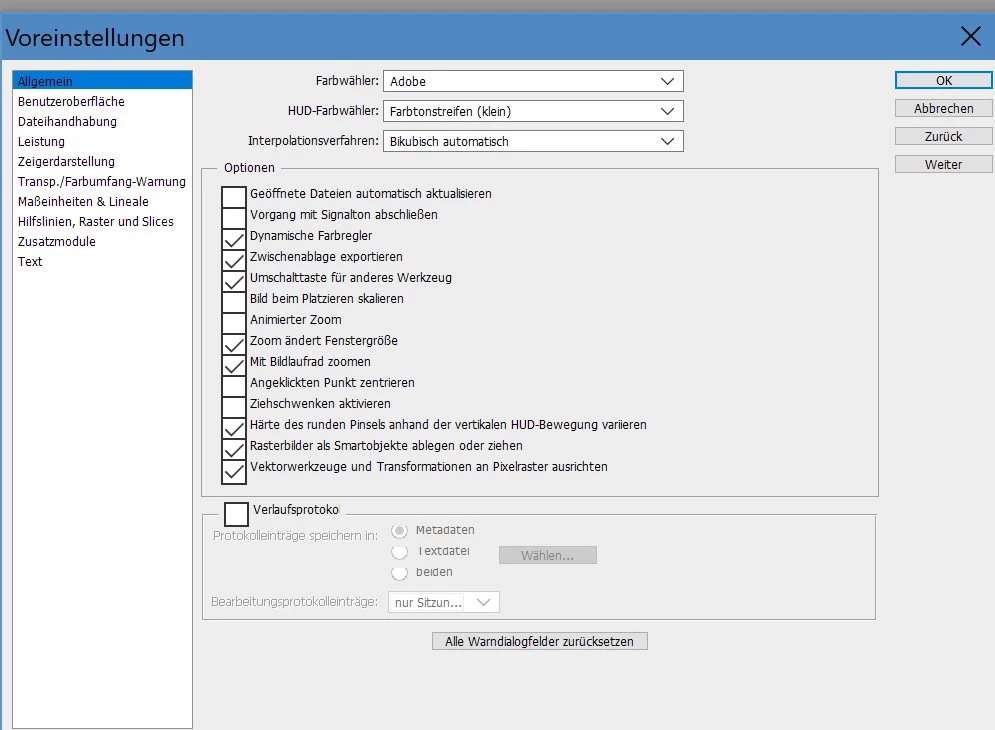
After installing PS CS6 on my new labtop, it doesn't zoom frames along with the picture.  I've activated "zoom changes window-size"


thanks for a hint,


Aki

 

This topic has been closed for replies.

4 replies

Jeff Arola
Community Expert
Community Expert
July 12, 2020

Using the Scroll wheel on mouse doesn't resize the document window, it only zooms the image.


If in Preferences>General you have Zoom Resizes Window checked then Ctrl + +/Ctrl + - zooms in out of image while resizing the document window. If you add Alt to the shortcuts then the window does not resize.


If you have Zoom Resizes Window unchecked in Preferences>General, then the Al+Ctrl++/Alt + Ctrl+- resizes the windows while zooming and Ctrl++/Ctrl+- does not.

-aki-
-aki-Author
Participating Frequently
July 12, 2020

aaaaahhhh ... the new laptop has the Alt+Ctrl just at the place where the old one has the Ctrl   🙂


thank you very much!  

Jeff Arola
Community Expert
Community Expert
July 11, 2020

Are you using a keyboard shortcut ( Ctrl++ and Ctrl+-) or the Zoom Tool?


You can get the 13.0.1.3 installer from here:


https://supportdownloads.adobe.com/detail.jsp?ftpID=5677

-aki-
-aki-Author
Participating Frequently
July 11, 2020

I use either the keyboard shortcuts or the mouse-wheel, neither one works with the frames, but I just tried the zoom-tool, and that one works;  much more complicated though, if you zoom a lot;


I just installed the update, thanks for the link.  I restarted the notebook, but it didn't change anything.  In "help-about photoshop", still the original version appears, but I assume that's normal;


thanks,


Aki

Jeff Arola
Community Expert
Community Expert
July 11, 2020

Have you installed all the cs6 updates by going to Help>Updates in photoshop cs6?

-aki-
-aki-Author
Participating Frequently
July 11, 2020

I have version 13.0.1 and have read somewhere that the latest update is 13.0.1.3, but when I make creative cloud search for updates, it shows that it is already "actual";  the three dots on the right don't lead anywhere to uptdates;


It is also very slow, although I gave it 7 GB ram


thanks for your reply 🙂

-aki-
-aki-Author
Participating Frequently
July 11, 2020

nn

Jeff Arola
Community Expert
Community Expert
July 10, 2020

I believe you want to go to Edit>Preferences>Interface and uncheck Open Documents as Tabs


-aki-
-aki-Author
Participating Frequently
July 10, 2020

Hi,


thanks for your reply,  but I have this unchecked already ...


thanks,


Aki