
Known Participant
February 12, 2020
Answered

Free Transform - stuck in one option no matter what I choose on settings

  • February 12, 2020
  • 2 replies
  • 5584 views

Hello


My free transform tool act as legacy no matter if I checked "Use Legacy Free transform" or not
I personally like the new approach, most of the time I keep aspect ration


any ideas?
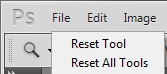
Correct answer PECourtejoie

Hello, did you try to to reset the transform tool (right-click on its icon in the option bar  ) or, if it did not work, to recreate your preferences?

2 replies

PECourtejoie
Community Expert
PECourtejoieCommunity ExpertCorrect answer
Community Expert
February 12, 2020

Hello, did you try to to reset the transform tool (right-click on its icon in the option bar  ) or, if it did not work, to recreate your preferences?

Known Participant
June 29, 2023

I'm sorry sir but this is confusing.  I've only used the shortcut. I do not know what the "optoin bar" is.   Your image does not compute with my photoshop.  

The instructions in this thread in general feel incongruent and only obvious to those in the know. 
I use custom shortcuts so those don't help too well either. 

Stacey@Wk
Participant
October 4, 2023


Hi @rv_el  hope this clears it up for you. However this did not work for me, I had to 'reset preferences on quit' to get it to work as Mohammad said at the top. Thanks @Mohammad.Harb .

Mohammad.Harb
Community Expert
Community Expert
February 12, 2020

Reset Photoshop Preferences Settings


Known Participant
February 12, 2020

thanks it works