
Participant
April 17, 2017
Answered

Frozen Filter Gallery in PS

  • April 17, 2017
  • 1 reply
  • 2280 views

I have been using filter Gallery fairly frequently up until about 2 weeks ago when suddenly I found I could not apply any of the filters. I must have done something to cause this freeze as I know my images are in 8 bits and my foreground/background colours are correct; and my colour space is in RGB. Any idea how I can get it back working again? I am using Windows.

many thanks

Deborah Atkinson
    This topic has been closed for replies.
    Correct answer Jeff Arola

    Does the Filter Gallery open, but you just don't see a preview of the applied filters and nothing changes after you hit the Okay button?

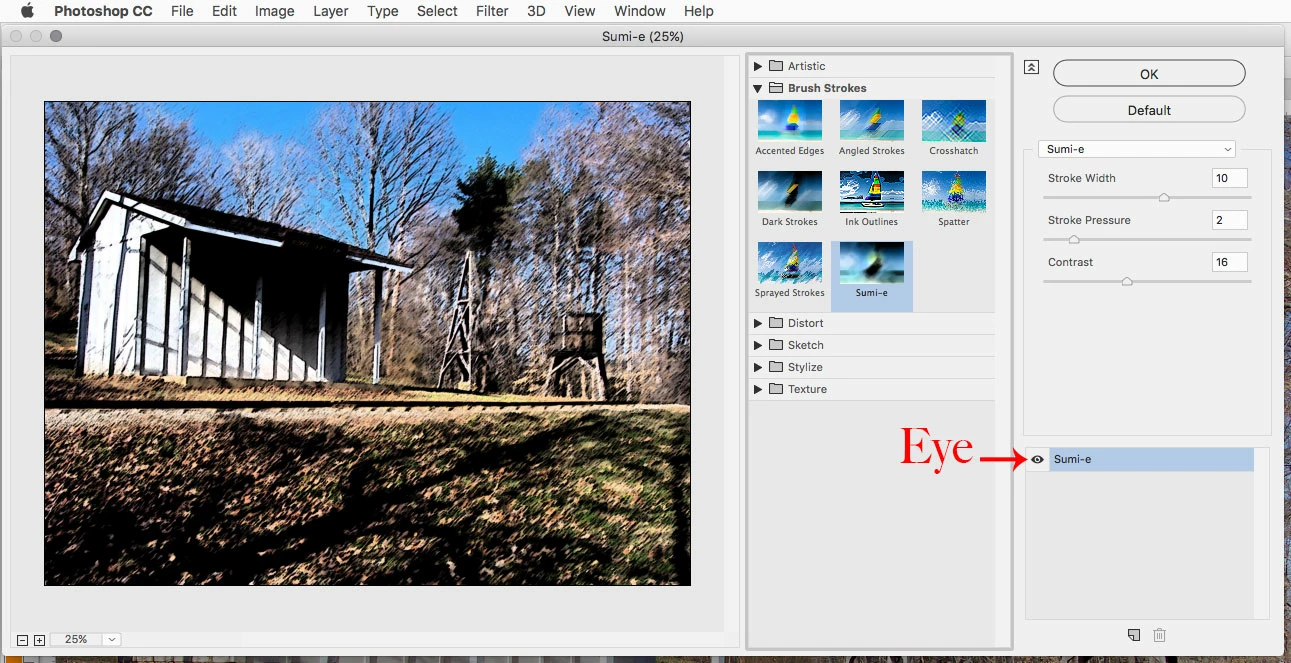
    If so, maybe the Eye beside the applied filter list in the filter gallery is off.

    1 reply

    Jeff Arola
    Community Expert
    Jeff ArolaCommunity ExpertCorrect answer
    Community Expert
    April 17, 2017

    Does the Filter Gallery open, but you just don't see a preview of the applied filters and nothing changes after you hit the Okay button?

    If so, maybe the Eye beside the applied filter list in the filter gallery is off.

    Participant
    April 18, 2017

    So appreciate your willingness to help - many thanks! You have described my problem to the T - very frustrating! Here is the problem though - my version of Filter Gallery ( Windows 10) does not have an eye... I have practically lifted the screen off my monitor looking for one, but nope - nada!! So - now what...?

    Participant
    April 18, 2017

    No _ I am wrong !! I found the eye - hallelluja!! It wasn't there at all but I clicked where you showed it should be , and one appeared! Oh I am sooo grateful - this has been bugging me to death as it seemed so weird! And everything is now back to normal. Yay !! thank you so much!!