Exit
  • Global community
    • Language:
      • Deutsch
      • English
      • Español
      • Français
      • Português
  • 日本語コミュニティ
  • 한국 커뮤니티
0

Fuji Camera Raw Profiles [RAF files opening in greyscale due to no Adobe Standard profile]

Community Beginner ,
Jan 20, 2018 Jan 20, 2018

Have Adobe removed Adobe Standard from the Fuji Camera profiles in Camera Raw

Taken me ages to figure out why all of a sudden all Fuji RAF files were opening in greyscale.

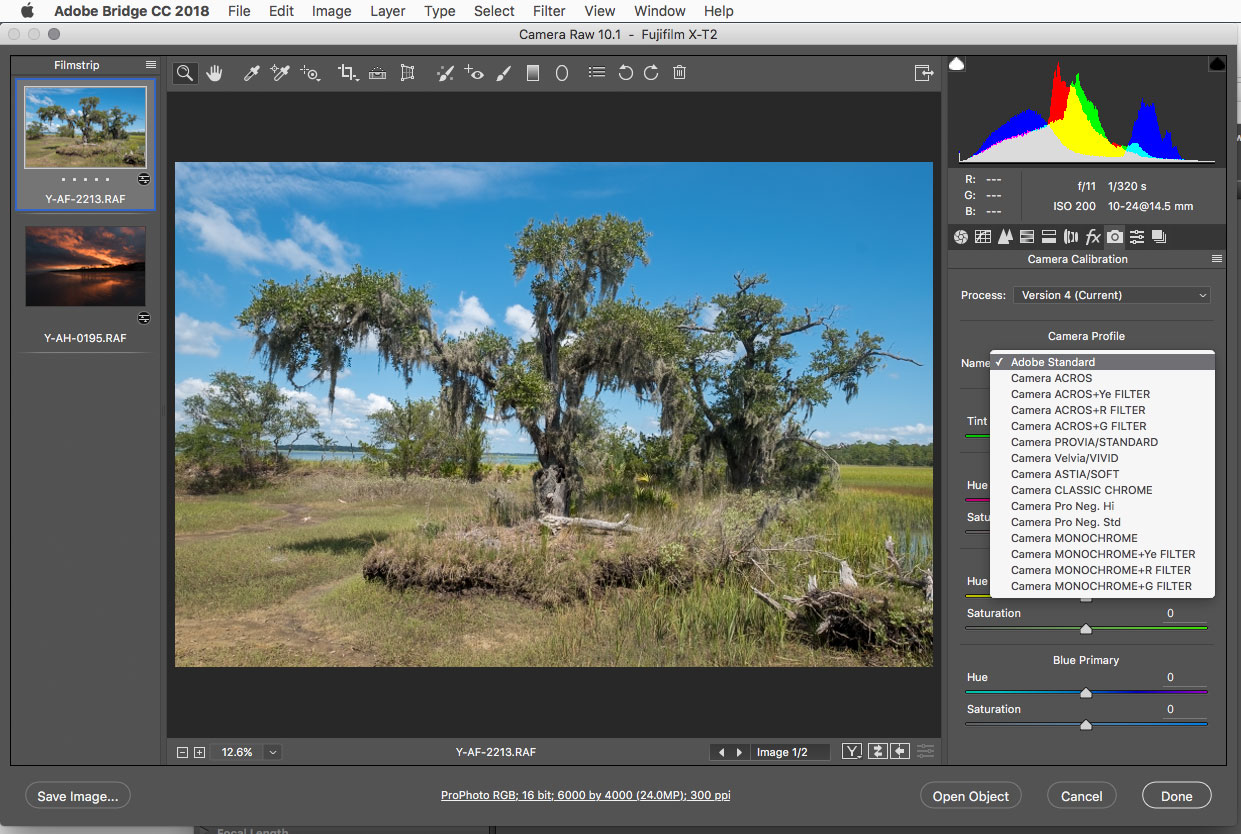
Looks like ACROS had become the default as I have no Adobe standard profile when I open a Fuji RAW

Is it something Adobe has done with latest Fuji version in Camera Raw?

Is it something Fuji has done?

Has my camera Raw got corrupted?

Is it something I am doing wrong?

Does anyone have an explanation?

I am using Fujifilm X-T2 with latest firmware update.

Camera set to STD Provia simulation

5.8K
Translate
Report
Community guidelines
Be kind and respectful, give credit to the original source of content, and search for duplicates before posting. Learn more
community guidelines

correct answers 1 Correct answer

Community Beginner , Jan 20, 2018 Jan 20, 2018

Could not figure out how to remove it safely.

Tried re-boot system

In end just downloaded Camera Raw 10.1 and ran the installer .exe

That seemed to work and all OK now though may leave the default at Fujifilm Provia as Adobe Standard looks a bit flat in comparision.

Thanks for all your help

Translate
Adobe
Community Expert ,
Jan 20, 2018 Jan 20, 2018

What version of photoshop, camera raw and operating system are you using?

With camera raw 10.1 and some sample Fujifilm X-T2 RAF files from here, all the profiles seem to be there.

http://www.imaging-resource.com/PRODS/fuji-x-t2/fuji-x-t2GALLERY.HTM

fuji.jpg

Translate
Report
Community guidelines
Be kind and respectful, give credit to the original source of content, and search for duplicates before posting. Learn more
community guidelines
Community Beginner ,
Jan 20, 2018 Jan 20, 2018

Photoshop CC release 19.0

Raw 10.1

Windows 10

Weird. not checked in Bridge before but same as Photoshop the Adobe Standard on top of your list is missing.

It's there in Lightroom though

Maybe Provia is better anyway for most pics

Translate
Report
Community guidelines
Be kind and respectful, give credit to the original source of content, and search for duplicates before posting. Learn more
community guidelines
Community Expert ,
Jan 20, 2018 Jan 20, 2018

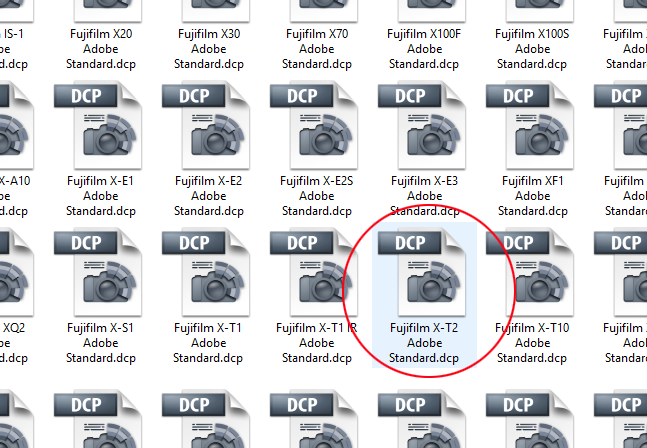
Look under C > ProgramData > Adobe > CameraRaw > CameraProfiles > Adobe Standard. This folder contains the AS profile for all supported cameras. If the profile is there, but not showing up in ACR, I'd uninstall and reinstall ACR:

profiles.png

Translate
Report
Community guidelines
Be kind and respectful, give credit to the original source of content, and search for duplicates before posting. Learn more
community guidelines
Community Beginner ,
Jan 20, 2018 Jan 20, 2018

It's there.

have to have a go at uninstall and re-install

Translate
Report
Community guidelines
Be kind and respectful, give credit to the original source of content, and search for duplicates before posting. Learn more
community guidelines
Community Beginner ,
Jan 20, 2018 Jan 20, 2018

Could not figure out how to remove it safely.

Tried re-boot system

In end just downloaded Camera Raw 10.1 and ran the installer .exe

That seemed to work and all OK now though may leave the default at Fujifilm Provia as Adobe Standard looks a bit flat in comparision.

Thanks for all your help

Translate
Report
Community guidelines
Be kind and respectful, give credit to the original source of content, and search for duplicates before posting. Learn more
community guidelines
Explorer ,
May 12, 2019 May 12, 2019

I cannot find Camera Raw 10.1. In my Bridge, it says v. 9.03, and that no updates are available. Likewise, PS CC says no updates available.

Can someone help me with this enigma?

Translate
Report
Community guidelines
Be kind and respectful, give credit to the original source of content, and search for duplicates before posting. Learn more
community guidelines
Community Expert ,
May 12, 2019 May 12, 2019
LATEST

Camera raw 10.1 is now quite dated

We are now up to camera raw 11.2.1 and that's the installer you should use from here:

Camera Raw plug-in installer

Translate
Report
Community guidelines
Be kind and respectful, give credit to the original source of content, and search for duplicates before posting. Learn more
community guidelines