jessicad95751474
Participant
January 5, 2017
Question

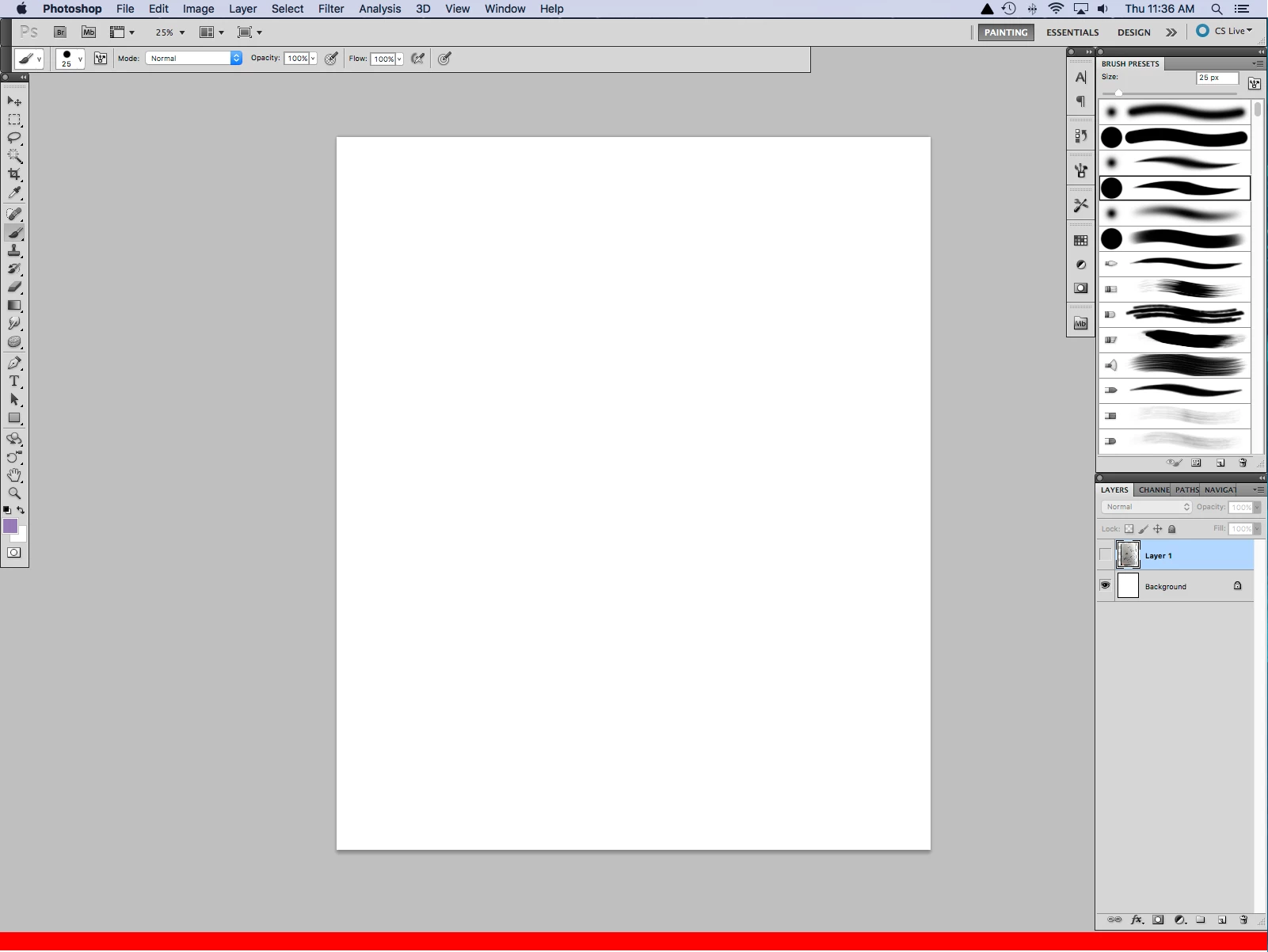
full screen mode - red bar at bottom

  • January 5, 2017
  • 3 replies
  • 1595 views

Why is there a red bar at the bottom of photoshop cs5 only in full screen mode?
This topic has been closed for replies.

3 replies

jessicad95751474
Participant
January 11, 2017

Glad I'm not the only one with this issue, even though I don't wish this issue on anyone! At first I wasn't sure if the issue was with Mac, Adobe, or Wacom. I am having the exact issue you also described, when I drag photoshp back over to my mac screen there are no calibration issues in full screen and the red bar doesnt appear, it is only on the wacom screen, also there is no registrion/calibration issues in regular mode its only in full screen and where I tap the pen to the screen the cursor doesnt draw there it draws above and it does seem to be the exact amount of space that the red bar is thick. But I spent a lot of time on the phone with wacom, and finally someone was able to say they think the issue is with Wacom. I uninstalled and reinstalled all the Wacom drivers from the newest all the way back to 5 drivers ago and nothing changed I still had the red bar, I also reset all my photoshop prefferences and nothing happened then I uninstalled photoshop and reinstalled and still the same problem. Needless to say the person I spoke to at Wacom couldn't fix it, however they do think the problem is the wacom driver, so he started a case for me and was goong to send it higher up to the programers and see if they could fix it. I will post here if they solve the problem.

January 11, 2017

i have this same problem. i tried resetting the preferences as was suggested by the only other reply, it didnt work.

what is worse is that the cursor is out of sync with the screen, which is to say that when i click (with mouse, or stylus), the effect (brush stroke, selection box, etc) actually happens above where i click (and where the cursor appears) by a distance equal to the thickness of the red bar (i think, i havent measured it or anything but it looks the same).

what is odd, is that this only happens on one of my two monitors. it only happens when using photoshop, and only in full screen mode (with or without menues), and only in the work window. the menues, toolbars, etc all work fine. for all other applications this monitor works as expected.

this monitor is also my tablet screen, so it is especially important for it to be lined up correctly, and as long as this problem persists, it makes the program unusable to me for the work i am trying to do with it. i cant find anything about this problem anywhere else on the internet.

does anyone have any other fixes?

JJMack
Community Expert
Community Expert
January 11, 2017

I do not use a Mac the original OP screen capture shows they do. If you also use a Mac look at You Mac settings make sure you are not having Mac OS scale your cursor I believe Mac has such a feature.

JJMack
January 11, 2017

im not sure what you mean by this.

yes i do use a mac, but this suggestion does not even start to address the red bar at the bottom of the screen.

and i dont think it is an issue of my cursor being scaled through my mac os (im not even sure what that means), because then it would be scaling my cursor in all applications at all times. this only happens in the photoshop CS5 active window in full screen mode. as i said, the cursor lines up with the actual click location everywhere else, including in photoshop's tool bars and menues, as well as all other applications.

it only started recently (after updating to mac sierra i think, but i am not positive of this), and only has appeared on my secondary monitor.

this is clearly some sort of new glitch in the way CS5 is interfacing with the new system.

JJMack
Community Expert
Community Expert
January 5, 2017

Try resetting your Photoshop preferences if this red bar just started happening.

JJMack
